See Window Peeper AI in Action — No Prompt Writing Needed
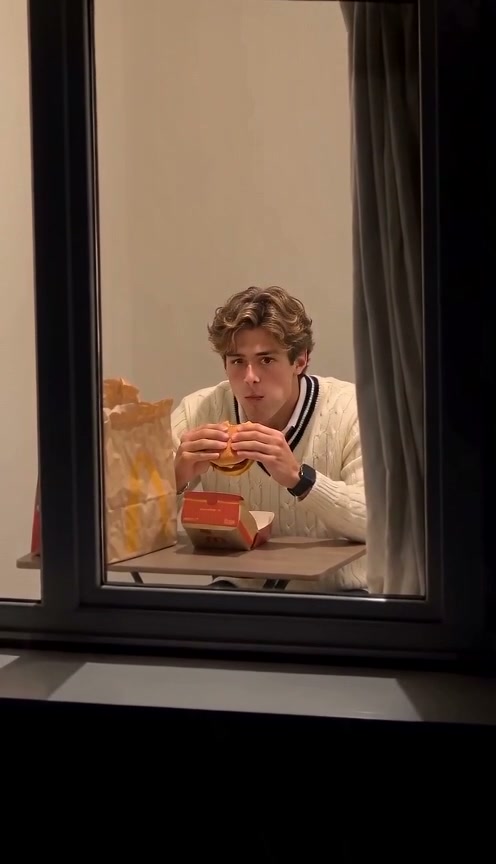
Street telephoto zoom pushes past dark apartment glass onto a mid-bite snack catch, 2.5-second guilty pause, and panicked curtain yank.
Pick Solo, Wave, Couple, or Pet mode inside Window Peeper AI and upload a crisp front-facing portrait—the studio automatically renders the 10-second 800mm street telephoto zoom into a warm 2AM apartment window, catching you mid-bite before freezing in shock and yanking the curtain shut from 5 credits.
- 1Four built-in 2AM skits: Burger at Night, Caught & Wave, Couple Dinner, or Pet at the Window.
- 2Warm 2700K window lighting contrasted against dark exterior brick apartment glass.
- 3Works from clean daytime portraits—no night camera or burger prop required.
- 4Starts at 5 credits (480p); purchased credit packs never expire and failed tasks refund automatically.
- Scene Presets
- Solo, Wave, Couple, Pet
- Clip Length
- 10 Seconds
- Entry Rate
- 5 Credits (480p)
- Default Frame
- 9:16 Vertical
Why the 2AM Street Zoom Is So Funny
Contrast fuels the punchline: ominous true-crime telephoto framing promises drama, then exposes nothing worse than someone quietly inhaling late-night fast food alone at a kitchen table.
- Warm 2700K fishbowl effect: One bright amber window glowing inside pitch-black concrete acts like a spotlight on the subject's table, drawing every eye straight to the guilty bite.
- Zero-dialogue panic pacing: Watching eyes widen slowly before yanking a heavy curtain shut communicates universal late-night shame across every language without subtitles.
Inside Window Peeper AI, you can spin that entire staged sitcom skit in 10 seconds without setting up an 800mm lens across the street. If you love deadpan reaction-freeze memes, also test Car Leg Touch Prank AI or read our Fancy Cafe AI casting guide.
10-Second Guilty Freeze Breakdown
| Timestamp | Phase | What Happens on Screen | Why Your Photo Matters Here |
|---|---|---|---|
| 0.0s – 3.5s | 800mm Street Facade Zoom | Camera tracks smoothly from dark neighboring panes into one glowing triple-pane apartment window. | Establishes the sneaky street-level perspective before facial features become recognizable. |
| 3.5s – 6.5s | Mid-Bite Burger Reveal | Lens settles through the glass on the subject holding a takeaway burger beside a brown paper bag and box. | Natural front-facing hair and jawline clarity let the AI keep identity tight inside the smaller window cutout. |
| 6.5s – 8.5s | Wide-Eyed Guilty Freeze | Chewing halts abruptly—wide eyes lock straight onto the distant street lens in a 2.5-second silent freeze. | Avoid glasses glare or heavy shadows in your upload so both pupils track cleanly toward the camera. |
| 8.5s – 10.0s | Frantic Curtain Yank | Subject lunges toward the right drape, grabs the heavy fabric, and pulls it violently shut across the frame. | Free shoulders and clear torso framing allow smooth reach and arm tension across the window edge. |
Lighting & Expression Prep
Well-lit everyday selfies retain far sharper eyes through the glowing apartment window than dark indoor photos:
Portrait Prep for Warm Interior Window Zooms
Because this effect runs on a locked motion preset with zero prompt typing, photo selection accounts for most of the final quality.
Upload Photos Like This
- Use an evenly lit daytime or indoor portrait showing full face, eyes, hair, and shoulders clearly.
- Stick to plain glasses-free portraits whenever possible so eye shock remains readable through glass.
- Pick relaxed headshots without extreme tilt; the zoom locks straight onto eye level.
- For Couple Dinner mode, prepare two separate solo portraits or one clear joint photo.
Avoid These Mistakes
- Do not darken or warm-tint your source photo—the effect studio supplies the 2700K window contrast.
- Do not wear reflective sunglasses, face masks, or heavy beauty-smoothing filters.
- Do not submit blurry ultra-wide shots where your face occupies only a tiny speck of pixels.
- Do not upload photos of minors, celebrities, or non-consenting subjects.
Launch Window Peeper AI Studio
Upload your portrait below to pre-load Window Peeper AI, pick Solo Burger, Wave, Couple, or Pet mode, and generate your 10-second night zoom skit from 5 credits at Standard 480p.
 10s MP4
Telephoto Staging vs. AI Preset
Shooting an authentic street zoom across an avenue usually runs into lighting glare, passersby, and glass reflections:
Window Peeper AI vs. Street Telephoto Shoots
| What Matters | Viral AI Video Preset | Typical CapCut Template |
|---|---|---|
| Telephoto Gear & Location | Automated street zoom, glowing 2700K pane, table props, and curtain pull. | Needs a real 800mm street camera setup opposite a lit ground- or second-floor window. |
| Multiple Gag Endings | Switch freely between Burger Stare, Wave, Couple, or Pet modes in one click. | Requires re-shooting every time to film a wave, couple dinner, or pet catch. |
| Upfront Cost Clarity | Starts at 5 credits (480p), zero subscription required. | Hidden paywalls trigger only after manual compositing and audio work. |
| Failed Render Safety | Automatic credit return on any failed task. | No refund on discarded takes or crashed exports. |
Choosing Solo, Couple, or Pet Modes
- Burger at Night vs. Caught & Wave: Pick Burger at Night for maximum panic comedy ("me at 2:14 AM after swearing my diet starts tomorrow"), or Caught & Wave for wholesome late-night banter with followers.
- Couple Dinner & Pet Modes: Upload two partner shots for Couple Dinner midnight-feast confessions, or upload a front-facing dog or cat shot for Pet at the Window ("catching your roommate sneaking shredded cheese").
- Add Telescopic Lens Click or Ambience: Pair the opening 3 seconds on TikTok or Reels with faint distant traffic audio and a sharp camera-shutter sound right as the guilty freeze hits.