
YOU NEVER LET HER PAY AI VIDEO GENERATOR: VIRAL RESTAURANT DATE MEME
Star in the viral “You Never Let Her Pay” restaurant meme by @s.nemz. Upload one photo to generate an authentic 11-second comedy clip ready for TikTok and Reels. Pay-as-you-go video generation starts at just 6 credits with zero monthly subscription.
CREATE YOUR RESTAURANT MEME VIDEO
Upload your photo
Tip: Use a clear front-facing upper-body or full-body photo with visible face and outfit styling in even light.
Video Options
By generating you confirm compliance with our Terms · Privacy · Acceptable Use
11-second video · 6 credits per generation
WATCH EXAMPLES FREE · REVIEW THE COST · FAILED-TASK CREDIT RETURN
WHAT IS THE YOU NEVER LET HER PAY AI TREND?
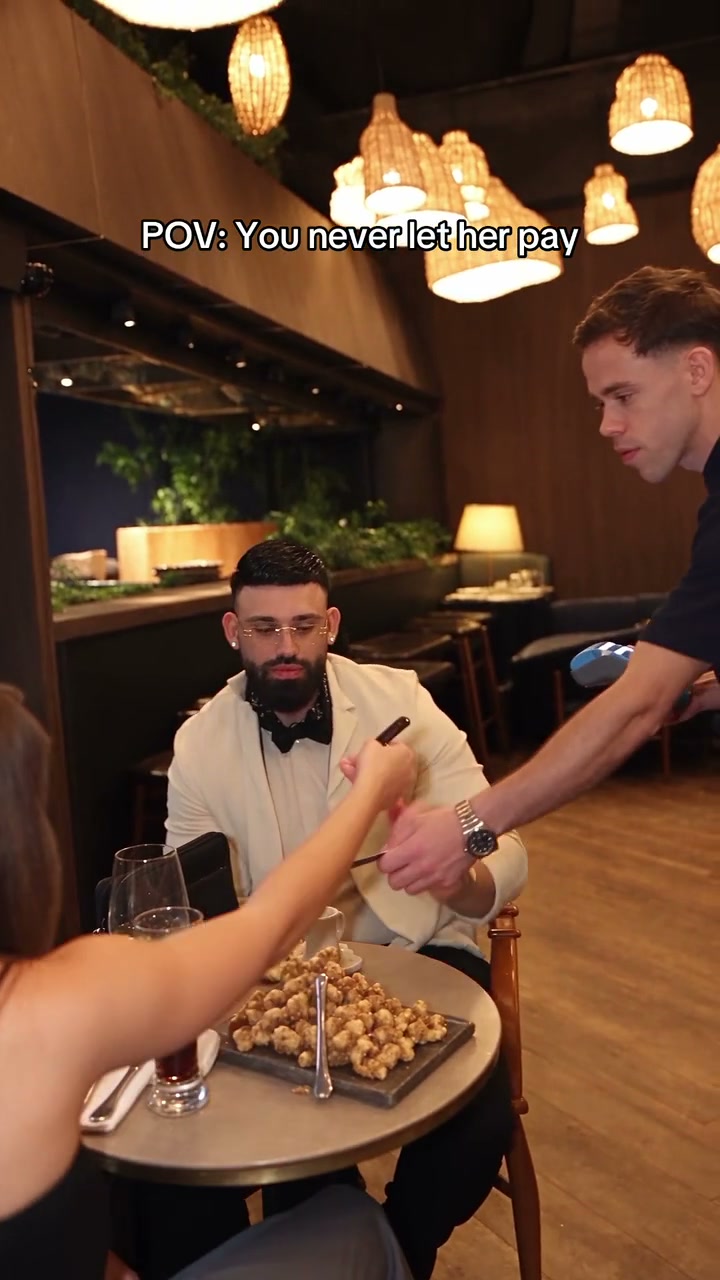
You Never Let Her Pay AI is a photo-to-video generator based on the viral TikTok and Instagram comedy trend created by @s.nemz. You star as the confident diner who swats away his date’s payment card, unzips a luxury designer clutch to reveal a kitchen dishwashing sponge, and gets escorted by the waiter to wash dishes in the commercial kitchen. This workspace requests an 11-second viral video from one portrait.
Known across TikTok and Instagram Reels as the TikTok "You Never Let Her Pay" meme, this viral comedy sensation flips a high-roller dinner date flex into a hilarious back-kitchen dishwashing payoff.
One-Click Viral Comedy Generation
Upload 1 portrait photo. Our engine casts you directly as the lead diner, guided by the viral restaurant choreography and camera motion reference, without requiring filming, VFX suites, or prompt engineering.
Compare viral clips trending across TikTok You Never Let Her Pay search results.
Independent AI creative tool, not affiliated with TikTok, Instagram, YouTube, or TikTok.
Trending Viral Effects
Explore More Viral AI Video Templates
Jump into other trending meme formats or create custom video remakes.
Мои слёзы AI
REMAKE →Hotline Bling AI
REMAKE →Bottle Kick AI
REMAKE →Tsundere Dance AI
REMAKE →Deck The Halls Dance AI
REMAKE →Pimp Walk Entrance AI
REMAKE →Groomer vs Dog AI
REMAKE →The Jawn Dance AI
REMAKE →One Treat Dog Head Bop AI
REMAKE →Funny Driver AI
REMAKE →Flying Tricycle AI
REMAKE →Stormzy Shut Up AI
REMAKE →Gangnam Style Dance AI
REMAKE →Wassup in a Minute AI
REMAKE →Rubber Band Prank AI
REMAKE →Ice Ice Baby Dance AI
REMAKE →Cat Riding Dirt Bike AI
REMAKE →Flamingo Float AI
REMAKE →Bicep Heart AI
REMAKE →Fancy Cafe AI
REMAKE →Window Peeper AI
REMAKE →How to Create Your You Never Let Her Pay AI Video in 3 Steps
Start with one portrait. The scene direction is already set; you choose the setting and output options. No reference upload, video breakdown, or prompt writing is required.
Upload Your Portrait Photo
Add one clear front-facing upper-body or full-body photo with visible facial features, hairstyle, and outfit styling in even light. Use a photo from this device or scan the QR code to send one from your phone. No suit, clutch, or props in the photo needed.
Original Scene & Review Cost
The preset uses the authentic luxury dining room and kitchen scullery setting. Pick the model, an available resolution (480p, 720p, or 1080p), and format. Review credits, sign in, and confirm permission before starting a render.
Render & Download MP4
Follow the task status while the model generates. Preview the full video, listen to its audio, and download the MP4 to your computer or phone before account expiry. Add permitted music in TikTok, Reels, or Shorts when you publish.
Creative Angles for Your Viral Video
Whether posting to TikTok, Instagram Reels, or Shorts, these three creator angles maximize watch time and comedic engagement.
The Back-Kitchen Scullery Twist
Cutting straight from the candlelit dining room to an industrial stainless-steel sink piled with dirty plates and bowls delivers the ultimate comedic plot twist.
The "I Got This" Bill Swat
When the waiter arrives with the card terminal, you confidently swat away your date's payment card with an ultra-confident smirk, perfectly executing the viral comedy setup.
The Dishwashing Sponge Reveal
Unzipping a luxury black designer clutch to reveal a bright yellow-and-green kitchen dishwashing sponge turns an everyday social flex into pure viral comedy gold.
Why Create Your Restaurant Meme Video Here
Upload your photo, check the transparent credit total, and create your version of the viral TikTok restaurant date meme. The choreography is locked for you; review the generated MP4 before sharing.
Failed-Task Credit Return
A failed task returns its reserved credits. A return can temporarily show as pending; check the task status.
One-Click Direct Preset
No reference upload or breakdown step. The preset supplies the restaurant choreography, clutch unzip, and kitchen dishwashing motion.
Flexible Resolution & Format
Render in 480p, 720p, or 1080p across 9:16, 1:1, or 16:9 formats. Credit totals adapt dynamically to your chosen settings.
MP4 Download & Phone Handoff
Save the task MP4 on desktop or scan its phone download QR code. Both deliver the same generated file.
Non-Expiring Sitewide Credits
Purchased pack credits work across effects and do not expire. Check the render total; subscription credit rules differ.
Transparent Privacy & Expiry
Save before the account download expiry. The Privacy Policy explains uploaded photos, provider processing, and retention.
Inside the 11-Second Restaurant Date Storyboard
This is the choreography requested by the preset, mirroring the viral TikTok clip. Watch the full result to check the card swat, clutch unzip, sponge reveal, and kitchen dishwashing payoff.
The Dinner Date Flex & Bill Rejection
The lead diner sits across from his date at an upscale restaurant table with hanging woven lamps, confidently smirking and waving his hand to swat away his date's payment card when the waiter approaches with the terminal.
The Clutch Unzip & Sponge Reveal
Close-up camera framing as the lead unzips his luxury black designer clutch with a proud smile, revealing a yellow-and-green kitchen dishwashing sponge tucked neatly inside.
The Waiter's Smile & Escort
Medium shot as the smiling waiter places a friendly hand on the lead diner's back, escorting him away from the dining table towards the back of the restaurant.
The Commercial Scullery Reality
Cut to the restaurant kitchen where a staff member welcomes the lead toward a huge stainless steel sink overflowing with dirty dishes, pots, and bowls to settle the dinner bill.
Photo Guidelines & Quality Tips
Get the sharpest facial likeness and cleanest restaurant comedy choreography results by following these straightforward photo suggestions.
Give Your Portrait the Best Edge
- Use Even Light and Visible Facial FeaturesCapture your portrait in daylight or balanced indoor light. You don't need a suit, designer clutch, or sponge prop; the AI renders the entire upscale restaurant dining room and commercial kitchen.
- Frame Head & Upper Torso ClearlyKeep your full head, hairstyle, shoulders, and outfit styling visible. Avoid tight crops cutting off the top of your head or heavy blur filters.
- Avoid Obscured Faces & Heavy FiltersAvoid dark shadows covering the eyes, motion blur, sunglasses, or heavy face-obscuring stickers.
- Single Person in the Source PhotoThis preset casts one lead diner while keeping the date, waiter, and kitchen staff from the viral scene intact. Upload a single-person portrait for the sharpest result.
Check the Cost and the Finished Motion
- iReview the Displayed Credit TotalModel and resolution selections update the credit total in real-time. Review before confirming; each generation uses credits.
- iWatch Hands, Props & Scene CutsReview the card-swat gesture, clutch unzip, sponge reveal, and back-kitchen dishwashing transition in the full preview before sharing.
- iKnow What a Failed Task MeansIf a generation task fails, the system automatically returns the reserved task credits back to your balance.
- iPrepare First, Generate When ReadyExperiment with settings and preview examples for free. When ready, sign in and check that your balance covers the selected render. A small pack may not cover every model and resolution combination.
How Does This Restaurant Date Meme Engine Work?
Your portrait photo supplies facial likeness, hairstyle, skin tone, and personal styling. The scene preset describes the luxury restaurant, card swatting, designer clutch unzip, and commercial kitchen dishwashing chores. Our generation service combines that direction with the built-in viral motion reference and sends an 11-second task to the video model you select. The model synthesizes authentic cinematic motion from the reference choreography.
For you, this means there is zero friction: no reference-video upload or complex VFX workflow. Upload one portrait photo, check the transparent credit total (6 credits for default Standard 480p; higher tiers vary), and generate. When the task completes, desktop and phone downloads use its saved MP4. When publishing to TikTok, Instagram Reels, or YouTube Shorts, attach an audio track from the platform's approved music library that is authorized for your account and intended use.
Check current credit options, failed-task and payment refund rules, and photo processing and retention before generating.
Frequently Asked Questions
QHow do I create a You Never Let Her Pay AI video from my photo?
QCan I generate a You Never Let Her Pay video for free?
QHow much does this generation cost, and what if a render fails?
QWhat is the You Never Let Her Pay AI trend on TikTok?
QWho created the original You Never Let Her Pay video on TikTok?
QWhat kind of photo works best for this restaurant meme?
QDoes the AI copy my photo’s static standing pose or follow the video?
QDoes the video include sound, and can I use the TikTok audio?
QHow long does generation take and how do I download my video?
Star in the Viral Restaurant Meme Tonight
Upload your portrait photo, review the transparent credit cost (6 credits at 480p), and generate your viral You Never Let Her Pay AI video. Watch the comedy payoff, download the 11s MP4, and share directly to TikTok & Reels.
MP4 download · Phone QR option · Sitewide credits