
FLAMINGO FLOAT AI VIDEO GENERATOR: THE ROOFTOP INFINITY POOL TREND
Put yourself on the pink flamingo float from the “Hey Bro, Thank You Bro” trend. Upload one portrait, configure video options, and make the 12-second drift-and-rescue viral skit. Review the credits before requesting your 12-second MP4.
CREATE YOUR FLAMINGO FLOAT VIDEO
Upload your photo
Tip: Use a clear front-facing portrait with your face, hair, and shoulders visible in even light.
Video Options
By generating you confirm compliance with our Terms · Privacy · Acceptable Use
12-second video · 6 credits per generation
WATCH EXAMPLES FREE · REVIEW THE COST · FAILED-TASK CREDIT RETURN
WHAT IS THE FLAMINGO FLOAT AI TREND?
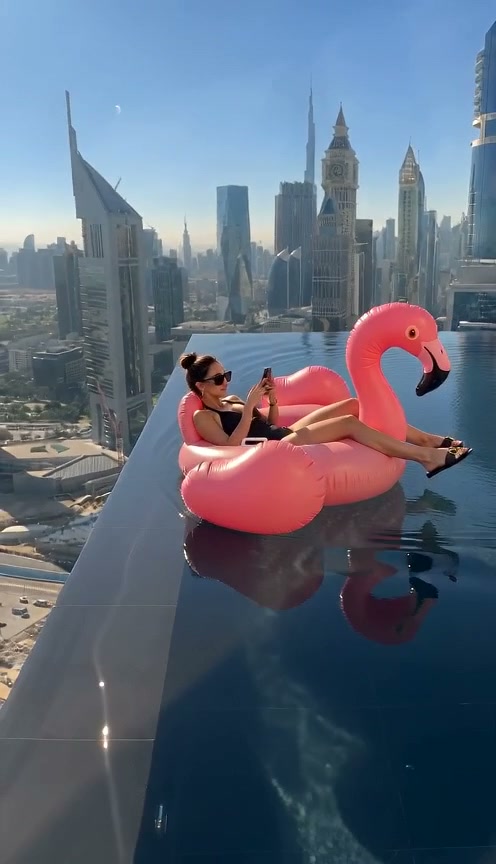
Flamingo Float AI is a photo-to-video effect that casts you on a pink flamingo float in a skyscraper rooftop infinity pool. The float drifts near the edge, a hand reaches in to pull it back, and your reaction finishes the joke. This workspace requests a 12-second rescue-pullback video from one adult portrait.
You may know it as the Hey Bro Thank You Bro trend, infinity pool AI, or the flamingo floatie video. The joke comes from the contrast: you are relaxed and looking at your phone while the viewer can already see the drop. The reaching hand interrupts the drift, and your late reaction is the payoff.
Which version will I make?
This workspace uses the rescue-pullback story. Some infinity pool clips end with the float sliding off the other side. That falling ending is a different variation and is not offered here. All four scene choices use one person and the same rescue setup.
Unlike a live camera filter, this photo-to-video tool generates a whole scene: the rider, inflatable float, water, reaching hand, and skyline. You do not need to visit a pool, film a stunt, upload a reference video, or write a prompt. The result is AI-generated fiction; review it before sharing and label it as AI-created where required.
Compare the wording used by creators in TikTok infinity pool flamingo results. Names and endings vary between clips; we have not verified an earliest original creator.
Independent AI creative tool, not affiliated with TikTok, Instagram, YouTube, or CapCut.
How to Create Your Flamingo Float AI Video in 3 Steps
Start with one portrait. The scene direction is already set; you choose the setting and output options. No reference upload, video breakdown, or prompt writing is required.
Upload Your Portrait
Add one clear single-person portrait of a consenting adult aged 18+. Show your face, hair, and shoulders in even light. Use a photo from this device or scan the QR code to send one from your phone. A pool background is not needed.
Original Scene & Review Cost
The preset uses the iconic Dubai Burj Khalifa rooftop infinity pool setting. Pick the model, an available resolution, and format. Review credits, sign in, and manually confirm photo permission before starting a render.
Render & Download MP4
Follow the task status while the model generates. Preview the full video, listen to its audio, and download the MP4 to your computer or phone before account expiry. Add permitted music in TikTok, Reels, or Shorts when you publish.
The Viral Infinity Pool Story
The original preset focuses on the iconic drift-and-pullback story. Here is how creators make this 12-second prank video go viral.
Daylight City Infinity Pool
The classic Dubai skyline backdrop and turquoise pool water. Recline casually on the pink flamingo float while staring at your phone as the float begins its slow edge drift.
The Startled Edge Drift
As the float reaches the dizzying skyscraper ledge, a friendly deck hand reaches in. You look up from your phone in comic realization at the sheer high-altitude drop.
"Thank You Bro" Reaction
Turning directly toward the camera with genuine relief and laughter, you mouth the iconic "Thank you bro!" while holding onto the float as it glides along the safe pool edge.
Why Create Your Flamingo Float Video Here
Upload your portrait, check the transparent credit total, and make your version of the rooftop pool rescue. The setup is handled for you; review the generated MP4 before sharing.
Failed-Task Credit Return
A failed task returns its reserved credits. A return can temporarily show as pending; check the task status.
One-Click Direct Preset
No reference upload or breakdown step. The preset supplies the pool setting, drift, reaching hand, and reaction.
Four Single-Portrait Looks
Choose daylight, modern city, sunset, or neon night. The same one-person story runs across all four settings.
MP4 Download & Phone Handoff
Save the task MP4 on desktop or scan its phone download QR code. Both deliver the same generated file.
Non-Expiring Sitewide Credits
Purchased pack credits work across effects and do not expire. Check the render total; subscription credit rules differ.
Transparent Privacy & Expiry
Save before the account download expiry. The Privacy Policy explains uploaded photos, provider processing, and retention.
Inside the 12-Second Rooftop Pool Skit
This is the timing requested by the preset, not a guarantee of exact frame-by-frame motion. Watch the full result to check the drift, hand contact, and final reaction.
Sun-Drenched Skyline Infinity Pool
You lounge comfortably on a giant pink inflatable flamingo float, scrolling on a phone, as the float drifts toward the dizzying skyscraper drop.
The Edge Drift & Deck Contact
Gentle water caustics guide the float toward the glass perimeter; a friendly deck hand reaches in toward the float handle as you look up startled.
The Relieved "Thank You Bro" Reaction
Glancing over at the breathtaking city drop, you turn to the camera with a relieved laugh and iconic appreciative smile while gliding safely along the pool border.
Photo Guidelines & Quality Tips
Get the sharpest facial likeness and cleanest water reflection results by following these straightforward photo suggestions.
Give Your Portrait the Best Edge
- Use Even Light and Visible EyesFace the camera in daylight or balanced indoor light. You don’t need to be near a pool or holding anything; the AI renders the entire infinity pool scene.
- Include Hair and ShouldersKeep hair and shoulders in frame. Avoid ultra-close crops or text overlays.
- Avoid Obscured Faces & Heavy FiltersAvoid dark sunglasses covering both eyes, face masks, or extreme beauty distortion filters.
- One Person in the Source PhotoEach available scene casts one person. Use a single-person photo so the model has a clear appearance reference. Couple photos and pet photos are not supported here.
Check the Cost and the Finished Motion
- iReview the Displayed Credit TotalModel and resolution selections update the credit total in real-time. Review before confirming; each generation uses credits.
- iWatch the Hand, Face & Pool EdgeFingers can distort at contact, the face can change during a turn, and reflections can flicker. A scene preset guides the model; it does not guarantee physically correct motion.
- iKnow What a Failed Task MeansA failed task triggers a return of reserved task credits, which can be pending. A completed clip with visual imperfections is different; see the Refund Policy.
- iPrepare First, Generate When ReadyExperiment with settings and preview examples for free. When ready, sign in and check that your balance covers the selected render. A small pack may not cover every model and resolution combination.
How Does Flamingo Float AI Work Behind the Scene?
Your portrait supplies the appearance reference. The scene preset describes the rooftop pool, pink float, edge drift, reaching hand, and reaction. Our generation service combines that direction with a built-in motion reference and sends a 12-second task to the video model you select. The model synthesizes the frames; it is not recording you at a real location or pasting a live camera mask on your face. Exact likeness, anatomy, and action timing can vary.
For you, this means there is no reference-video upload or separate analysis step. Start from the preset, review the output options, and generate. The scene thumbnails describe a desired look; the preview after rendering is where you check what was actually made. When the task completes, desktop and phone downloads use its saved MP4. The generator requests model audio, so listen to the file before choosing any additional sound on your publishing platform.
Check current credit options, failed-task and payment refund rules, and photo processing and retention before generating.
Flamingo Float AI — Frequently Asked Questions
QWhat is Flamingo Float AI?
QIs this the Hey Bro Thank You Bro infinity pool trend?
QHow do I make the flamingo float video with my own photo?
QWhich scenes and photo modes can I choose?
QIs Flamingo Float AI free, and how many credits does it use?
QDo I need a pool photo or a full-body picture?
QHow does the AI create the rooftop pool video?
QWill the face, rescue hand, and water always look right?
QHow long is the video, and when will it be ready?
QDoes the download include the TikTok sound or exact dialogue?
QWhat happens if generation fails?
QWhose photo can I upload, and how long is the result available?
Trending Viral Effects
Explore More Viral AI Video Templates
Jump into other trending meme formats or create custom video remakes.
Put Your Photo on the Rooftop Flamingo Tonight
Select your scene, upload your photo, and review the cost. Generate your Flamingo Float AI video when you are ready, watch it through, and download the MP4 before download expiry.
MP4 download · Phone QR option · Sitewide credits