
Bicep Heart AI Video Generator
Turn your photo into the viral TikTok flex-to-heart pose. Upload your portrait, customize video options, and generate a 7-second viral video with audio in one click. No filming or prompt writing needed.
CREATE YOUR BICEP HEART VIDEO
Upload your photo
Tip: Use an evenly lit upper-body portrait with your face and shoulders visible. No heart pose needed in the photo.
Video Options
By generating you confirm compliance with our Terms · Privacy · Acceptable Use
7-second video · 4 credits per generation
WATCH EXAMPLES FREE · REVIEW THE COST · FAILED-TASK CREDIT RETURN
WHAT IS THE BICEP HEART AI TREND?
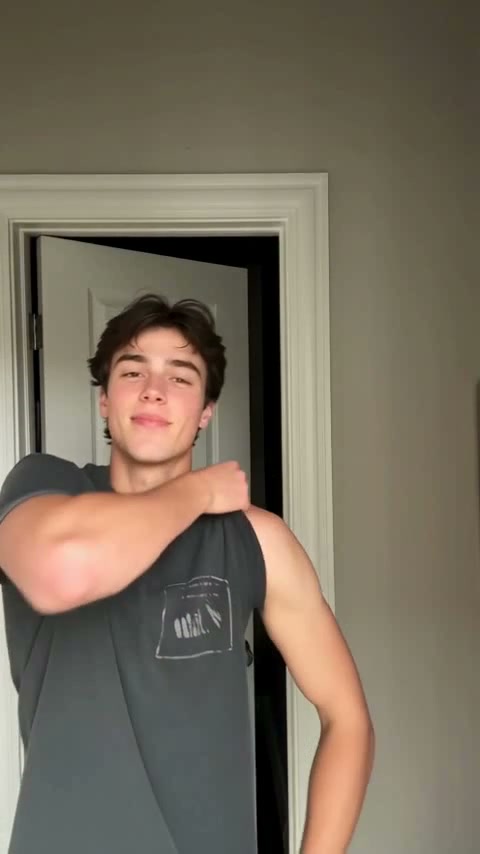
Bicep Heart AI turns your portrait into a short flex-to-heart video. You start facing the camera, bend one arm into a bicep flex, and bring the other hand toward it until the hand and upper arm outline a heart. The held pose is the reveal: it turns a confident flex into a playful way to send someone a heart.
You may know the gesture as the biceps heart trend, muscle heart pose, or arm heart challenge. A TikTok biceps heart pose example shows the real movement. Here, you make a photo-based animation of that idea, rather than filming your own take or applying a live filter while recording.
One portrait, four settings, the same heart gesture
Pick the background that fits your post. A bright room feels casual; a gym suits a fitness update; an outdoor street adds a sunny setting; a plain studio keeps attention on the arms. The pose instructions are prepared for you. Your photo supplies the person, and the tool requests a seven-second scene with the selected model and format.
This Bicep Heart AI generator is part of Viral AI Video. Stay here for this prepared pose. If you want to work from your own reference clip instead, the homepage has a separate video-remake workspace. This is an independent tool, not an official TikTok or CapCut filter.
Make Your Bicep Heart Video in 3 Steps
You do not need editing experience or the original TikTok file. Prepare your choices here, then sign in and use credits when you are ready to generate. The workspace shows the total before you confirm.
Upload Your Front-Facing Portrait
Choose a single-person photo with your face, hair, and shoulders visible. Use even light and leave room around your upper body. Select a file here or scan the phone QR code to send a photo from your album. No recorded flex or original TikTok clip is required.
Pick the Scene and Review Options
Pick Modern Living, Fitness Gym, Sunlit Outdoor, or Portrait Studio. Choose a model and an available resolution, then select vertical, square, or landscape. Check the updated credit total and confirm photo permission yourself. The requested clip length stays seven seconds across these scenes.
Generate, Review, and Download
Sign in and use your existing credits, or review the purchase options if needed. Follow the task status, then watch the full clip to check the fingers and finished heart shape. Save the MP4 directly or open the phone-download QR code. Each new render uses credits, so review your photo and settings before starting another attempt.
Which Bicep Heart Scene Should I Choose?
Choose the setting for your post, not the location of your photo. All four scenes start with one portrait and aim for the same arm-and-hand heart.
Bright Modern Living
A relaxed indoor setting for a casual hello, a playful reply, or a heart sent to a friend. Choose this when you want a familiar everyday feel rather than a fitness-themed clip.
Athletic Fitness Gym
A workout setting for a gym update or a lighthearted flex. You can start with an ordinary portrait; workout equipment and the planned arm movement come from the selected scene.
Sunlit Outdoor Street
A bright outdoor look for a daytime post. The requested background changes to a sunlit street, so you do not have to find an outdoor location or retake your photo there.
Minimalist Portrait Studio
A plain backdrop that puts attention on the face and heart pose. Try it when you want fewer background details competing with the hands, upper arms, and final heart outline.
Why Create Your Bicep Heart AI Video Here
Prepare this specific pose without filming the hand movement or building a video timeline. The controls below help you choose the file and cost that fit your post.
Failed-Task Credit Return
Failed tasks return reserved credits. Check the task status for pending refunds.
4 Realistic Environments
Keep the flex-to-heart idea while choosing the surroundings for your post. Changing the scene does not require a new reference-video upload.
Check Your Saved Audio
Listen to the saved file before publishing. Desktop audio attachment can fall back to the rendered file; choose any platform song separately with permission for your use.
MP4 Download and Phone Handoff
Download the MP4 directly or scan the phone QR code to save your clip.
Model, Resolution, and Cost
Choose among Standard, Fast, Pro, and Ultra. Available resolutions and credits change with the model; 1080p is offered on Pro and Ultra.
A Format for Your Post
Use 9:16 for a vertical short, 1:1 for a square post, or 16:9 for landscape. Save before the download expiry shown in your account.
What Happens in the Bicep Heart Video
Illustrative timing for the intended scene. Generated movement and exact timing may vary.
Initial Stance & Warm Smile
The starring character faces the camera in a relaxed posture, smiling warmly with confidence before making their move.
Cross-Arm Prep & Grip
One arm crosses smoothly across the chest, gently cupping the opposite upper arm to set the stage for the flex.
The Bicep Curl Snap
The opposite arm flexes upwards into a proud, sculpted bicep curl, locking into a bold curve right beside the cheek.
Close the Heart and Hold
The other hand curves toward the bent arm to complete the heart. The planned pause gives the viewer time to recognize the shape before the clip ends.
Choose Photos and Check Your Result
Use clear photos and review the finished clip.
Give Your Character a Clear Portrait
- Use Even Light and Visible EyesFace the camera with both eyes visible. Even daylight or room light works. You do not need to be in a gym or hold weights; the video creates the scene around the portrait.
- Include Hair, Shoulders & ArmsLeave space around the shoulders and upper arms. Short sleeves make the arm outline easier to see. A tight crop removes useful outfit and body detail; avoid text covering the hands or the person.
- Avoid Obscured Faces and Heavy FiltersAvoid sunglasses, masks, and strong filters. Clear details give the model a clearer face to work from; likeness and expression can still change during movement.
- One Separate Photo per PersonThe four scene tiles use one single-person photo. Keep other people out of the frame so the intended face and shoulders are clear. The selected setting is generated around that person.
Understand the Cost and Result
- iReview the Displayed Credit TotalModel and resolution changes update the total. Review it before confirming; each new render uses credits.
- iCheck Faces, Arms, and Heart SilhouetteWatch the arm curvature, bicep flex snap, and heart silhouette closure. Hands, lighting, and expressions can vary. Higher resolution does not guarantee better likeness.
- iKnow What a Failed Task MeansFailed tasks return credits. Completed clips are not automatically refundable for different expressions or movement. Report unplayable files to support.
- iPrepare First, Generate When ReadyPrepare your scene, then sign in and use your balance or compare credit packs and optional plans. Review the Terms, Privacy Policy, and Acceptable Use rules linked in the workspace.
Bicep Heart AI — Frequently Asked Questions
QWhat is Bicep Heart AI?
QIs this the biceps heart trend or a different heart filter?
QHow do I make a Bicep Heart AI video from my photo?
QWhat kind of photo should I upload?
QDo I need muscular arms or a gym photo?
QWhich Bicep Heart backgrounds can I choose?
QDo I need a Bicep Heart AI prompt or the original TikTok clip?
QIs Bicep Heart AI free, and how many credits does it use?
QHow long is the clip, and when will it be ready?
QCan I use the Bicep Heart video on TikTok, Reels, or Shorts?
QDoes the video include the same music as the preview?
QWhat if the heart shape, fingers, or face looks wrong?
QWhat happens if generation fails?
QWhose photos can I use, and how long can I keep the download?
Make Your Bicep Heart Video
Choose your photo and setting, review the credits, and make your own flex-to-heart clip. Keep the complete pose in frame, save the MP4, and add your caption when you post.
MP4 download · Phone QR option