THE JAWN DANCE AI VIDEO GENERATOR: VIRAL BEAT-DROP DANCE MEME
Star in the viral “That’s the Jawn” wait for the drop trend. Upload one photo, keep your chicken bucket ready, and generate a 12-second dance clip with beat-drop audio ready for TikTok and Reels. Pay-as-you-go video generation starts at just 6 credits with zero monthly subscription.
CREATE YOUR JAWN DANCE MEME VIDEO
Upload your photo
Tip: Use a clear front-facing upper-body or full-body photo with visible face and outfit styling in even light.
Video Options
By generating you confirm compliance with our Terms · Privacy · Acceptable Use
12-second video · 6 credits per generation
WATCH EXAMPLES FREE · REVIEW THE COST · FAILED-TASK CREDIT RETURN
WHAT IS THE JAWN DANCE AI TREND?
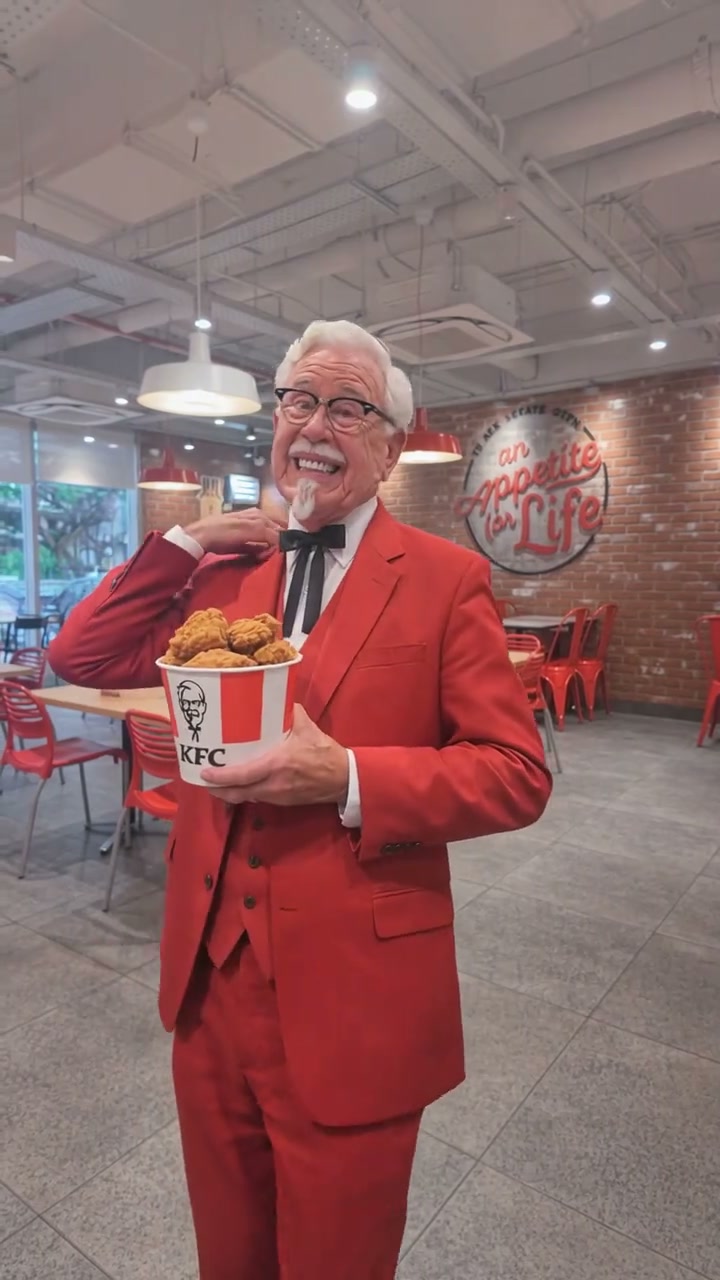
The Jawn Dance AI is a photo-to-video generator inspired by the viral "That’s the Jawn" TikTok trend set to Jerri’s track "The JAWN". You star inside a fried chicken restaurant cradling a chicken bucket, teasing the camera during the vocal build-up before hitting a bouncy hip dance on the beat drop. This workspace delivers a 12-second dance video from one portrait photo.
Known across TikTok and Instagram Reels as the “That’s the Jawn” wait-for-the-drop trend, this viral dance craze builds tension with chest-level props and expressive faces before hitting a bouncy hip-pop drop everyone replays.
1-Click Original Trend Sync
Upload 1 portrait photo. The generator automatically animates your portrait to mirror every beat-drop bounce, collar touch, and chicken-bucket hold frame-by-frame without dance filming or video editing skills.
Compare viral clips trending across TikTok The Jawn Dance search results.
Independent AI creative tool, not affiliated with TikTok, Instagram, YouTube, or any fast-food brand.
Trending Viral Effects
Explore More Viral AI Video Templates
Jump into other trending meme formats or create custom video remakes.
Мои слёзы AI
REMAKE →Hotline Bling AI
REMAKE →Bottle Kick AI
REMAKE →Tsundere Dance AI
REMAKE →Deck The Halls Dance AI
REMAKE →Pimp Walk Entrance AI
REMAKE →Groomer vs Dog AI
REMAKE →One Treat Dog Head Bop AI
REMAKE →Funny Driver AI
REMAKE →Flying Tricycle AI
REMAKE →Stormzy Shut Up AI
REMAKE →You Never Let Her Pay AI
REMAKE →Gangnam Style Dance AI
REMAKE →Wassup in a Minute AI
REMAKE →Rubber Band Prank AI
REMAKE →Ice Ice Baby Dance AI
REMAKE →Cat Riding Dirt Bike AI
REMAKE →Flamingo Float AI
REMAKE →Bicep Heart AI
REMAKE →Fancy Cafe AI
REMAKE →Window Peeper AI
REMAKE →How to Create Your The Jawn Dance AI Video in 3 Steps
Start with one portrait. The beat-drop routine is already set; you simply choose your video quality and format. No reference clip, choreography filming, or prompt writing required.
Upload Your Portrait Photo
Add one clear front-facing photo showing your face, hairstyle, and everyday outfit in even light. Pick a selfie from this device or scan the QR code to send one straight from your phone. No chicken bucket or dance pose needed.
Pick Quality & Review Credits
The template locks in the bright chicken restaurant stage and beat-drop timing. Select your resolution (480p, 720p, or 1080p), review the credit total, and confirm permissions.
Render & Download MP4
Track live render progress until your 12-second clip finishes with synced beat-drop audio. Save the MP4 to your computer or scan the QR code directly to your phone.
Creative Ways to Post Your Dance Clip
Whether posting to TikTok, Instagram Reels, or friend group chats, these three ideas turn one photo into instant laughs and replays.
The Group-Chat Friend Roast
Use a deadpan selfie of your quietest friend holding a chicken bucket until the beat drop catches everyone off guard.
Late-Night Cravings POV
Pair the bucket bounce with captions like “Me when the fried chicken arrives” for high-retention TikTok loops.
Zero-Filming Trend Hop
Jump on the viral “That’s the Jawn” dance trend without filming, memorizing steps, or editing beats.
Why Create Your Jawn Dance Video Here
Upload one photo, check the transparent credit total, and create your own version of the viral “That’s the Jawn” TikTok trend. Every beat drop and bounce step is timed for you, ready to save and share.
100% Automatic Refund If Cloud Task Fails
If a generation fails due to a cloud error, your reserved credits return to your balance automatically with zero manual support tickets.
One-Click Beat-Drop Preset
No reference video upload or choreography breakdown needed. The preset aligns your portrait to the bucket hold, anticipation tease, and hip-pop drop.
Flexible Resolution & Format
Render in 480p, 720p, or 1080p across 9:16, 1:1, or 16:9 formats. Credit totals adapt dynamically to your chosen settings.
Instant MP4 & Phone QR Save
Download the synced MP4 directly on desktop or scan the QR code to save the exact video straight to your phone camera roll.
Non-Expiring Sitewide Credits
Purchased pack credits work across every viral template on the site and never expire. Check your total before generating.
Transparent Privacy & Retention
Save clips before account expiry. Our Privacy Policy details how uploaded portraits are processed safely and never shared publicly.
Inside the 12-Second Beat-Drop Dance Storyboard
This is the choreography built into the template, matching the viral TikTok clip from start to finish: collar touch, build-up sway, anticipation face, and the 9-second bounce.
Collar Touch & Bucket Cradle
Standing inside the bright fried chicken restaurant holding a chicken bucket steady at chest height in the left arm, the performer raises their right hand behind the collar with a big grin and eases into the rhythm.
Rhythmic Step & Arm Swing
Lowering the right hand to swing gently with each beat, the dancer steps smoothly in place while nodding along to the rising tech-house vocal build-up.
Wait-for-the-Drop Anticipation Tease
Rocking side-to-side with soft knees and playful shoulder bounces, flashing a wide smile that flips into a cheeky pursed-lip pause right before the beat hits.
Beat Drop Hip Bounce & Arm Fling
Right on the 9-second drop, the performer flings their right arm out wide, bends into wide-kneed hip pops, and laughs brightly through the final beat.
Photo Guidelines & Quality Tips
Get the sharpest facial likeness and cleanest beat-drop dance movements by following these quick photo tips.
Give Your Portrait the Best Edge
- Use Even Light and Clear Facial FeaturesChoose a selfie or portrait taken in bright daylight or even indoor lighting. You do not need to pose inside a fried chicken shop or hold a bucket—the scene builds the entire setting for you.
- Frame Head, Shoulders & Outfit ClearlyKeep your full head, hairstyle, shoulders, and clothing style visible. Avoid tight crops cutting off the top of your head or blurry low-resolution screenshots.
- Avoid Covered Faces & Heavy FiltersAvoid sunglasses, masks, dark shadows across the eyes, or heavy beauty filters so expressions stay lifelike during the beat-drop grin.
- Single Person in the Source PhotoThis template animates one solo lead dancer in the bright restaurant dining room. Upload a photo showing one clear person for the cleanest likeness.
Check the Cost and the Finished Motion
- iReview the Displayed Credit TotalModel and resolution choices update your exact credit total live above the button. Review the total before starting your render.
- iWatch Hands, Chicken Bucket & Drop TimingPreview the collar touch, chest-level bucket hold, pre-drop anticipation look, and wide-kneed hip bounce in the player before downloading.
- i100% Automatic Refund on Failed TasksIf a cloud render fails for any technical reason, the system automatically returns your reserved credits back to your balance.
- iPreview Free, Generate When ReadyWatch the reference loop and test model/format combinations freely. Sign in and make sure your balance covers the chosen render before clicking generate.
How Does This Viral Beat-Drop Dance Generator Work?
Your portrait photo supplies your facial features, hairstyle, skin tone, and outfit styling. The AI automatically maps you into the bright fried chicken restaurant holding a bucket at your chest, animating the collar touch, anticipation tease, and explosive 9-second hip bounce across the full 12-second video.
There is zero friction: no reference-video upload, no dance filming, and no video editing skills needed. Upload one portrait photo, check the credit total (6 credits for default Standard 480p; higher tiers vary), and click generate. Your finished MP4 includes authentic synchronized viral TikTok dance audio ready for Reels, Shorts, and group chats, and you can pair approved platform tracks anytime you publish.
Check current credit options, failed-task and payment refund rules, and photo processing and retention before generating.
Frequently Asked Questions
QHow do I create The Jawn Dance AI video from my photo?
QCan I generate a The Jawn Dance video for free?
QHow much does this generation cost, and what if a render fails?
QWhat is The Jawn Dance AI trend on TikTok?
QWho started the viral "That’s the Jawn" dance trend and what song is it?
QCan I use a normal selfie, and do I need to hold a chicken bucket?
QDoes the AI copy my static standing pose or follow the beat-drop choreography?
QDoes the finished clip include beat-drop sound, and is my photo kept private?
QHow fast is rendering and how do I save the MP4 to my phone?
Star in the Viral Dance Meme Tonight
Upload your portrait photo, review the credit cost (6 credits at 480p), and generate your viral The Jawn Dance AI video. Download the 12s MP4 with synced beat-drop audio and share straight to TikTok & Reels.
MP4 download · Phone QR option · Sitewide credits