
WINDOW PEEPER AI MAKE A 2AM WINDOW VIDEO
Make a staged 2AM window video starring you, your partner, or your pet. Pick a scene, upload photos, and check the credit cost. No reference video or written prompt needed.
4 WINDOW SCENE EXAMPLES — SELECT A SCENE FOR YOUR VIDEO
CREATE YOUR WINDOW PEEPER VIDEO
Upload your photo
Tip: Use a sharp, evenly lit portrait with your face, hair, and shoulders visible. Check the likeness in your finished video.
Pick the Scene
Video Options
By generating you confirm compliance with our Terms · Privacy · Acceptable Use
PREVIEW SCENES FREE · REVIEW THE COST · FAILED-TASK CREDIT RETURN
WHAT IS THE WINDOW PEEPER AI TREND?
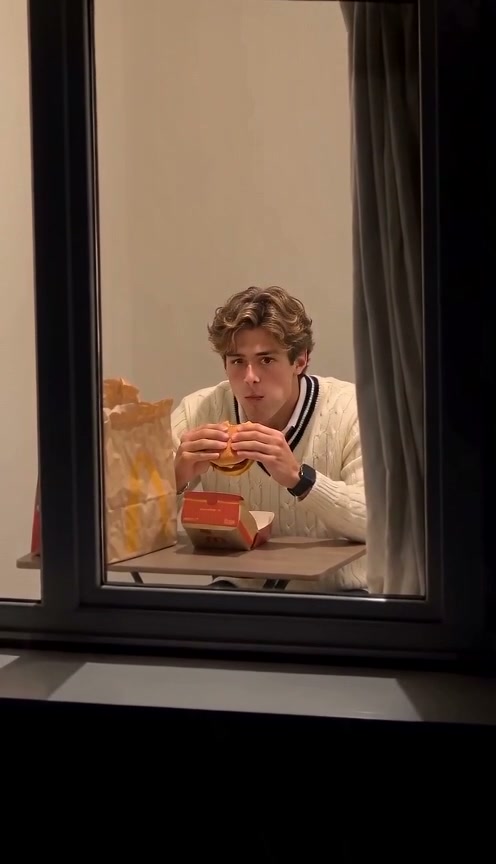
The burger window meme, starring you. This viral trend creates a staged 2AM window skit from your photos. A camera zooms toward a lit apartment, catches a diner mid-bite, and holds a guilty stare before the curtain closes. The scene is generated comedy, not real surveillance.
Four ready-made scenes on Viral AI Video
This Window Peeper AI generator includes solo, wave, couple, and pet scenes. Add your photos without finding a TikTok link, uploading a reference, or writing a prompt.
Use a clear portrait; no night background or meal is needed. Check faces, hands, food, and curtain movement in the generated clip before sharing.
Need a different effect using your own reference? Open the Viral AI Video homepage workspace. Your account credits work across both studios.
Viral AI Video is an independent tool, not affiliated with TikTok, Instagram, YouTube, or CapCut.
How to Create Your Window Peeper AI Video in 3 Steps
Prepare for free; generation requires an account and credits.
Choose a Scene and Add Photos
Select a scene and upload portraits or a pet photo from your device or the phone QR option. Choose the matching one-photo or two-photo mode for Couple Dinner.
Review the Options and Cost
Choose an available model, resolution, and format: 9:16, square, or landscape. Check the credit total and manually confirm photo permission. Resolution availability varies by model.
Generate, Review, and Download
Sign in and use your existing credits, or review the purchase options if needed. Follow the task status, review the full clip, and download your MP4. Each new render uses credits.
Which 2AM Window Scene Should You Choose?
Choose a scene to match your photos.
Burger at Night
A burger bite becomes a guilty stare and curtain escape. Use one clear adult portrait.
Couple Dinner
Two consenting adults react together. Use two different portraits or a clear joint picture in the matching mode.
Pet at the Window
Your dog or cat becomes the midnight snacker. Use one photo showing eyes, ears, and coat markings. The upright pose is generated; movement may vary.
Caught and Wave
An awkward wave precedes the curtain pull. Use a clear portrait and check the generated hand movement.
Why Make This Trend on Viral AI Video
Choose a prepared scene, review the cost, and download your MP4.
Failed-Task Credit Return
Failed tasks return reserved credits. Check the task status for pending refunds.
Four Prepared Window Scenes
The meal, camera approach, reaction, and ending are included in each scene’s instructions.
Choose Music When Posting
Add permitted platform audio after downloading; check the rules for your account.
MP4 Download and Phone Handoff
Download the MP4 directly or scan the phone QR code to save your clip.
Credits work across Viral AI Video
Use your existing balance. Compare packs and subscriptions on the Pricing page; pack credits never expire.
Know Your Download Expiry
Download before the displayed expiry. The Privacy Policy explains processing, retention, and deletion.
The Story Behind the 2AM Window Video
Illustrative timing for the intended scene. Generated movement and exact timing may vary.
Street-Level Telephoto Zoom
A camera approaches one warmly lit window across a dark building, setting up the reveal.
Unfiltered 2AM Feast
Inside, the subject enjoys a burger beside a takeout bag and fries, unaware of the camera.
2.5-Second Guilty Lock-On
Eye contact interrupts the meal. A wide-eyed, mid-bite pause delivers the joke.
Table Scramble
Food drops as the character scrambles toward the side curtain.
Blackout Curtain Slam
The curtain sweeps across the window, abruptly ending the scene.
Choose Photos and Check Your Result
Use clear photos and review the finished clip.
Give the Scene a Clear Starting Photo
- Use Even Light and Visible EyesFace the camera with both eyes visible. Even daylight or room light works; no staged night background is needed.
- Include Hair and ShouldersKeep hair and shoulders in frame. Avoid tiny face crops or text overlays; check both faces in joint photos.
- Avoid Obscured Faces and Heavy FiltersAvoid sunglasses, masks, and strong filters. Clear details cannot guarantee a perfect match.
- Match Photos to Your SceneUse one portrait for solo scenes, the selected couple photo mode, or one pet photo. Avoid crowded group shots.
Before You Confirm Generation
- iReview the Displayed Credit TotalModel and resolution changes update the total. Review it before confirming; each new render uses credits.
- iCheck Faces, Hands, and PropsReview the bite, stare, wave, and curtain ending. Higher resolution does not guarantee better likeness or smoother movement.
- iKnow What a Failed Task MeansFailed tasks return credits. Completed clips are not automatically refundable for different expressions or movement. Report unplayable files to support.
- iPrepare First, Generate When ReadyPrepare your scene, then sign in and use your balance or compare credit packs and optional plans. Review the Terms, Privacy Policy, and Acceptable Use rules linked in the workspace.
Cross-Studio Library
Explore More Trending AI Video Effects
Your credits work across all studios on Viral AI Video. Try these trending templates next.
Fancy Cafe AI Generator
Transport yourself to an outdoor Parisian terrace with sunglasses, a flaky croissant, and a rapid 10s drone zoom-out.
Remake Any Viral Video
Upload any TikTok or Reels clip to break down camera motion and recreate it starring your own portrait with custom prompts.
Window Peeper AI — Frequently Asked Questions
QWhat is Window Peeper AI?
QCan I try this window video generator for free?
QHow much does a Window Peeper AI video cost?
QDo I need the original TikTok video or a link?
QWhat photo should I use for the window video?
QCan I make a couple video or use my dog or cat?
QIs this a CapCut template or a live camera filter?
QHow long is the clip, and when will it be ready?
QDoes this generator add the trending TikTok sound?
QWhat if the video fails or the face looks different?
QWhose photos can I use, and can I share the result?
QWhat happens to my uploaded photos and finished video?
Put Your Photo in the Lit Window Tonight
Add photos, choose a scene, and make your 2AM window video.
MP4 download · Phone QR option