
RUBBER BAND PRANK AI GENERATOR CAST YOURSELF & A FRIEND
Who pulls the band, and who is too busy scrolling to notice? Upload one portrait for each role and make an authentic 7-second kitchen prank with a yellow-band backfire. Pay-as-you-go video generation starts at just 4 credits with zero monthly subscription.
CREATE YOUR RUBBER BAND PRANK VIDEO
Upload two portraits · Prankster & Seated Victim
Tip: Use clear front-facing photos of both people with eyes and facial features visible in even light.
Video Options
By generating you confirm compliance with our Terms · Privacy · Acceptable Use
7-second video · 4 credits per generation
WATCH EXAMPLES FREE · REVIEW THE COST · FAILED-TASK CREDIT RETURN
WHAT IS THE RUBBER BAND PRANK AI TREND?
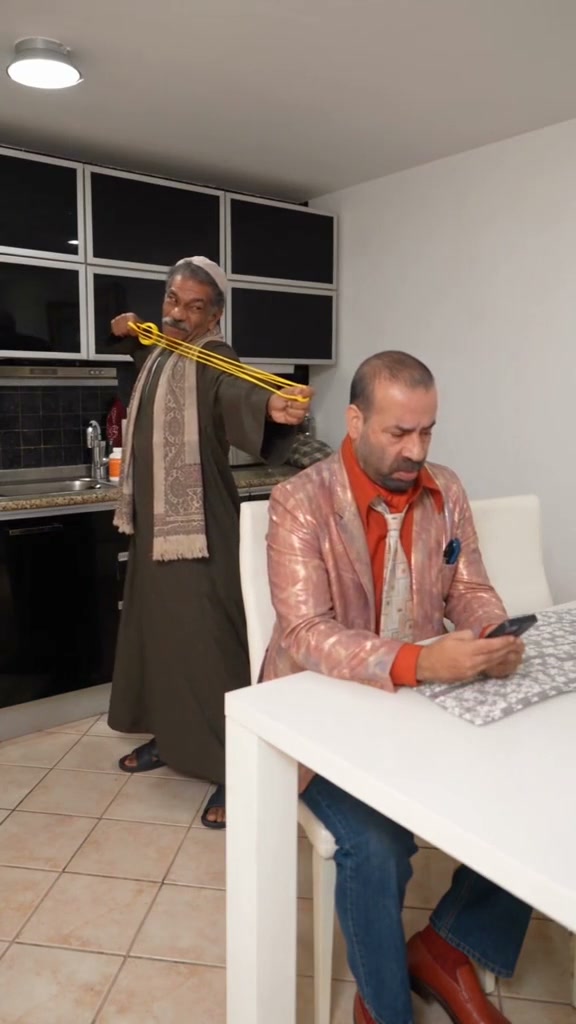
Rubber Band Prank AI turns two portrait photos into a short comedy video: one person stretches a yellow elastic band behind a friend who is looking at their phone, then the attempted prank backfires. This kitchen-scene preset casts Photo 1 as the standing prankster and Photo 2 as the seated friend. You do not need a real rubber band, a filmed prank, or a written prompt.
Looking for the Rubber Band Surprise AI template or the rubber band prank filter you saw on TikTok? The joke is the reversal: the person setting up the prank becomes the one caught off guard. Watch the example to check the scene before you create; this version uses a kitchen, a yellow band, and a friend distracted by their phone.
Pick the prankster. Pick the friend at the table.
Photo 1 guides the standing prankster behind the chair. Photo 2 guides the seated friend. You can use portraits taken in different places; no one needs to pose with a band. The model creates the kitchen, movement, and reaction. Check both faces and the band through the whole clip, because each render can vary.
Compare versions in the TikTok Rubber Band Prank AI results.
Content reviewed by Viral AI Video · . Independent AI creative tool, not affiliated with TikTok, CapCut or ByteDance.
Trending Viral Effects
Explore More Viral AI Video Templates
Jump into other trending meme formats or create custom video remakes.
Мои слёзы AI
REMAKE →Hotline Bling AI
REMAKE →Bottle Kick AI
REMAKE →Tsundere Dance AI
REMAKE →Deck The Halls Dance AI
REMAKE →Pimp Walk Entrance AI
REMAKE →Groomer vs Dog AI
REMAKE →The Jawn Dance AI
REMAKE →One Treat Dog Head Bop AI
REMAKE →Funny Driver AI
REMAKE →Flying Tricycle AI
REMAKE →Stormzy Shut Up AI
REMAKE →You Never Let Her Pay AI
REMAKE →Gangnam Style Dance AI
REMAKE →Wassup in a Minute AI
REMAKE →Ice Ice Baby Dance AI
REMAKE →Cat Riding Dirt Bike AI
REMAKE →Flamingo Float AI
REMAKE →Bicep Heart AI
REMAKE →Fancy Cafe AI
REMAKE →Window Peeper AI
REMAKE →How to Create Your Rubber Band Prank AI Video in 3 Steps
The kitchen scene and prank direction are already set. Bring two portraits, choose your output settings, and review the quote. No reference upload or breakdown step is needed.
Upload Two Portraits
Use one clear portrait of each consenting adult. Photo 1 is the person stretching the band; Photo 2 is the seated friend. Choose photos from this device or scan the QR code to send them from your phone. A group photo is not an input option in this studio.
Choose the Output & Review Credits
Keep 9:16 for a vertical post, or choose 1:1 or 16:9. Select a model and supported resolution. Standard 480p currently costs 4 credits for this 7-second preset. Review the updated total, sign in, and confirm consent before starting.
Render & Download MP4
Follow the task status, then watch the buildup, snap, and reaction. Listen to your chosen download's audio. Save the MP4 before the task's displayed download expiry, then upload it to your publishing app and label it as AI-made.
Who Will You Cast in the Rubber Band Prank?
The same setup can tell different jokes. Pick two adults who agree to appear, choose their roles, and add a caption that makes it clear the clip is AI-made.
Best Friends & Couples
Put the friend who always starts the joke behind the chair, and cast yourself as the one scrolling. Caption idea: “When the prank has other plans.” Ask your friend before using their photo or sharing the result.
Coworkers & Workplace Comedy
Pair up with a colleague who wants to join in. Two ordinary headshots become a kitchen comedy scene for your team chat. Try “Me trying to distract you before the deadline” as an AI-video caption, rather than passing it off as real footage.
Turn the Tables on Your Prank Partner
Usually the one getting pranked? Put your portrait in Photo 1 this time. Switch the photos before a new render to switch the roles. The kitchen scene stays the preset; each new version has its own credit cost.
Why Create Your Rubber Band Prank Video Here
You bring the two faces; the preset supplies the kitchen setup, stretched yellow band, and backfire direction. Standard 480p currently costs 4 credits for a 7-second request. Review the quote and example before committing to a render.
Failed-Task Credit Return
A failed task returns its reserved credits. A return can temporarily show as pending; check the task status.
One-Click Direct Preset
The kitchen prank direction is already prepared. Upload the prankster and seated friend portraits without a reference clip or written prompt.
Flexible Resolution & Format
Choose 9:16, 1:1, or 16:9. All models support 480p and 720p; Pro and Ultra also offer 1080p. Check the updated credit total before generating.
MP4 Download & Phone Handoff
Save an MP4 on desktop or scan the phone download QR code. Desktop soundtrack mixing can differ from the task video, so preview the file you will post.
Non-Expiring Sitewide Credits
Purchased pack credits work across effects and do not expire. Check the render total; subscription credit rules differ.
Transparent Privacy & Expiry
Save before the download expiry shown on the task. The Privacy Policy explains photo processing, provider handling, and retention.
What Happens in the 7-Second Prank?
These are the intended story beats. Exact timing, band movement, facial reactions, and camera details can vary. Compare the full render with the example before sharing.
The Setup: One Friend Is Distracted
The seated friend is busy with their phone while the prankster behind them stretches the yellow band. The pause sets up what the viewer expects to happen.
The Snap That Backfires
The band recoils and interrupts the plan. The prankster becomes the surprised character, reversing the setup instead of getting the reaction they expected.
The Reaction Gives It Away
The reaction finishes the joke. Check that both faces remain recognizable and that the ending makes sense after the buildup; the exact expression can vary.
Photo Guidelines & Quality Tips
Make both faces easy to recognize in the inputs. You do not need matching photos, a kitchen background, or anyone holding a band. Review the generated hands and elastic movement as carefully as the faces.
Give Your Portraits the Best Edge
- Use Even Light and Visible EyesChoose daylight or balanced indoor light so facial features are visible. No prop or costume is needed; the model supplies the scene and movements.
- Frame Head & Upper TorsoKeep the full face, natural expression, hairstyle, and upper shoulders visible. A front-facing or slight three-quarter view gives the model a clear face reference; it does not guarantee an exact likeness.
- Avoid Obscured Faces & Heavy FiltersAvoid dark shadows covering the eyes, motion blur, sunglasses, or heavy cartoon filters on the face.
- Two Separate Clear PhotosThis preset casts two characters in an ambush prank. Upload one front-facing portrait for the prankster and one for the victim so each character has a sharp facial appearance reference.
Check the Cost and the Finished Motion
- iReview the Displayed Credit TotalModel and resolution selections update the credit total in real-time. Review before confirming; each generation uses credits.
- iCheck Faces, Fingers & the BandWatch for changing faces, extra-looking fingers, a band that merges with a hand, or a reaction that happens too early. These can occur in AI video; check the complete sequence, not just its first frame.
- iKnow What a Failed Task MeansFailed tasks return their reserved credits, sometimes after a pending period. A completed clip with visual imperfections is not a failed task; a new render uses additional credits.
- iPrepare First, Generate When ReadyExperiment with settings and preview examples for free. When ready, sign in and check that your balance covers the selected render. A small pack may not cover every model and resolution combination.
What Creates the Backfire, and What Should I Check?
The portraits guide who appears in each role, while the built-in motion reference guides the stretched-band setup and backfire. The selected video model generates a new scene from those inputs. The gag depends on a readable pause: the seated friend is absorbed in the phone, the band builds anticipation, and the prankster's reaction reverses who seems in control. The example shows the intended joke; it is not a promise of identical frames.
Before posting, check that you can distinguish both people, follow the band between the hands, and understand the reaction. Listen to the downloaded file, too. Desktop preview or download may mix in the preset soundtrack; the phone QR download uses the saved task video. Sound can vary, so do not assume both versions have identical audio. If you replace the sound in a publishing app, use audio permitted for your account and intended use. Generation does not include a music licence.
Check current credit options, failed-task and payment refund rules, and photo processing and retention before generating.
Rubber Band Prank AI — Frequently Asked Questions
QHow do I create a Rubber Band Prank AI video from two photos?
QCan I generate a Rubber Band Prank video for free?
QHow much does this generation cost, and what if a render fails?
QWhat is Rubber Band Prank AI on TikTok?
QCan I use one photo, a group photo, or the same image twice?
QWhat photos work best for the prankster and seated friend?
QDoes the AI copy static poses or animate the prank backfire?
QDoes the finished video include sound and phone saving?
QHow long does generation take and are photos kept private?
Make Your Rubber Band Prank With a Friend
Pick who pulls the yellow band and who sits at the table. Add two portraits, check the credit total, and create your 7-second AI comedy clip. Preview it, save the MP4, and share the joke with your cast's permission.
MP4 download · Phone QR option · Sitewide credits