See Fancy Cafe AI in Action — No Prompt Writing Needed
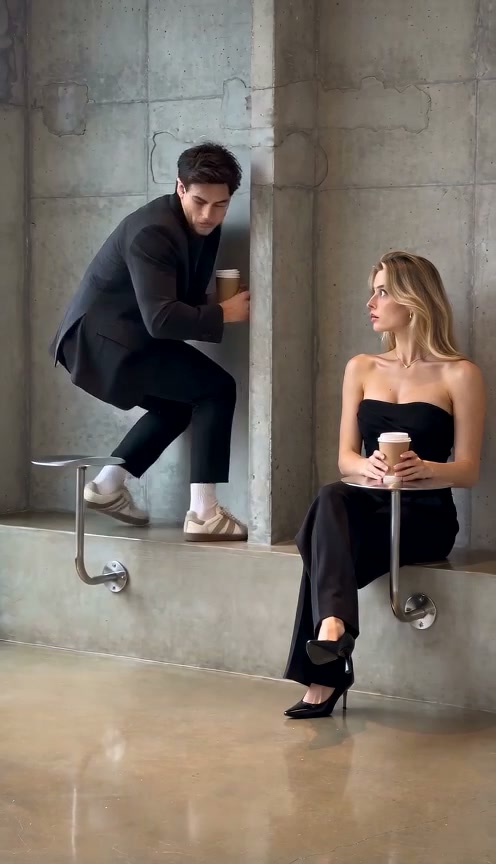
Full 15-second two-person cafe comedy showing Photo 1 perched on the stainless table, Photo 2 entering on the concrete bench, and the scrambled freeze.
Upload two solo portraits into Fancy Cafe AI—Photo 1 for the embarrassed drinker sitting on the stainless wall disc, and Photo 2 for the chic guest who calmly sets her iced coffee on the matching disc—to generate the complete 15-second concrete-cafe sitcom skit starting at 8 credits.
- 1Two-role sitcom setup: Photo 1 takes the table seat by mistake while Photo 2 shows how the bench works.
- 2Full 15-second comedic pacing with a lingering 2.5s deadpan realization freeze.
- 3Zero cafe scouting or coffee props required—works from plain indoor or outdoor headshots.
- 4Starts at 8 credits (480p); purchased credit packs never expire and failed tasks refund automatically.
- Cast Roles
- 2 Solo Portraits
- Clip Length
- 15 Seconds
- Entry Rate
- 8 Credits (480p)
- Default Frame
- 9:16 Vertical
Why Deadpan Minimalism Hits So Hard
No dialogue is needed because the spatial geometry tells the entire joke cleanly in a single locked architectural shot.
- Visual Rule of Two: Identical circular steel discs sit on both left and right sides of the concrete seam—seeing one used as a barstool beside one holding an iced latte immediately exposes the mistake.
- Full 15-Second Slow Burn: Having extra runtime gives viewers three seconds to absorb the confident sipping pose before the twist lands, making the hurried hop down onto the concrete bench land twice as hard.
Instead of hunting down a minimalist Seoul-style coffee shop with two willing friends and a tripod, Fancy Cafe AI lets you cast both leads straight from two everyday portraits. Compare two-person comedic timing in our You Never Let Her Pay AI studio or see short prank pacing in the Rubber Band Prank AI playbook.
15-Second Embarrassment Timeline
| Timestamp | Phase | What Happens on Screen | Why Your Photo Matters Here |
|---|---|---|---|
| 0.0s – 4.5s | Proudly Seated on the Table | Photo 1 sits confidently perched atop the left wall-mounted stainless disc, sipping iced coffee with feet propped on the bench. | Clear facial profile and hairstyle clarity in Photo 1 keep the casual opening crisp. |
| 4.5s – 8.5s | Guest Places Coffee on Matching Disc | Photo 2 enters from the right, settles comfortably on the wide concrete bench, and sets an iced coffee onto the right steel disc. | Balanced framing and relaxed posture in Photo 2 give the guest natural composure. |
| 8.5s – 12.0s | Slow-Burn Realization Freeze | Photo 1 stops mid-sip, freezes in a wide-eyed stare between her cup on the disc and the identical metal plate underneath him. | Unobstructed eyes (zero sunglasses) make the slow-burn realization stare readable on small screens. |
| 12.0s – 15.0s | Hasty Bench Scramble & Side-Eye | Photo 1 scrambles awkwardly off the table onto the concrete bench while Photo 2 holds an unimpressed deadpan side-eye. | Both distinct portraits keep their outfits cleanly separated while shifting seating levels. |
Two-Portrait Role Guide
Distinct style contrast between Photo 1 and Photo 2 sharpens the unspoken punchline:
Casting Photo 1 (Seated) & Photo 2 (Guest)
Because this effect runs on a locked motion preset with zero prompt typing, photo selection accounts for most of the final quality.
Upload Photos Like This
- Use two separate single-person adult portraits—Photo 1 for the embarrassed sitter, Photo 2 for the regular guest.
- Keep eyes, eyebrows, hair, and outfits clearly visible under soft natural lighting.
- Contrast styles naturally (casual streetwear for Photo 1 vs. neat coat or blazer for Photo 2) to heighten the joke.
- Stand clear of messy backgrounds so concrete shadows render naturally around both figures.
Avoid These Mistakes
- Do not upload a joint couple picture into both slots or duplicate the same face twice.
- Do not wear sunglasses or baseball caps that shadow eyebrows during the realization freeze.
- Do not upload heavily compressed night selfies that smear clothing textures across the bench.
- Do not submit photos of minors, celebrities, or non-consenting people.
Launch Fancy Cafe AI Two-Person Studio
Upload Photo 1 below for the embarrassed table-sitter and carry it straight into Fancy Cafe AI, then add Photo 2 for your cafe guest from 8 credits at Standard 480p.
 15s MP4
Location Filming vs. AI Preset
Finding a brutalist concrete interior with identical wall-mounted stainless steel discs is almost impossible locally:
Fancy Cafe AI vs. On-Location Production
| What Matters | Viral AI Video Preset | Typical CapCut Template |
|---|---|---|
| Architecture & Props | Built-in brutalist concrete alcove, dual steel coffee discs, and iced cups. | Impossible to edit cleanly unless you physically find a cafe with wall-mounted steel tables. |
| Two-Friend Coordination | Assembled directly from 2 still portraits anywhere on browser or phone. | Needs two actors, tripod placement, and quiet cafe clearance for multiple retakes. |
| Transparent Credits | Clear 8-credit 480p pricing before you click Generate. | Template apps lock 15s exports or soundless edits behind recurring billing. |
| Failed Render Safety | Automatic credit refund returned whenever a task fails. | Zero refund after wasted shooting and masking time. |
POV Captions & Timing Beats
- Lean Into Short POV Hooks: Keep on-screen text centered near the top blank concrete wall—"POV: your first time at a $9 oat latte cafe"—so neither performer's head nor the twin metal tables get covered by TikTok captions.
- Silence Sells Awkwardness: Low-volume cafe espresso hum or mild cricket-chirp ambience works far better here than loud hype songs because viewers read the joke straight off Photo 1's freeze.
- Share With Real-Life Coffee Friends: Tag the friend you cast as Photo 2 with playful banter; dual-cast memes generate huge friend-tag comment chains.