
WASSUP IN A MINUTE AI TRIO DANCE VIDEO GENERATOR
Put yourself and your friends into the "Wassup, been a minute" hillside dance. Choose one, two or three dancers to replace, upload your portraits, and create a 10-second MP4 without filming the routine yourself. Pay-as-you-go video generation starts at just 5 credits with zero monthly subscription.
CREATE YOUR WASSUP IN A MINUTE VIDEO
Choose your performers & upload photos
Tip: Use a clear front-facing portrait with eyes and facial features visible in even daylight.
Video Options
By generating you confirm compliance with our Terms · Privacy · Acceptable Use
10-second video · 5 credits per generation
WHAT IS THE WASSUP IN A MINUTE AI TREND?
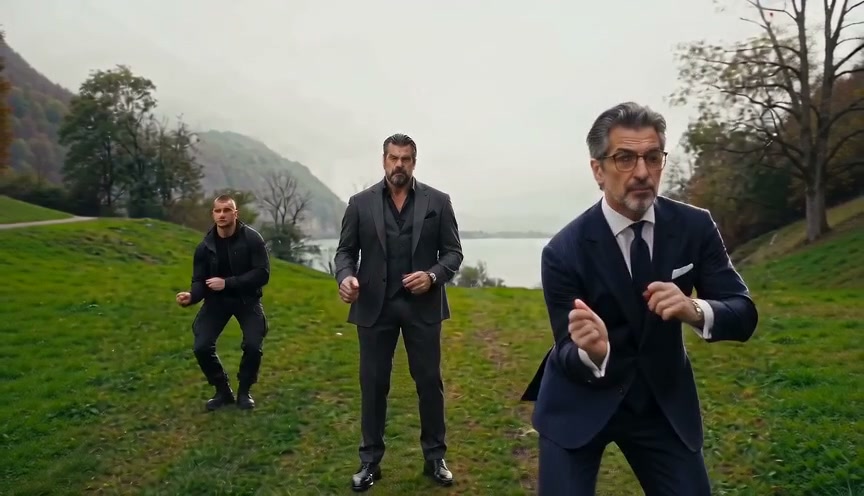
Wassup in a Minute AI on Viral AI Video turns your photos into the viral three-person hillside dance seen in "Wassup, been a minute" TikTok edits. Choose one, two or three people to star: the center lead, the dancer on the right, or the full trio. The AI uses the motion reference to cast your performers into the 10-second viral routine.
The green, red and blue outfits give this version its Alvin and the Chipmunks look. The camera moves between the dancers as they point toward the lens, touch their hair and finish together. Match your photos to the role colors shown in the preview; the person stays in that role through each camera change.
Browse the Wassup trio dance clips on TikTok to recognize the trend, then use the example here to choose the dancers for your version.
Trending Viral Effects
Explore More Viral AI Video Templates
Jump into other trending meme formats or create custom video remakes.
Мои слёзы AI
REMAKE →Hotline Bling AI
REMAKE →Bottle Kick AI
REMAKE →Tsundere Dance AI
REMAKE →Deck The Halls Dance AI
REMAKE →Pimp Walk Entrance AI
REMAKE →Groomer vs Dog AI
REMAKE →The Jawn Dance AI
REMAKE →One Treat Dog Head Bop AI
REMAKE →Funny Driver AI
REMAKE →Flying Tricycle AI
REMAKE →Stormzy Shut Up AI
REMAKE →You Never Let Her Pay AI
REMAKE →Gangnam Style Dance AI
REMAKE →Rubber Band Prank AI
REMAKE →Ice Ice Baby Dance AI
REMAKE →Cat Riding Dirt Bike AI
REMAKE →Flamingo Float AI
REMAKE →Bicep Heart AI
REMAKE →Fancy Cafe AI
REMAKE →Window Peeper AI
REMAKE →How to Create Your Wassup in a Minute AI Video in 3 Steps
The dance reference is already included. Choose who to replace, add one portrait for each selected role and review your video settings.
Choose Cast Setup & Upload Photos
Photo 1 stars as the center lead dancer. In two-person mode, Photo 2 stars as the right dancer. In three-person mode, Photo 3 stars as the left dancer. Use a separate clear photo for each performer.
Choose Video Settings & Review Credits
Pick the model, resolution and 9:16, 1:1 or 16:9 format. Standard starts at 5 credits for 480p; other settings change the total shown in the studio. Sign in and confirm permission for everyone in your photos.
Render & Download MP4
Follow the task status while the model generates. Preview the full video, listen to its audio, and download the MP4 to your computer or phone before the displayed expiry. Add permitted music in TikTok, Reels, or Shorts when you publish.
Choose Your Part in the Trio
Start with the dancer roles, then choose the photos. Each mode uses the same 10-second reference.
Solo: Take the Green Lead
Use one portrait for the center dancer in green. The preset requests your identity for that lead role and keeps the red and blue backup dancers unchanged.
Duo: Add the Red/Right Dancer
Add a second portrait for a friend in the red/right role. Your first photo stays assigned to the green lead; the blue dancer remains in the scene.
Trio: Cast All Three Dancers
Add a third portrait for the blue/left role to cast the full group. Put each person in the intended slot and check that the faces stay consistent in close-ups and wide shots.
Why Create Your Wassup in a Minute Video Here
Upload your photo, check the transparent credit total, and create your version of the viral TikTok Wassup in a Minute dance. The setup is handled for you; review the generated MP4 before sharing.
Failed-Task Credit Return
A failed task returns its reserved credits. A return can temporarily show as pending; check the task status.
One-Click Direct Preset
The hillside dance reference is included. Choose your roles and photos without uploading a video or writing a prompt.
Flexible Resolution & Format
Standard and Fast support 480p or 720p; Pro and Ultra also offer 1080p. Choose vertical, square or landscape and review the total.
MP4 Download & Phone Handoff
Save the task MP4 on desktop or scan its phone download QR code. Both deliver the same generated file.
Non-Expiring Sitewide Credits
Purchased pack credits work across effects and do not expire. Check the render total; subscription credit rules differ.
Transparent Privacy & Expiry
Save before the account download expiry. The Privacy Policy explains uploaded photos, provider processing, and retention.
Inside the 10-Second Wassup in a Minute Trio Dance
These moments help you recognize the hillside trio version of the Wassup dance. The built-in clip guides the movement and camera changes throughout your 10-second video.
The Green, Red and Blue Lineup
Three dancers share the hillside setting. The colored outfits identify the roles you select in the studio, even when the camera moves.
Camera Points and Head-Touch Gestures
The reference moves between the dancers and brings the green lead closer to the lens. Follow each person through the cuts rather than assigning a new face by screen position.
Back Together as a Trio
The final wider view brings all three dancers together. Check that your selected identities stay consistent through the group finish.
Photo Guidelines & Quality Tips
Help the model recognize each person with clear, evenly lit portraits.
Use a Clear Portrait for Each Role
- Use Even Light and Visible EyesCapture your portrait in daylight or balanced indoor light. You don't need costumes, dance experience, or props; the AI renders the entire Alvin & Chipmunks dance choreography.
- Frame Head & Upper TorsoKeep the full head, face, and shoulders clearly visible. Avoid tight crops cutting off hair or heavy blur filters.
- Avoid Obscured Faces & Heavy FiltersAvoid dark shadows covering facial features, motion blur, or heavy cartoon filters obscuring identity.
- One Person in Each PhotoUse a separate photo for each dancer. Group photos can make it unclear which face belongs in the selected role.
Check the Cost and the Finished Motion
- iReview the Displayed Credit TotalModel and resolution selections update the credit total in real-time. Review before confirming; each generation uses credits.
- iWatch Gestures, Rhythms & MotionReview the double-finger point on "Wassup", synchronized head-touches, and swagger slow sway in the full preview before sharing.
- iKnow What a Failed Task MeansIf a generation task fails, the system automatically returns the reserved task credits back to your balance.
- iPrepare First, Generate When ReadyExperiment with settings and preview examples for free. When ready, sign in and check that your balance covers the selected render. A small pack may not cover every model and resolution combination.
How Are Your Photos Used in the Dance?
Your portraits provide the facial likeness and hair for the selected dancers. The built-in reference provides the gestures, timing, camera changes and hillside scene. The preset asks the model to keep the outfits and unselected dancers unchanged, so a solo, duo or full-trio version follows the same routine.
Choose the output format for your post: 9:16 for a vertical feed, 1:1 for a square crop or 16:9 for a wider view of the group. Watch the full preview for face consistency and hand movements before downloading. You can check credit options and photo processing and retention at any time.
Wassup in a Minute AI — Frequently Asked Questions
QHow do I create a Wassup in a Minute AI video from my photo?
QCan I generate a Wassup in a Minute video for free?
QHow much does this generation cost, and what if a render fails?
QWhat is Wassup in a Minute AI on TikTok?
QHow many photos do I need, and who stars in the video?
QWill the dance, clothes and other dancers stay the same?
QWhich photos work best for this dance?
QDoes the finished video include sound and phone saving?
QHow long does generation take and are photos kept private?
Make Your Wassup in a Minute Trio Dance
Choose your dancers, add the portraits and review the cost. Create a 10-second video of the hillside routine, then preview and download your MP4.