
FANCY CAFE AI: FIRST TIME IN A FANCY CAFE VIDEO GENERATOR
You and a friend, starring in the “first time in a fancy cafe” meme. Upload two separate portraits: Photo 1 plays the seated coffee drinker; Photo 2 plays the guest who walks in. Review the credit cost, then generate your 15-second video.
FANCY CAFE DUO VIDEO EXAMPLES
Independent creator parody. Source meme choreography credited to original creators (@leehoustonx / TikTok). Includes reference clip audio for parody creation.
CREATE YOUR FANCY CAFE VIDEO
Upload two portraits · One for each role
Use one clear portrait of each consenting adult (18+). Keep faces, hair, and shoulders visible. Upload separate photos, not a photo of both people together.
Video Options
By generating you confirm compliance with our Terms · Privacy · Acceptable Use
15-second video · 8 credits per generation
WATCH EXAMPLES FREE · REVIEW THE COST · FAILED-TASK CREDIT RETURN
WHAT IS THE FANCY CAFE AI TREND?
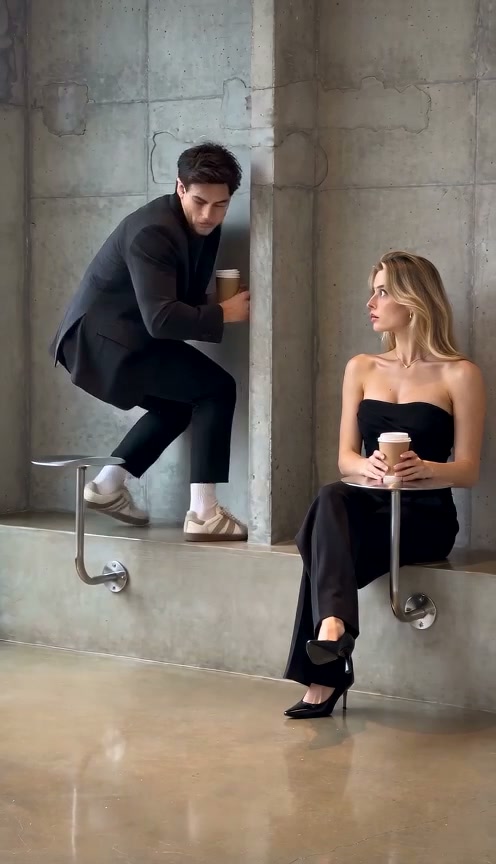
A minimalist cafe table, a confident visitor, and an awkward mix-up. Fancy Cafe AI lets you star in the viral “POV: Your first time in a fancy cafe” trend popularized across TikTok and Instagram. In an ultra-minimalist concrete coffee shop, a newcomer innocently sits on a low display table. When another guest arrives with a coffee cup, the embarrassing blunder unfolds.
You and a Friend, Starring Together
This Fancy Cafe AI generator casts both characters from your photos: Photo 1 plays the seated coffee drinker, and Photo 2 plays the guest who walks in. Add one clear, separate portrait of each person. The cafe setup and action are already prepared, so you do not need to write a prompt or upload a video.
Searching for the viral cafe filter or POV meme template? Rather than an AR camera overlay, this tool renders 15-second cafe comedy videos from your two portraits. Review the finished clip and download your MP4 in your selected format. Vertical 9:16 is the default; square and landscape are also available.
Independent AI creative tool, not affiliated with TikTok, Instagram, YouTube, or CapCut.
How to Create Your Fancy Cafe AI Video in 3 Steps
You do not need editing experience or the original TikTok file. Prepare your choices here, then sign in and use credits when you are ready to generate. The workspace shows the total before you confirm.
Upload Two Portraits, One per Role
Photo 1 plays the seated coffee drinker; Photo 2 plays the guest who walks in. Use a separate single-person photo of each consenting adult. Choose files on this device or scan the QR code to upload from your phone.
Review the Options and Cost
Choose an available model, resolution, and video shape. Vertical 9:16 suits a full-screen social post; square and landscape are also available. The request is for 15 seconds. Read the displayed credit total and manually confirm photo permission. Some resolutions are unavailable on certain models.
Generate, Review, and Download
Sign in and use your existing credits, or review the purchase options if needed. Follow the task status, review the full clip, and download your MP4. Each new render uses credits.
Who Will Star in Your Fancy Cafe Video?
The same cafe scene has two starring roles. Cast yourself with a friend, partner, or another consenting adult. Each person needs a separate portrait.
Friends & Buddy Comedy
Put yourself and a friend in the cafe mix-up. Decide who plays the seated coffee drinker and who walks in, then add each person’s portrait to the matching slot.
Couples & Date Nights
Turn your next coffee date into an AI comedy. Upload one selfie of yourself and one of your partner to cast both roles. You do not need a photo taken together.
Swap Roles for Another Take
Want to see the other person walk in? Swap the two photos between the upload slots and generate another version. Review the cost first; each new render uses credits.
Why Create Your Fancy Cafe AI Video Here
Upload two portraits, check the credit total, and cast both roles in a prepared cafe scene. Download the finished MP4 after reviewing your result.
Failed-Task Credit Return
Failed tasks return reserved credits. Check the task status for pending refunds.
Two Photos, Both Roles
Cast the seated coffee drinker and the guest who walks in with separate portraits. The cafe scene and action are already prepared.
Review Audio Before Posting
Review the AI-generated ambient sound, which can vary by result. Add a platform song when posting only if it is permitted for your account and use.
MP4 Download and Phone Handoff
Download the MP4 directly or scan the phone QR code to save your clip.
Flexible Sitewide Credits
Use your existing balance or credit packs. Pack credits never expire and work across all templates.
Know Your Download Expiry
Download before the displayed expiry. The Privacy Policy explains processing, retention, and deletion.
The Story Behind the Fancy Cafe Video
Illustrative timing for the intended scene. Generated movement and exact timing may vary.
A Confident First Visit
A visitor settles comfortably onto a raw concrete cafe surface with coffee, unaware it is a table rather than a stool.
The Unsuspecting Patron
A second guest arrives carrying a fresh cup and casually uses the surface, triggering sudden confusion.
The Table-or-Chair Moment
Awkward eye contact reveals the hilarious mix-up: mistaking modern brutalist furniture in a fancy cafe.
The Scramble & Poker Face
A hurried adjustment to save face, ending in an iconic deadpan meme poker face punchline.
Choose Photos and Check Your Result
Use clear photos and review the finished clip.
Give Each Role a Clear Portrait
- Use Even Light and Visible EyesFace the camera with both eyes visible. Even daylight or room light works. You do not need to visit a cafe or hold a cup; the video creates the scene around the portrait.
- Include Hair and ShouldersKeep hair and shoulders in frame. Avoid tiny face crops or text overlays. For both roles, check each individual portrait before uploading it to the matching slot.
- Avoid Obscured Faces and Heavy FiltersAvoid sunglasses, masks, and strong filters. Clear details cannot guarantee a perfect match.
- One Separate Photo per PersonUpload two separate single-person portraits: Photo 1 for the seated coffee drinker, Photo 2 for the guest who walks in. Do not use the same image twice, a group photo, or one photo of both people together.
Understand the Cost and Result
- iReview the Displayed Credit TotalModel and resolution changes update the total. Review it before confirming; each new render uses credits.
- iCheck Faces, Hands, and PropsWatch the entrance, cup placement, seated posture, and reaction. Hands, furniture, and expressions can vary. Higher resolution does not guarantee better likeness or a more convincing joke.
- iKnow What a Failed Task MeansFailed tasks return credits. Completed clips are not automatically refundable for different expressions or movement. Report unplayable files to support.
- iPrepare First, Generate When ReadyPrepare your scene, then sign in and use your balance or compare credit packs and optional plans. Review the Terms, Privacy Policy, and Acceptable Use rules linked in the workspace.
Fancy Cafe AI — Frequently Asked Questions
QWhat is Fancy Cafe AI?
QIs Fancy Cafe AI free to try?
QHow much does a Fancy Cafe AI video cost?
QDo I need the original TikTok video or CapCut?
QWhat photos should I use for the cafe video?
QHow do I cast both roles in the Fancy Cafe AI video?
QIs this a CapCut template or a live camera filter?
QHow long is the video, and when will it be ready?
QDoes Fancy Cafe AI add the trending TikTok sound?
QWhat if the video render fails?
QWhose photos can I use, and can I share the result?
QWhat happens to my uploaded photos and finished video?
Trending Viral Effects
Explore More Viral AI Video Templates
Jump into other trending meme formats or create custom video remakes.
Put Your Photo in the Fancy Cafe Tonight
Choose your cafe role, add the right photos, and review the cost. Make your Fancy Cafe AI video when you are ready, then watch it through and save the MP4 before its download expiry.
MP4 download · Phone QR option