
CAR LEG TOUCH PRANK AI VIDEO GENERATOR
Put yourself, your co-pilot, or your crew inside the viral parked car deadpan leg-touch prank. Upload 1 to 3 portrait photos to generate a 10-second cabin skit with synchronized cabin audio. Pay-as-you-go video generation starts at just 5 credits with zero monthly subscription.
CREATE YOUR PARKED CAR COMEDY REACTION CLIP
Upload 2 portraits · Driver & Passenger
Tip: Use crisp front-facing indoor or daylight photos with visible face, hair, and shirt styling. Distinct adult portraits give the cleanest car seat separation.
Video Options
By generating you confirm compliance with our Terms · Privacy · Acceptable Use
10-second video · 5 credits per generation
WATCH EXAMPLES FREE · TRANSPARENT CREDITS · 100% AUTO-REFUND ON FAILED TASKS
WHAT IS THE CAR LEG TOUCH PRANK TREND?
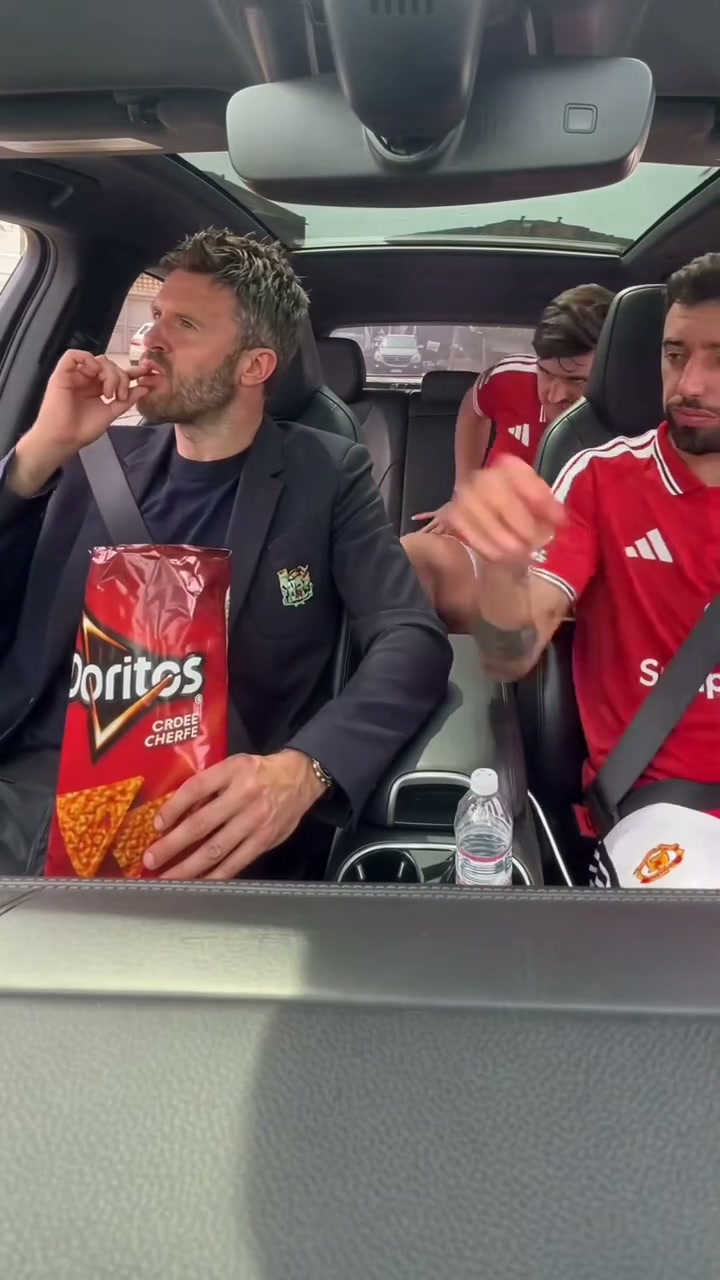
Car Leg Touch Prank AI is a viral comedy video generator based on the viral TikTok and Reels parked car leg-touch prank trend. Framed from the front windshield looking back across all three seats, choose between starring solo as the chip-eating front-right occupant (frame left) reacting deadpan, solo as the front-left prankster (frame right) reaching across onto their thigh, Duo (both front seats), or Full Trio with the silent backseat spectator. The AI animates your photos into the full 10-second scene with deadpan frozen glares and synchronized cabin audio without filming or editing.
A dashboard camera facing the cabin shows the front right seat sharing chips from a snack bag before a calm thigh touch from the companion sets off a frozen deadpan glare while a backseat friend watches silently.
1 to 3 Portraits In · 3-Seat Cabin Skit Out
Cast the driver, front passenger, or rear spectator from ordinary snapshots across the full 10-second reaction loop—no car filming setup needed.
Explore parked cabin reaction remakes in the TikTok car cabin prank search results.
Content reviewed by Viral AI Video · . Independent AI creative tool, not affiliated with TikTok, CapCut, or ByteDance.
Trending Viral Effects
Explore More Viral AI Video Templates
Jump into other trending meme formats or create custom video remakes.
Drake Solar Eclipse AI
La Nena No Se Compara AI
Hibidi Skibidi AI
Shoulder Carry AI
Need for Speed AI
Old Town Road AI
Fitting Room Outfit Change AI
Yes Yes I Love You AI

King Jin AI
Bad Aim Edit AI
Hit the Road Dude AI
Мои слёзы AI
Bottle Kick AI
Pimp Walk Entrance AI
Funny Driver AI
Flying Tricycle AI

Stormzy Shut Up AI
You Never Let Her Pay AI
Rubber Band Prank AI
Flamingo Float AI
How to Create Your Car Cabin Comedy Video in 3 Steps
Pick your seats, upload casual portraits, check credits live, and save a post-ready vertical or horizontal MP4.
Assign Seats & Upload Portraits
Pick Front Duo, Full Trio, Driver Only, or Passenger. Drop clear casual portraits straight into the matching seat boxes or scan the phone QR code.
Pick Quality & Review Credits
Stay in 9:16 vertical for Shorts and TikTok or switch to 1:1 or 16:9. Standard 480p starts at 5 credits for the full 10-second scene.
Save Your 10s MP4 With Sound
Play back your synchronized car cabin audio right away and download the MP4 on desktop or save to mobile via QR.
Who Will You Put in the Front & Back Seats?
Zero acting rehearsal and zero car staging needed. Drop one, two, or three friend photos into the parked sedan bit for instant group-chat comedy.
Full 3-Person Friend Group
Select Full Trio to cast your chip-sharing friend on frame left, your deadpan prankster on frame right, and your snack-eating witness in the middle back seat.
Couples & Road Trip Duos
Use Front Duo with two selfies for the snack bag hand-off, calm thigh touch, and frozen glare.
Solo Seat Cameos
Only have one portrait handy? Switch to Driver Only or Passenger Solo to step right into the reaction while keeping the rest of the cabin cast intact.
Why Make Your Parked Car Skit Here
Upload 1 to 3 selfies, pick your model and resolution, and let our preset reaction pacing drive every beat. Standard 480p starts at just 5 credits for all 10 seconds.
100% Automatic Refund If Cloud Task Fails
Your balance stays protected on every generation. Any failed cloud render triggers an automatic full refund back to your account.
1-Click Reaction Timing Preset
No prompt engineering, filming inside tight car cabins, or multiple takes required. Portraits animate cleanly across the punchline.
Flexible Feeds & Sharp 1080p
Default 9:16 vertical matches TikTok, Reels, and Shorts, with 1:1 and 16:9 available. Pro and Ultra unlock 1080p HD rendering.
Matched Audio & Phone QR Save
Downloads with original comedic reaction audio included, plus instant QR scanning so you can save straight to iPhone or Android.
Non-Expiring Sitewide Credits
Credit packs work across every viral reaction and dance generator on the platform with exact credit prices calculated upfront.
Consent-First & Clear Retention
Download your MP4 before temporary storage expires. Review our Privacy Policy anytime for upload cleanup details.
Inside the 10-Second Cabin Skit
How each beat unfolds across the full 10-second interior shot from snack sharing to the deadpan freeze.
Snack Chip Sharing & Cabin Setup
From a dashboard camera looking back, the frame-left occupant eats from a red chip bag and shares with the frame-right friend while the center backseat witness watches.
Backseat Bag Grab & Calm Arm Reach
The backseat spectator reaches forward to take the chip bag as the frame-right prankster extends their right arm across the console and rests a hand onto the neighbor’s thigh.
Frozen Deadpan Glare & Silent Witness
The frame-left occupant freezes mid-motion and delivers an intense sideways deadpan glare while the prankster stays unbothered and the backseat witness silently munches a chip.
Photo Guidelines & Quality Tips
Keep every car seat expression crisp during chip sharing and deadpan sideways glares with these simple portrait checks.
Best Photos for Crisp Reaction Results
- Even Lighting & Clear EyesBright indoor or daylight portraits preserve crisp facial expressions when turning toward the camera.
- Include Hair & Top OutfitUpper-body framing helps keep shirts, hoodies, and hairstyles consistent across seated angles.
- Skip Sunglasses & Heavy FiltersAvoid tinted lenses or heavy shadows so subtle eyebrow raises and frozen deadpan stares read clearly.
- Separate Single-Person PortraitsUpload one clear person per seat slot so driver, passenger, and backseat identities stay separated.
What to Check Before Sharing
- iLive Credit Quote Before RenderStandard 480p starts at 5 credits upfront for the full 10s skit.
- iConsenting Adults OnlyOnly feature yourself or friends aged 18+ who agreed to appear in your parody clip.
- i100% Automatic Credit RefundAny failed cloud render automatically returns all reserved credits directly to your balance.
- iTest Options Free FirstPreview the example clip and switch between cast presets or resolutions free before generating.
How Does This Car Prank Generator Work?
Your portraits bring each participant's likeness and outfit into the cabin frame across all 10 seconds, driving the chip sharing, calm thigh touch, and frozen glare with matched cabin audio.
Check current credit options, failed-task and payment refund rules, and photo processing and retention before generating.
Car Leg Touch Prank AI — Frequently Asked Questions
QHow do I create a Car Leg Touch Prank AI video from my photo?
QIs Car Leg Touch Prank AI free to use, and when do I pay?
QHow much does this 10-second generation cost, and what if it fails?
QCan I star in the left front seat, right front seat, or with the full car crew?
QWhat kind of photo works best for this car prank video?
QDoes the generated video include synchronized car comedy audio?
QHow does user privacy work, and how long are my uploaded photos kept?
QCan I save the finished MP4 video straight to my phone camera roll?
QDo I need video editing skills or prompt writing experience?
QWhat aspect ratios and resolutions are supported?
Make Your Parked Car Reaction Tonight
Pick 1 to 3 seat portraits, preview your credit quote, and render a 10-second interior comedy clip with matched audio—ready for TikTok, Reels, and group chats.
MP4 download · Phone QR option · Sitewide credits