See Pet Rock AI in Action — No Prompt Writing Needed
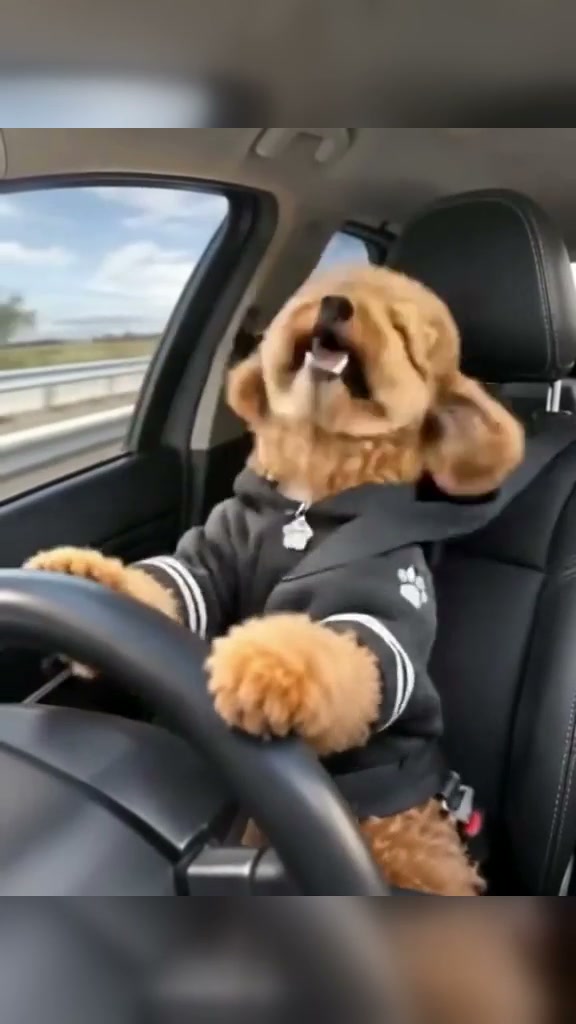
One single-pet portrait drives the 10-second steering-wheel headbang routine inside a moving highway cabin—no steering props or prompts required.
Pet Rock AI turns a single dog or cat picture into a 10-second highway driver headbanging to a rock groove. Seated in the black leather seat with both front paws resting on the wheel, your pet shakes its head to the tempo and finishes with a happy smile starting from 5 credits.
- 1Input rule: 1 front-facing pet picture showing both eyes, ears, and muzzle clearly.
- 2Visual punchline: hoodie-wearing pet buckled into a moving car seat gripping the steering wheel.
- 3Core motion arc: steady wheel hold (0–1s), intense headbanging (1–7s), panting grin (7–10s).
- 4Output flexibility: 9:16 vertical default with 1:1 square or 16:9 widescreen toggles available.
- 5Upfront cost: begins at 5 credits (Standard 480p), backed by automatic task refunds.
- Clip Length
- 10 Seconds
- Starting Cost
- 5 Credits (480p)
- Default Frame
- 9:16 Portrait
- Upload Slot
- 1 Pet Portrait
Inside the Steering Wheel Setup
Comedy pet videos surge when animals mirror human weekend habits—like blasting classic rock alone in traffic. By putting your dog or cat in the driver seat beside a blurry highway guardrail, the clip triggers an instant double-take in the very first frame.
Because the preset handles cabin lighting, seatbelt positioning, and front-paw wheel contact under the hood, creators do not write camera prompts or mask fur edges manually. Focusing on crisp eye spacing and unobstructed fur colors is the quickest way to make the animated driver unmistakably yours.
10-Second Headbang Timeline
| Timestamp | Phase | What Happens on Screen | Why Your Photo Matters Here |
|---|---|---|---|
| 0.0s – 1.0s | Driver Hook | Your pet sits belted upright inside the dark car interior with both front paws resting on the top rim of the steering wheel as highway guardrails streak past the side window. | A centered muzzle and unobstructed forehead give the AI reliable facial anchors before rapid motion starts. |
| 1.0s – 4.0s | First Riff | Heavy neck dips and rhythmic headbanging kick in while ears bounce horizontally and jaws bounce loose with each downbeat. | Photos showing natural ear tips help the motion keep distinctive floppy or pointed ear shapes cleanly. |
| 4.0s – 7.0s | Sustained Groove | Continuous side-to-side head nods build energy while front paws stay anchored firmly along the steering wheel arch. | Avoid uploading pictures with human fingers wrapped around your dog so extra hand geometry never drifts onto the paws. |
| 7.0s – 10.0s | Smile Payoff | Your pet faces forward toward the dashboard camera, opens its mouth in an excited panting grin, and lifts one paw slightly with the closing chord. | Clean lighting around mouth markings lets the closing grin expression read crisp and lovable. |
Ideal Pet Angles vs. Bad Inputs
Rapid head shakes reveal every flaw in a low-light snapshot. Match your upload against these studio guidelines before launching your render:
High-Accuracy Pet Portraits vs. Distortion Triggers
Because this effect runs on a locked motion preset with zero prompt typing, photo selection accounts for most of the final quality.
Upload Photos Like This
- Eye-level mugshot or slight 15-degree angle where left eye, right eye, and nose tip are sharp.
- Single animal alone against a clean wall, carpet, or bright lawn backdrop.
- Full head, neck collar area, and both ears completely uncropped at the photo border.
- Soft daytime window illumination separating dark eyes from brown, black, or white fur.
- Relaxed natural expression with no costume glasses hiding pupil direction.
Avoid These Mistakes
- Owner arms holding or hugging the animal close to the chest where hands overlap fur.
- High-angle overhead phone shots staring down at the crown with tiny hidden nostrils.
- Action motion blur or zoomed-out yard captures smaller than a thumbnail crop.
- Deep shadows where black coats merge into dark sofa cushions.
- Sunglasses, hats, multiple pets side-by-side, or human portraits.
Ready to Put Your Pet Behind the Wheel?
Choose a clear head-on dog or cat snapshot below to jump into Pet Rock AI pre-loaded—review the live 5-credit 480p quote and export in moments.
 10s MP4
AI Studio vs. CapCut Bobble Overlays
Searchers hunting "pet rock CapCut template" often run into stiff green-screen cutouts or jittery keyframed stickers pasted on stock car interiors. Here is how full-frame motion synthesis stacks up:
Pet Rock AI Preset vs. Manual CapCut Edits
| What Matters | Viral AI Video Preset | Typical CapCut Template |
|---|---|---|
| Head & ear animation | Synthesizes full 3D head nods, ear bounce, jaw movement, and blinking locked to the rhythm. | Rotates or stretches a flat 2D pet cutout layer along keyframes. |
| Car cabin integration | Seats your pet directly inside the belted hoodie outfit behind a matching steering wheel. | Typically overlays a pasted circle face over another pet’s pre-recorded body. |
| Masking effort | None—drop in one clean photo without erasing curly hair or fur strands. | Curly coats like poodles often show jagged background cutouts around ears. |
| Resolution & aspect options | Renders 9:16 vertical, 1:1 square, or 16:9 landscape MP4 across Standard to Ultra models. | Locked to whatever canvas crop the template author uploaded. |
| Pricing model | From 5 credits per 10s Standard 480p video; purchased credit packs never expire. | Basic tools free; watermark or cloud effects frequently lock behind Pro tiers. |
Soundtrack, Preview & Upload Steps
Three quick checks before publishing your finished driving rock video to short-form feeds:
- Inspect steering wheel paws during playback: Rapid paw lifts around 8–10 seconds can occasionally blur claws or hoodie sleeves. Scrub the entire clip once before sharing; failed renders return credits automatically.
- Match platform sound when uploading on mobile: Desktop exports can attach the preset rock audio file locally, while phone task saves use the model stream so picking your favorite guitar riff inside TikTok or Instagram audio search keeps rights clean.
- Label synthetic comedy clips transparently: Adding TikTok’s AI-generated content label avoids unnecessary moderation flags while viewers enjoy the gag. Looking for another viral animal stunt? Try Cat Riding Dirt Bike AI or read our wheelie pet photo checklist.