See Cat Riding Dirt Bike AI in Action — No Prompt Writing Needed
Generated directly from one calm cat portrait photo—no motorcycle props, no green screen, and zero manual prompt writing.
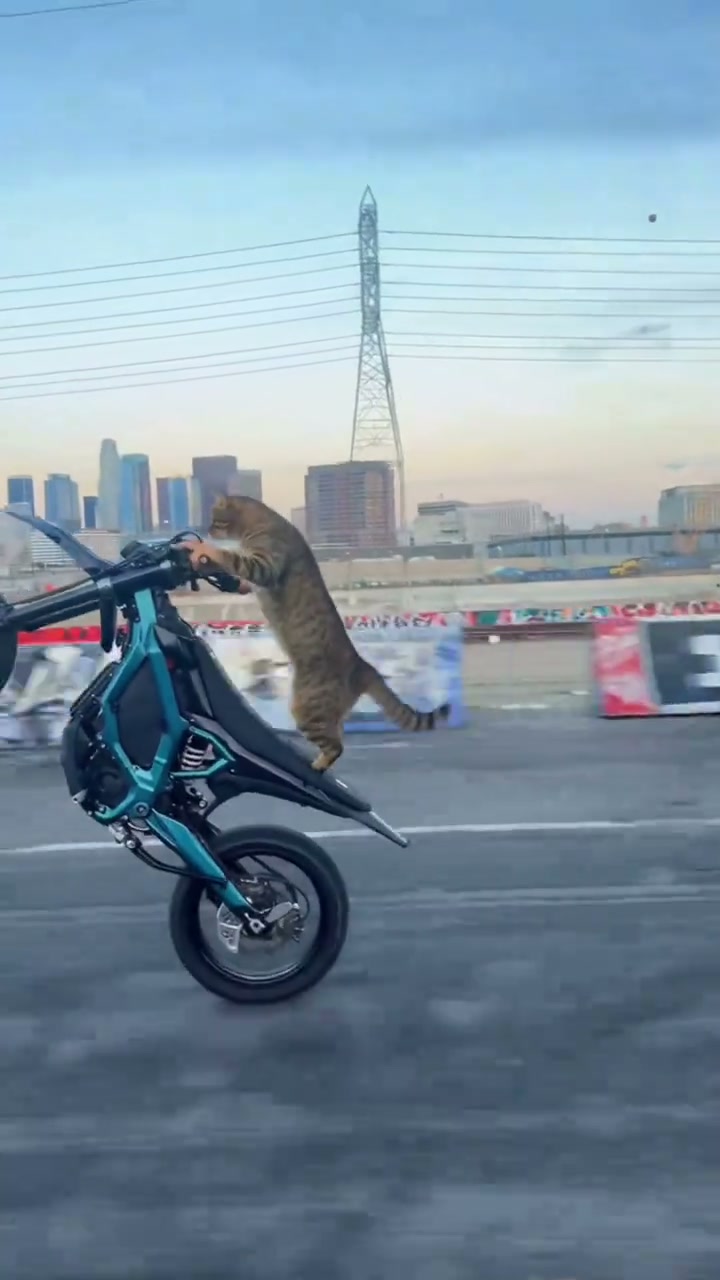
Cat Riding Dirt Bike AI casts your pet standing on the rear seat of a cyan electric dirt bike popping a 90-degree vertical wheelie down an urban highway. Using one clear pet photo on Viral AI Video generates an 8-second MP4 starting at 4 credits (Standard 480p) with zero prompts.
- 1Input needed: 1 front-facing photo of your own cat, dog, or domestic pet in even daylight (no human faces or celebrities).
- 2Instant visual hook: opens right away with your pet standing upright on the dirt bike before lifting into a full highway wheelie.
- 3Matched timeline: 0.0–3.0s upright handlebar grip, 3.0–6.0s 90-degree vertical wheelie, 6.0–8.0s smooth flyby ride-out.
- 4Formats & options: supports 9:16 vertical, 1:1 square, and 16:9 widescreen across Standard, Fast, Pro, and Ultra models.
- 5Transparent pricing: starts at 4 credits (8s, Standard 480p); failed tasks automatically return reserved credits.
- Clip Length
- 8 Seconds
- Entry Cost
- 4 Credits (480p)
- Aspect Ratios
- 9:16 · 1:1 · 16:9
- Photo Input
- 1 Clear Pet Photo
Why the Wheelie Cat Format Works
Short-form pet clips hold attention well when they pair an ordinary house pet with an unexpected realistic setting. Instead of putting a pet in costumes or lip-syncing, the electric dirt bike preset relies on bright daylight asphalt, urban power lines, and a calm pet expression while the cyan bike climbs straight into a vertical wheelie.
Two structural traits inside the preset make the clip work right out of the studio:
- Immediate opening action: Viewers see the pet standing upright on the rear seat from the opening segment (
0.0–3.0s), with no slow intro delaying the visual punchline. - High-contrast motion readability: Keeping the bright cyan bike frame and open roadway behind your pet keeps the fur markings and facial silhouette easy to spot even on small phone screens.
8-Second Shot-by-Shot Beat Breakdown
| Timestamp | Phase | What Happens on Screen | Why Your Photo Matters Here |
|---|---|---|---|
| 0.0s – 3.0s | Setup | Your pet stands upright on the rear seat of a cyan electric dirt bike rolling down an urban asphalt highway with paws holding the handlebars. | Clear eye visibility and unmistakable ear shape in your source photo anchor identity before the bike pitches upward. |
| 3.0s – 6.0s | Peak Stunt | The dirt bike lifts smoothly into a 90-degree vertical wheelie against bright city skyline power lines while fur and tail react to wind. | Uncluttered lighting showing natural coat markings (stripes, calico spots, patches) keeps texture continuity steady at full tilt. |
| 6.0s – 8.0s | Payoff | The bike eases down from the wheelie angle and streaks forward into a crisp highway tracking flyby. | Single-animal photos prevent a second pet or background leg from bleeding into the rider anatomy during fast motion. |
How to Pick the Best Pet Photo (Zero-Prompt Workflow)
Because the studio handles the motorcycle choreography and camera direction on the server, you never write a prompt. Picking a clean input photo is the one step you control that visibly improves identity likeness and anatomy.
High-Accuracy Pet Photos vs. Stunt Mistakes
Because this effect runs on a locked motion preset with zero prompt typing, photo selection accounts for most of the final quality.
Upload Photos Like This
- Front-facing or slight three-quarter portrait where both eyes, nose, and ear tips are clearly visible.
- Even natural daylight or bright indoor light with clear fur color and coat markings.
- Plain, uncluttered background with only one animal in the entire frame.
- Full head and upper chest visible—no motorcycle or helmet props needed.
- Natural bare face—no sunglasses, hats, or bulky overlays blocking eye expression.
Avoid These Mistakes
- Two pets in one frame or a person’s hands cradling the pet right next to its head.
- Dark backlit silhouettes where black or dark fur blends into the room background.
- Tiny distant crops or blurry motion-blurred snapshots where eye details are lost.
- Sleeping or curled poses where half the pet’s face is buried in a blanket or pillow.
- Human faces, public figures, or photos you do not have permission to use.
Have Your Pet’s Photo Ready? Launch Straight Into the Studio
Pick one clear pet portrait here to carry it into the Cat Riding Dirt Bike AI studio pre-loaded—review your exact credit estimate (from 4 credits at 480p) and generate in seconds.
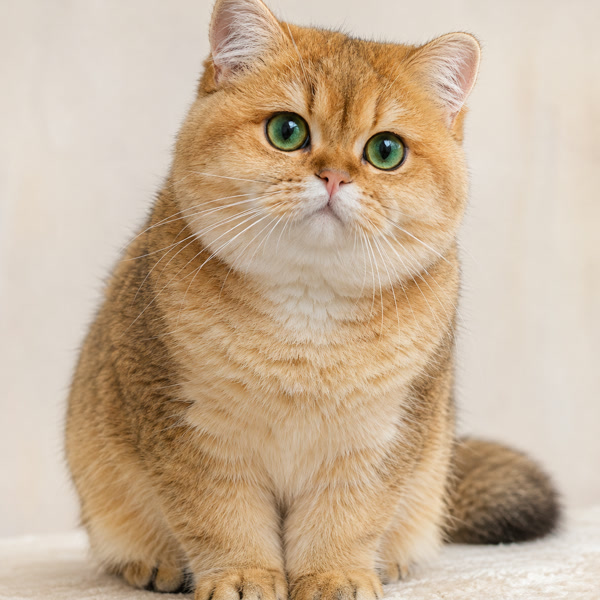 1 Pet Photo
 8s MP4
Preset Video vs. CapCut Templates: Which Should You Use?
Creators searching for "cat riding dirt bike CapCut template" usually want a fast way to join the meme without keyframing in a video editor. Both approaches solve different needs depending on whether you want synthetic riding motion or quick multi-clip cuts:
Cat Riding Dirt Bike AI Preset vs. CapCut Templates
| What Matters | Viral AI Video Preset | Typical CapCut Template |
|---|---|---|
| How your pet appears | Synthesizes an 8-second wheelie clip guided by your pet photo and the built-in stunt motion reference. | Places cutouts, stickers, or pan-and-zoom photo overlays onto existing template footage. |
| Bike, highway & motion synthesis | Generates the cyan electric dirt bike, 90° vertical wheelie, and highway camera motion automatically. | Requires pre-recorded bike footage or relies strictly on fixed template slots. |
| Manual editing required | Zero prompts or keyframes—upload 1 photo, review credits, generate and preview. | Quick for pre-built slots; custom cutouts often need manual masking. |
| Resolution & aspect ratio options | Generates MP4s in 9:16 Reels/TikTok, 1:1 square, or 16:9 widescreen across supported model resolutions (480p, 720p, and 1080p on Pro+). | Depends on the source template orientation and account export tier. |
| Credit model vs. subscription | Starts at 4 credits per 8s Standard 480p clip; purchased credit packs never expire (subscription rules differ). | Free basic templates, while Pro filters and export features require recurring tiers. |
Audio, Previewing & Posting Tips
Before downloading and sharing your finished clip to TikTok, Instagram Reels, or YouTube Shorts, keep these three studio checks in mind:
- Preview video & audio carefully before exporting: Fast wheelie motion around handlebars and paws can occasionally produce minor AI artifacts. Always watch the full 8-second preview and listen to its audio first; remember that desktop studio downloads can mix the companion track differently than direct phone task downloads.
- Use permitted sound on the publishing app: Renders request model ambient engine and wind audio without copyrighted pop songs, so attach an approved track directly from TikTok, Reels, or Shorts when you upload. Save your MP4 before your account retention expiry shown on the task.
- Toggle AI content disclosure where required: Turning on the platform’s AI-generated content flag keeps realistic synthetic pet stunts transparent and compliant with short-form distribution policies. Want another animal comedy hit? Cast your dog or cat in Pet Rock AI or read our car-driving pet portrait tips.