See Hit the Road Dude AI in Action — No Prompt Writing Needed
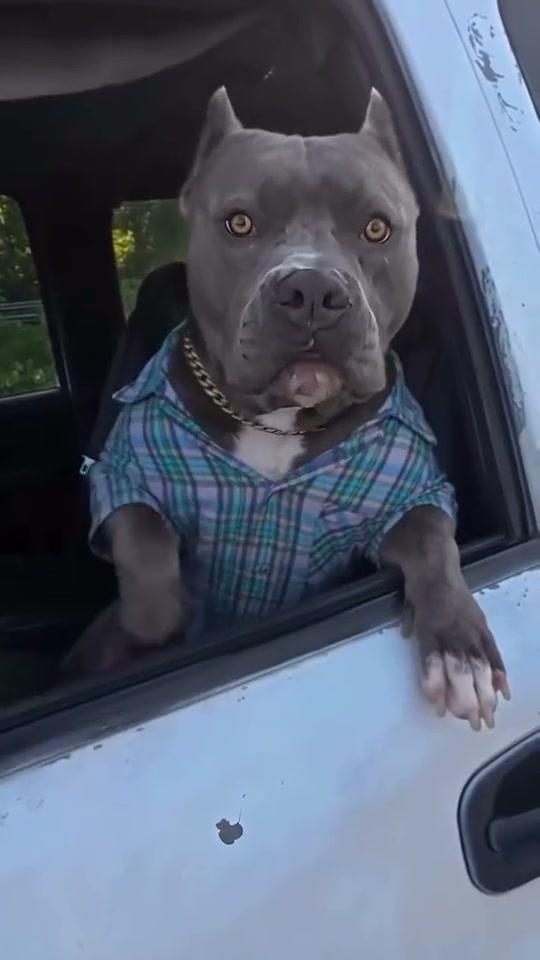
Upload one pet or human portrait to re-enact the 14-second white pickup window confrontation—complete with annoyed side-eye glares and exasperated head shakes.
Turn any solo pet snapshot or clear selfie into the viral 14-second white pickup window comedy meme. Select Pet Star or Human Driver inside the studio to place your subject in the driver seat matching every questioning stare, squint, and head-shake punchline starting at 7 credits.
- 1Dual cast modes: switch between Pet Star (dogs & cats) or Human Driver with 1 portrait photo.
- 2Daytime cab staging: weathered white pickup door edge, open window sill grip, and sunny rear foliage.
- 3Four comedic beats: silent stare (0–3s), questioning talk (3–6s), squinting shake (6–9s), final glare (9–14s).
- 4Vertical ready: 9:16 portrait framing by default for TikTok, Instagram Reels, and YouTube Shorts.
- 5Predictable pay-as-you-go pricing: from 7 credits (Standard 480p) with automatic failed-task refunds.
- Duration
- 14 Seconds
- Entry Price
- 7 Credits (480p)
- Aspect Ratio
- 9:16 Vertical
- Cast Modes
- Pet Star / Human Driver
Pet Star vs. Human Driver Setup
Most roadside comedy skits break on delivery rather than dialogue. In the Hit the Road Dude format, the camera stares straight into an open driver-side window of a white pickup while the seated driver sizes up someone standing outside and delivers an incredulous three-beat brush-off.
Unlike templates limited to animals or people alone, this effect studio separates Pet Star and Human Driver at submission time. Keeping those two modes distinct ensures dogs and cats keep believable paws draped along the white door sill, while human portraits sit upright in their own clothes with expressive human hands—zero accidental animal ears or leftover plaid shirts from the reference clip.
14-Second Confrontation Timeline
| Timestamp | Phase | What Happens on Screen | Why Your Photo Matters Here |
|---|---|---|---|
| 0.0s – 3.0s | Silent Window Hook | Seated inside the open driver window, your star leans toward the white door sill with an unblinking deadpan stare straight down the lens. | A relaxed mouth and square eye level prevent stiff distortion right as the opening stare holds. |
| 3.0s – 6.0s | Incredulous Turn | The driver squares up toward the camera with mouth movement and skeptical brow raises synced to the questioning dialogue beat. | Keep eyes, noses, and lips well lit so animated talking motions stay symmetrical. |
| 6.0s – 9.0s | Squint & Head Shake | Eyes squeeze shut in exaggerated disbelief through a tight head shake before whipping back right toward the passenger-side camera angle. | Clear uncovered eyes without sunglasses or heavy bangs keep eyelids crisp when they squint shut. |
| 9.0s – 14.0s | Unimpressed Side-Eye Payoff | Settling deeper against the driver seat, the character holds a lingering annoyed glare inside the bright pickup cab until fade-out. | Include chest or collar fabric in your source shot so outfit continuity looks intentional through closing close-ups. |
Window-Friendly Portraits vs. Avoid
Tight cab framing magnifies facial lighting and crop margins. Screen your source picture against these pickup-window rules before spending credits:
Clean Truck-Window Inputs vs. Distortion Risks
Because this effect runs on a locked motion preset with zero prompt typing, photo selection accounts for most of the final quality.
Upload Photos Like This
- Front-facing or subtle three-quarter portrait framed from head down to upper chest or collar.
- Even outdoor or window daylight separating eye whites, brow lines, and outfit colors cleanly.
- Single subject alone—either one clear pet for Pet Star or one person for Human Driver.
- Ears, hair outline, and shoulders uncropped with generous breathing room around the edges.
- Natural expression without oversized stickers, beauty filters, or colored sunglasses.
Avoid These Mistakes
- Sunglasses, tinted visors, or bangs blocking eyelids needed for the 6s–9s squinting head shake.
- Dark backlit silhouettes where eyes disappear before the driver squints and turns.
- Group selfies with extra shoulders or second pets crowded inside the frame.
- Uploading a pet photo while Human Driver is selected—or a human selfie on Pet Star.
- Tightly cropped forehead cuts or low-resolution screenshots with heavy compression blocks.
Test Your Photo Inside the White Pickup Now
Pick a crisp portrait below to open the studio with your image loaded—choose Pet Star or Human Driver and render the full 14-second clip from 7 credits.
 14s MP4
AI Studio vs. Manual CapCut Cutouts
Creators looking for a Hit the Road Dude CapCut template usually end up stacking static green-screen stickers over a cropped pickup clip, which leaves eyes frozen while the audio plays. Here is how dedicated motion generation differs:
Hit the Road Dude AI vs. Static Video Editors
| What Matters | Viral AI Video Preset | Typical CapCut Template |
|---|---|---|
| Eyelid & jaw acting | Animates full eye squints, skeptical head turns, and mouth timing matched to the 14-second dialogue arc. | Slides or wobbles a frozen cutout image without blinking or squinting. |
| Door sill & lighting match | Seats your pet’s paws or your hands naturally along the sunlit white pickup door edge. | Leaves flat halo cutouts floating behind a static truck-door overlay. |
| Pet vs. Human flexibility | Built-in Pet Star and Human Driver toggles keep anatomy and outfits completely separated. | Requires finding separate animal or human reaction footage to mask manually. |
| Audio pairing | Automatically attaches the matched pickup confrontation soundtrack cleanly on export. | Depends on importing third-party sounds and sliding mouth keyframes by hand. |
| Credit transparency | Starts at 7 credits at Standard 480p; purchased credit packs never expire. | Watermarks, background removers, and HD exports frequently lock behind monthly plans. |
Paws, Eye Contact & Export Checks
Run through these three quick checks right before saving your vertical video for short-form feeds:
- Match the cast toggle before clicking generate: Verify Pet Star is highlighted for pets and Human Driver is highlighted for people—switching toggles mid-draft prevents mismatched anatomy cues.
- Scrub the 6s–9s head shake: Watch the tight eye-squint turn inside the studio player first so facial identity holds steady through fast movement. If a server job errors out, reserved credits return automatically.
- Explore other pet-comedy classics: Want another high-energy animal meme after your truck skit? Check out Pet Rock AI for headbanging highway rock, or read our Pet Rock photo angle breakdown.