See Flamingo Float AI in Action — No Prompt Writing Needed
Casual mid-pool phone scrolling gives way to sudden sheer-edge panic and an instant rescue yank back to safety.
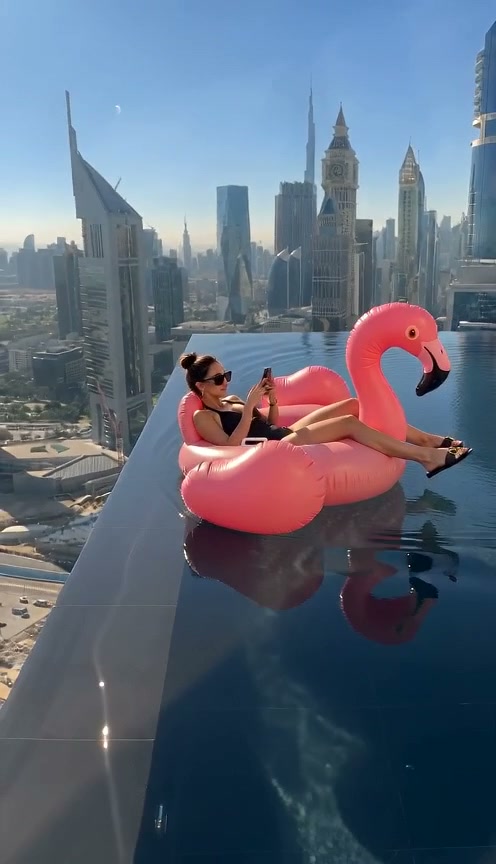
Upload one clear front-facing portrait of yourself and Viral AI Video places you on a bright pink flamingo float drifting to the sheer ledge of a Dubai-style skyscraper infinity pool—grabbing the wet edge in panic before getting yanked safely back in a 12-second clip from 6 credits.
- 1Single-portrait input: one clear selfie drives lounging posture, shocked glance, and relief smile.
- 2Full sunlit infinity pool reflections overlooking a dramatic Dubai Marina tower skyline.
- 3Built-in vertigo pacing: calm phone browsing turns into a sheer-edge grab around 7s.
- 4Starts at 6 credits (480p); purchased credit packs never expire and failed renders refund automatically.
- Upload Count
- 1 Solo Portrait
- Duration
- 12 Seconds
- Entry Rate
- 6 Credits (480p)
- Default Frame
- 9:16 Vertical
Anatomy of the Infinity Edge Hook
Every frame leverages extreme spatial contrast: a bright neon-pink pool float and sunny Marina skyline behind a thin ribbon of dark infinity coping stone dropping straight to city streets below.
- Misdirection in Seconds 0–4: Relaxed phone scrolling hides the danger so viewers barely register how close the tail of the float already sits to the drop-off.
- Tactile Panic Peak: One hand slams down onto the wet pool rim as ripples spill over the edge, creating visceral height anxiety right before the comedic pull-back.
Head straight into the Flamingo Float AI studio with one clear photo, or compare other high-altitude visual gags like Flying Tricycle AI and our Pet Rock AI outdoor setup.
12-Second Pool Drift Timeline
| Timestamp | Phase | What Happens on Screen | Why Your Photo Matters Here |
|---|---|---|---|
| 0.0s – 4.0s | Phone Scrolling Drift | Subject reclines back on the pink flamingo float looking calmly at a phone while drifting toward the left infinity rim. | Sharp facial lighting in your uploaded portrait ensures natural eye focus down at the phone screen. |
| 4.0s – 7.5s | Infinity Rim Rotation | Float rotates against the dark coping edge as water slops over into open city air hundreds of feet above Marina towers. | Open hairline and uncropped chin keep expression shifts crisp as calm turns into alarm. |
| 7.5s – 9.5s | Coping Edge Grab & Shock | Free hand grabs the slippery stone ledge while head snaps up toward camera in sudden realization. | No sunglasses lets viewers read raised eyebrows and wide-eyed shock clearly. |
| 9.5s – 12.0s | Rescue Yank & Smirk | Float glides briskly back into safe infinity water with ripples trailing behind and a grateful "Thank you bro!" smirk. | Clear smile or neutral lips in your input photo helps lock the comedic relief expression cleanly. |
Portrait & Lighting Prep
Sunny rooftop lighting reveals every eye shift between calm distraction and sudden edge panic:
Solo Lounger Portrait Guidelines
Because this effect runs on a locked motion preset with zero prompt typing, photo selection accounts for most of the final quality.
Upload Photos Like This
- Use one sharp daylight or window-lit solo portrait showing face, hair, and upper chest.
- Keep eyes completely unobstructed—skip mirrored shades even though it is a pool scene.
- Choose a casual relaxed expression or gentle smile so both calm and shocked beats blend smoothly.
- Stick to a plain neutral background that lets sunlit Dubai sky reflections take over cleanly.
Avoid These Mistakes
- Do not upload sunglasses—the entire mid-clip comedic payoff relies on eye contact.
- Do not upload heavily shadowed indoor club lighting or neon color casts.
- Do not include extra people standing in the background of your source selfie.
- Do not upload photos of minors, celebrities, or non-consenting subjects.
Launch Flamingo Float AI Rooftop Studio
Upload one solo portrait below to pre-load it right into Flamingo Float AI and generate your 12-second infinity edge rescue clip from 6 credits at Standard 480p.
 12s MP4
Editing Workaround vs. AI Preset
Green-screening yourself onto high-altitude water reflections almost always reveals harsh hair fringes:
Flamingo Float AI vs. Manual Green Screen
| What Matters | Viral AI Video Preset | Typical CapCut Template |
|---|---|---|
| Green Screen & Water Physics | Zero filming—pool water refraction, skyline parallax, and pink float reflections automated. | Requires filming on a real float plus manual skyline chroma-key and ripple masking. |
| Lighting Match | Automatically relights subject skin tones to bright midday rooftop reflections. | Indoor footage looks pasted onto bright midday rooftop sunlight. |
| Pricing Clarity | Pay-as-you-go from 6 credits (480p), zero subscription trap. | Pro subscription upsells hit right at 720p/1080p export. |
| Failed Task Protection | Automatic instant credit return on failed generation tasks. | No refund after spending time keyframing masks. |
Caption Hooks & Export Settings
- Label Comedy Transparently: Open with deadpan POV text like "POV: checking work Slack on a windless roof" and follow platform rules on AI-generated comedy so comments focus on the gag rather than calling it out.
- Keep 9:16 Vertical Framing Intact: The towering skyscraper perspective beneath the infinity stone only maximizes dizziness when it fills the whole vertical smartphone screen.
- Overlay Splashing Water SFX: Use TikTok or Reels' light poolside ambiance or dramatic whoosh sound just before the 7-second grab to heighten the close-call drop.