See Unicycle Ride AI in Action — No Prompt Writing Needed
Generated from a single portrait photo—no electric unicycle, no stunt balance skills, and zero manual prompt writing required.
Unicycle Ride AI casts you or a friend as a skilled solo rider gliding smoothly down a sunlit city avenue on an electric unicycle. Using one clear portrait photo generates a high-definition 14-second MP4 starting at 7 credits (Standard 480p) with zero prompts.
- 1Input needed: 1 front-facing portrait photo in natural daylight with clear eye and hair visibility.
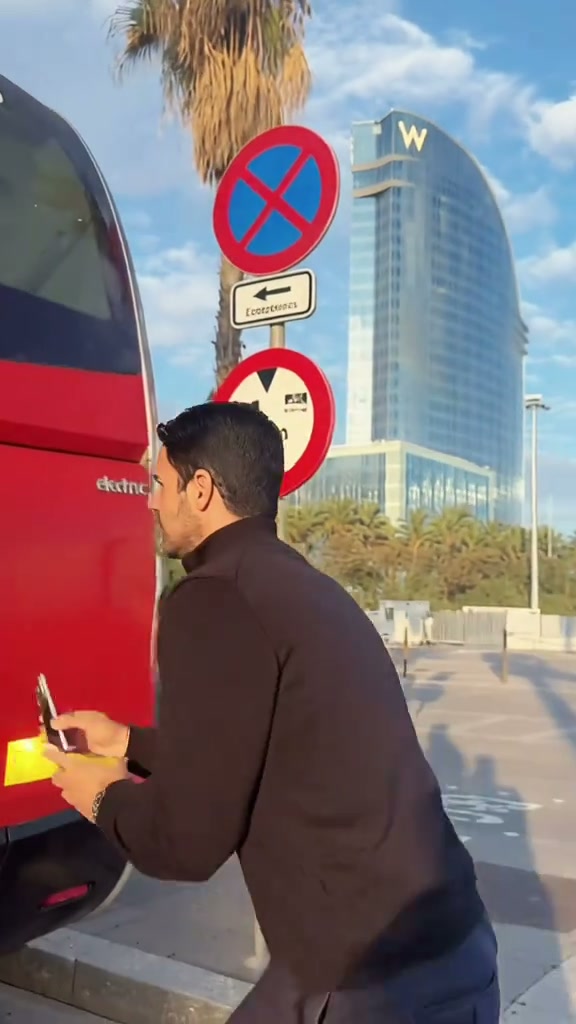
- 2Instant visual hook: opens with a stealthy bus tag before mounting smoothly onto an electric unicycle across a zebra crossing.
- 3Matched timeline: 0.0–3.0s bus tag prep, 3.1–5.0s pedal step, 5.1–8.5s zebra crosswalk mount, 8.6–11.5s taxi lane cruise, 11.6–14.0s wide swagger glide.
- 4Formats & options: native 9:16 vertical framing for TikTok/Reels, plus optional 1:1 square and 16:9 widescreen across Standard, Fast, and Pro models.
- 5Transparent pricing: starts at 7 credits (14s, Standard 480p); failed tasks automatically return reserved credits.
- Clip Length
- 14 Seconds
- Entry Cost
- 7 Credits (480p)
- Aspect Ratios
- 9:16 · 1:1 · 16:9
- Photo Input
- 1 Clear Portrait
Why the Unicycle Ride Format Goes Viral
Short-form stunt clips grab high engagement when they combine unexpected physical mastery with effortless swagger. Rather than relying on cartoon filters or stiff stickers, the Unicycle Ride preset drops your likeness into real Barcelona street architecture, bright sunny daylight, and high-speed electric unicycle balancing.
Two core structural strengths make the format perform consistently on social feeds:
- Immediate narrative curiosity: The opening seconds (
0.0–3.0s) hook viewers with a crouched figure beside a red city bus before springing into action, preventing viewers from swiping away. - Dynamic tracking camera motion: The camera smoothly tracks backward as the rider accelerates down the taxi lane, creating a cinematic sense of speed and hands-free balance that feels authentic.
14-Second Shot-by-Shot Beat Breakdown
| Timestamp | Phase | What Happens on Screen | Why Your Photo Matters Here |
|---|---|---|---|
| 0.0s – 3.0s | Hook & Setup | The rider crouches in low side profile next to the rear corner of a red city bus, checking the street while holding a smartphone. | Clear eye visibility and unmistakable facial features in your source photo anchor personal likeness before motion begins. |
| 3.1s – 5.0s | The Tag & Mount | The rider reaches forward to tag the back of the bus, pivots, and steps one foot onto the electric unicycle pedal. | Even daylight across the forehead and cheeks prevents harsh shadows when the rider turns toward the camera. |
| 5.1s – 8.5s | Crosswalk Glide | The rider mounts upright onto the electric unicycle across the pedestrian zebra crossing, balancing smoothly with a confident grin. | Single-subject photos avoid secondary faces bleeding into the street environment or background pedestrians. |
| 8.6s – 11.5s | Taxi Lane Cruise | The rider cruises down the center asphalt street and taxi lane, leaning into gentle turns and gesturing playfully toward the viewer. | Natural clothing in your photo is preserved by the model, keeping your distinctive style intact throughout the ride. |
| 11.6s – 14.0s | Full-Speed Outro | The rider cruises at full speed with arms spread wide for balance and swagger, sailing smoothly into the foreground under clear sunny skies. | High-resolution portraits ensure crisp detail even during wide-angle street tracking shots. |
How to Pick the Best Portrait Photo (Zero-Prompt Workflow)
Because the studio handles the unicycle choreography and camera motion on the server, no manual prompt writing is needed. Choosing a clean portrait photo is the single step you control that visibly improves facial likeness and anatomical consistency.
High-Accuracy Portrait Photos vs. Common Mistakes
Because this effect runs on a locked motion preset with zero prompt typing, photo selection accounts for most of the final quality.
Upload Photos Like This
- Front-facing or slight three-quarter portrait where both eyes, nose, and jawline are clearly visible.
- Even natural daylight or bright indoor lighting that highlights natural skin tones without harsh shadows.
- Neutral, uncluttered background with only one person in the frame.
- Clear head and shoulders framing—no helmets, unicycles, or props required.
- Natural open face—no sunglasses, face masks, or heavy filters obscuring features.
Avoid These Mistakes
- Group photos or two people standing side-by-side in the same frame.
- Dark backlit photos where facial features are lost in heavy shadow or lens flare.
- Heavily compressed or low-resolution crops where facial details blur.
- Photos with sunglasses, ski goggles, or hands covering the mouth and chin.
- Celebrity portraits or images of public figures used without permission.
Have Your Portrait Ready? Launch Straight Into the Studio
Pick one clear portrait here to carry it into the Unicycle Ride AI studio pre-loaded—review your exact credit estimate (from 7 credits at 480p) and generate in seconds.
 1 Portrait Photo14s MP4
Preset Video vs. CapCut Templates: Which Should You Use?
Creators searching for "unicycle ride CapCut template" usually want a fast way to join the trend without manually keyframing stunts in an editor. Here is how our dedicated AI video generation compares to traditional mobile template apps:
Unicycle Ride AI Preset vs. CapCut Templates
| What Matters | Viral AI Video Preset | Typical CapCut Template |
|---|---|---|
| How your likeness appears | Synthesizes a continuous 14-second stunt clip guided by your photo and the built-in electric unicycle motion reference. | Pastes static photo cutouts, 2D stickers, or pan-and-zoom overlays onto fixed pre-existing video clips. |
| Unicycle & street motion synthesis | Generates genuine physical balancing, street turns, and camera tracking motions automatically. | Requires pre-filmed stunt footage or locks you into non-customizable template slots. |
| Manual editing required | Zero prompts or keyframing—upload 1 photo, review credit cost, generate, and preview. | Fast for simple templates, but custom masking and timing adjustments often require tedious manual tweaks. |
| Resolution & aspect ratio options | Generates high-definition MP4s in 9:16 vertical, 1:1 square, or 16:9 widescreen across Standard, Fast, and Pro model tiers. | Limited to the source creator template dimensions and mobile export constraints. |
| Pricing model vs. subscription | Starts at 7 credits per 14s Standard 480p clip with zero monthly subscription lock-in and 100% automatic refund protection. | Free tier includes basic templates, while advanced filters, cloud storage, and watermark removal require recurring subscriptions. |
Audio, Previewing & Posting Tips
Before downloading and publishing your finished video to TikTok, Instagram Reels, or YouTube Shorts, keep these essential tips in mind:
- Preview the full 14-second clip before downloading: High-speed stunt motion around feet and electric unicycle pedals can occasionally show minor visual artifacts. Review the preview video and listen to the audio track to ensure smooth playback.
- Synchronize trending platform audio: Every generated video includes synchronized upbeat street audio. When posting to TikTok or Instagram, you can also search the official sound library for trending unicycle tracks to maximize algorithm distribution.
- Toggle AI content disclosure: Always enable TikTok and YouTube's AI-generated content toggle. This keeps your stunt videos transparent, avoids algorithmic flags, and complies with platform community standards. Looking for more viral comedy concepts? Check out Mans Not Hot AI or explore our pet stunt guides.