See Shoulder Carry AI in Action — No Prompt Writing Needed
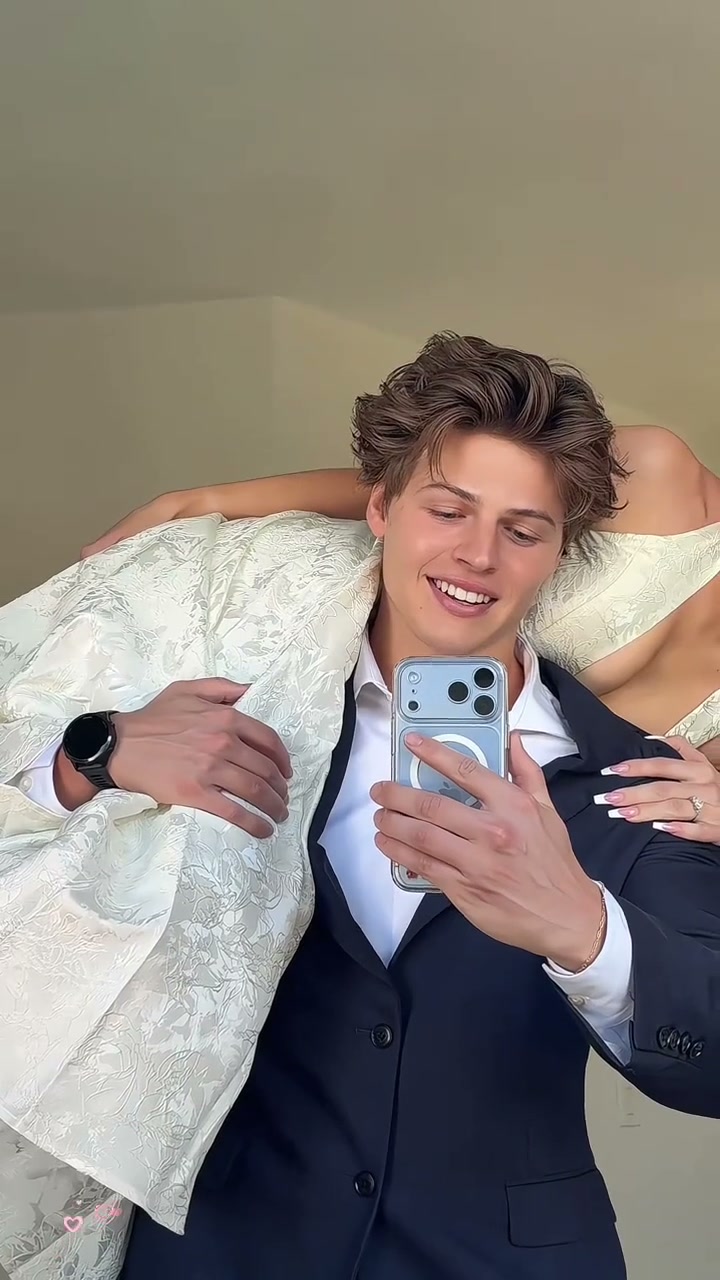
Preview the 9-second 9:16 Shoulder Carry AI clip: steady tuxedo balance, romantic head turn, and tender chin touch.
Transform everyday photos into the viral 9-second TikTok date-night mirror selfie starting at 5 credits—with synchronized romantic music and zero awkward physical heavy lifting.
- 1Three casting modes: Duo (Both, 2 photos), Solo as Girl (1 photo), or Solo as Guy (1 photo).
- 2Photo 1 commands the standing carrier holding the phone; Photo 2 portrays the carried partner.
- 3Use clear, front-facing portraits with natural suite lighting and visible facial expressions.
- 4Outputs 9 seconds natively in 9:16 vertical smartphone format with synced viral audio.
- 5Starts at just 5 credits (Standard 480p) with zero monthly fees and 100% failure refund guarantee.
- Duration
- 9 Seconds
- Entry Rate
- 5 Credits (480p)
- Cast Modes
- Duo & 2 Solo Roles
- Aspect Ratio
- 9:16 Vertical
Date-Night Cast Specs & Duo vs. Solo Options
Couples and solo creators searching Shoulder Carry AI want to capture the glamour of romantic date-night prom photos without balancing a partner on their shoulder while holding a heavy phone in front of a bathroom mirror.
Our effect studio supports three flexible modes:
- Duo: Both (2 Photos): Cast both yourself and your partner. Upload Photo 1 for the carrier holding the phone in a dark navy tuxedo and Photo 2 for the partner draped over his shoulder in an elegant floral brocade evening dress.
- Solo: Star as Girl (1 Photo): Star as the carried partner in the glamorous evening dress, looking into the mirror with a radiant smile while preserving the original handsome tuxedo carrier.
- Solo: Star as Guy (1 Photo): Star as the poised carrier holding the smartphone, projecting effortless poise and strength while preserving the original carried partner.
9-Second Over-the-Shoulder Timeline
Unlike static photo filters, this motion preset captures a four-stage emotional progression with cinematic pacing:
9-Second Shoulder Carry Shot Breakdown
| Timestamp | Phase | What Happens on Screen | Why Your Photo Matters Here |
|---|---|---|---|
| 0.0s – 3.0s | Over-the-Shoulder Pose & Steady Balance | Photo 1 stands upright holding the smartphone in front of the mirror with a confident smile while Photo 2 rests horizontally over his right shoulder with her head initially draped behind his back. | Photo 1 needs steady eye contact with the phone camera and crisp jawline definition. |
| 3.0s – 5.5s | Anticipation & Mirror Alignment | The duo holds steady framing as warm suite light catches the tuxedo and evening gown, building romantic anticipation before the reveal. | Avoid extreme camera tilts in your input photos to ensure smooth vertical tracking. |
| 5.5s – 7.5s | Romantic Head-Turn & Smile Reveal | On beat, Photo 2 gracefully raises her head to look directly into the mirror reflection, unveiling a radiant smile and makeup. | Ensure Photo 2 has clear eye visibility so the turn from behind the shoulder lands crisply. |
| 7.5s – 9.0s | Tender Chin-Touch & Sweet Finale | Photo 2 reaches her hand forward to gently touch Photo 1's chin as both share a sweet romantic smile into the phone camera to close. | Natural skin tones and unblurred fingers in both portraits allow the chin touch to look completely realistic. |
Suite Lighting & Evening Dress Framing
Because the reference clip takes place in a bright, modern hotel suite with clean neutral walls and soft warm ambient lighting, your source photos look best when shot under clean daylight or warm indoor lamps. Harsh overhead neon or heavy selfie beauty smoothing can flatten facial contours when the camera captures close reflections.
Portrait Preparation: Best Practices vs. Common Pitfalls
Because this effect runs on a locked motion preset with zero prompt typing, photo selection accounts for most of the final quality.
Upload Photos Like This
- Clear, front-facing portraits taken at eye level in soft, natural indoor daylight.
- Exposed forehead, eyes, and jawline with hair styled neatly off the face.
- Relaxed, confident smiles or natural pleasant expressions that match date-night energy.
- Single-person crops with plain neutral backgrounds and clear subject separation.
- High-resolution JPG or PNG files without heavy social compression or pixelation.
Avoid These Mistakes
- Dark sunglasses, tinted spectacles, or wide visors obscuring the eyes and brow.
- Heavy artificial beauty filters that erase realistic skin pores and contours.
- Side profiles or extreme low-angle up-chin shots that warp facial geometry.
- Uploading the exact same image file for both Photo 1 and Photo 2 in Duo mode.
- Screenshots containing visible TikTok text overlays, watermarks, or emojis.
Send Portraits Straight to Studio
Step Into the Date-Night Mirror Selfie
Upload your photos and jump straight into the 9-second Shoulder Carry AI studio starting at just 5 credits.
 9s MP4
Physical Stunts & CapCut vs. Instant AI Sync
Trying to recreate this date-night mirror selfie manually requires convincing your partner to physically hoist someone onto their shoulder, balance near bathroom counters, and hold a smartphone steady without shaking or dropping it. Here is how our automated motion pipeline compares:
Shoulder Carry AI vs. Manual Physical Stunts & CapCut Templates
| What Matters | Viral AI Video Preset | Typical CapCut Template |
|---|---|---|
| Effortless over-the-shoulder pose | Generates a smooth 9s over-the-shoulder video from everyday photos without any physical strain or risk of dropping anyone. | Requires real-world heavy lifting, perfect physical core strength, and awkward mirror staging. |
| Flexible Duo or Solo casting | Switch effortlessly between Duo, Solo Girl, or Solo Guy from a single studio interface. | Templates force rigid video clip slots where pasted single portraits look completely out of place. |
| Synchronized viral romantic beat | Automatically muxes the full-length date-night viral audio with beat-aligned smile reveals in the exported MP4. | Manual audio alignment often slips out of sync during cuts, requiring tedious manual re-trimming. |
| Transparent pricing & guarantees | Pay-as-you-go starts at 5 credits (Standard 480p) with zero subscriptions and 100% automatic refund on task failures. | Exporting without watermarks or accessing advanced motion tools frequently requires expensive ongoing subscriptions. |
Looking for more couple and duo video ideas? You can also explore our You Never Let Her Pay AI viral restaurant meme or dance along with friends in the Deck The Halls Dance AI kitchen routine.