See Need for Speed AI in Action — No Prompt Writing Needed
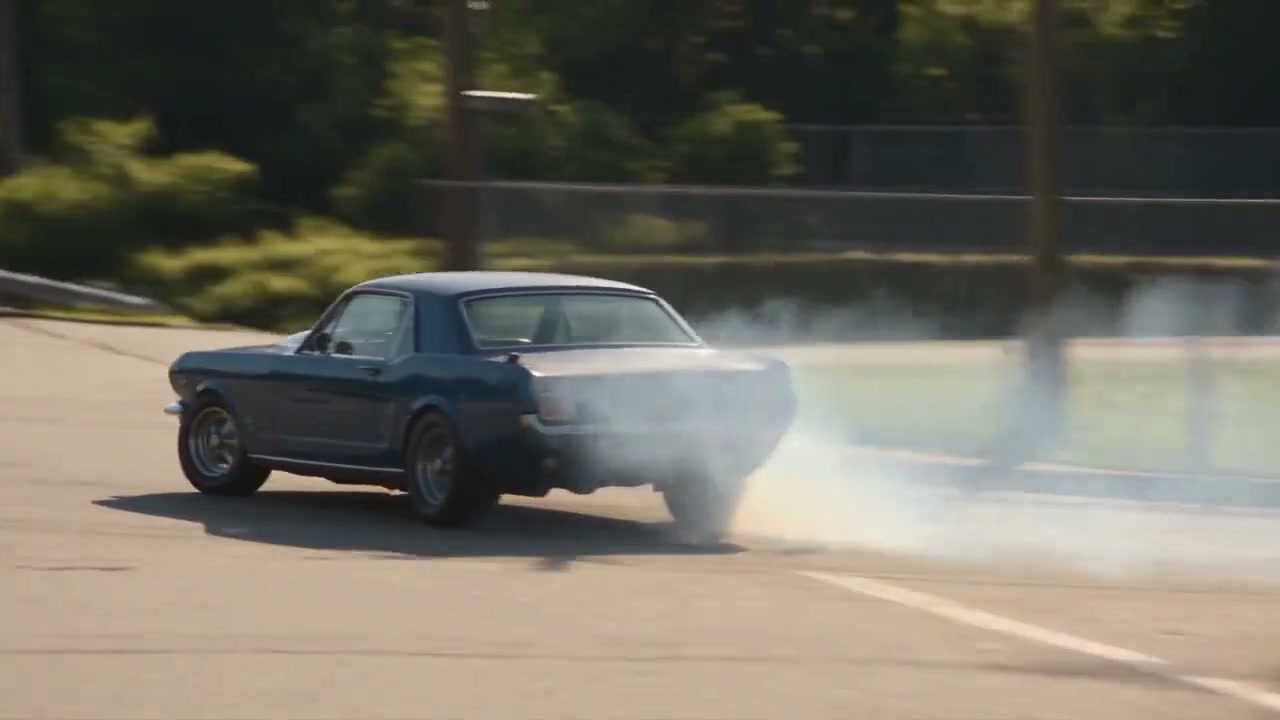
Sunlit open road drifting into highway traffic weaves—turn any car snapshot into a 15-second cinematic pursuit.
Need for Speed AI transforms 1 still photo of any car, truck, or sports coupe into an adrenaline-fueled 15-second street racing chase featuring smoking asphalt drifts, cockpit driver POV weaves, and synchronized engine audio. Generates from 8 credits at Standard 480p.
- 1Authentic 16:9 widescreen composition: captures full drift arcs, adjacent lane traffic, and landscape roadside flybys.
- 2Single-photo automotive control: upload 1 exterior car picture or a portrait of you standing beside your ride.
- 3Realistic tire smoke & physics: billowing white tire friction reacts naturally to steering adjustments and asphalt curves.
- 4Dual-perspective cinematography: seamlessly transitions from wide exterior pursuit angles into driver cockpit speed perspectives.
- 5Upfront billing: starts at 8 credits (480p); purchased credit packs never expire.
- Duration
- 15 Seconds
- Entry Rate
- 8 Credits (480p)
- Upload Count
- 1 Car or Owner Photo
- Default Frame
- 16:9 Widescreen
Why 16:9 Widescreen Grounds Street Racing Edits
Cinematic vehicle motion requires lateral canvas space. Tight vertical formats often crop away the sweeping drift trajectory, roadside scenery, and multi-lane highway traffic that establish high-velocity drama. By delivering in native 16:9 widescreen, Need for Speed AI gives your vehicle room to breathe across sweeping curves and rapid lane slaloms.
If you enjoy widescreen performance clips, explore our gritty rap cipher in Stormzy Shut Up AI or check out the neon cube stage choreography in Hotline Bling AI.
Inside the 15-Second Highway Pursuit
| Timestamp | Phase | What Happens on Screen | Why Your Photo Matters Here |
|---|---|---|---|
| 0.0s – 3.5s | Asphalt Drift & Tire Smoke | Wide low-angle tracking shot as your starring car executes an aggressive right-curve drift, tires spinning and kicking up dense billowing white smoke. | Clear side and front-quarter photos allow the neural engine to model the rims and body silhouette accurately during rapid rotation. |
| 3.5s – 7.5s | Cockpit POV Traffic Weave | Rapid hard cut into the driver cockpit perspective behind the steering wheel, threading between multi-lane highway commuters at intense speed. | Portraits uploaded with you standing by the vehicle allow the rear-view mirror close-up to reflect your personal focused eyes. |
| 7.5s – 11.0s | Roadside Balcony Pursuit | Low tracking camera speeds past a wooden roadside terrace where onlookers watch in awe as the vehicle roars down the open straightaway. | Even daylight captures ensure the car metallic paint reflections blend seamlessly against roadside environment lighting. |
| 11.0s – 15.0s | Service Station Breakaway | The car powers past a roadside service station island, maintaining top-end momentum before speeding off into the horizon. | Consistent wheelbase geometry prevents chassis warping during high-speed flyby perspectives. |
Choosing One Car Photo That Traverses Smoothly
To get the most photorealistic vehicle render without visual artifacts, your source photo should give the neural model clear visibility of the car's body styling, wheels, and color.
Car Photo Prep: Sharp Daylight vs. Dark Garages
Because this effect runs on a locked motion preset with zero prompt typing, photo selection accounts for most of the final quality.
Upload Photos Like This
- Outdoor daytime parking shot taken from a 45-degree front-three-quarter angle.
- Entire car visible from front bumper to rear quarter panel with clean wheels.
- Natural sunlight or open sky lighting showing realistic metallic paint luster.
- Optional portrait of you standing beside the vehicle with clear posture.
Avoid These Mistakes
- Dim underground parking garages with heavy harsh fluorescent shadows.
- Extreme close-up shots of a single wheel, emblem, or headlight.
- Blurry motion shots taken while driving or through dirty windshields.
- Heavy post-processing filters, tinted vignettes, or commercial stickers over the body.
Jump Directly into the Need for Speed Studio
Ready to see your daily driver or dream sports car tear up the highway? You can load a photo right here to bridge directly into the studio workspace with your assets ready to render.
Turn Your Vehicle into a Cinematic Drift Legend
Pick your model, upload 1 car photo, and export an authentic 15-second widescreen drift pursuit video with synchronized engine roar in under 2 minutes.
 15s MP4
AI Physics Rendering vs. CapCut Cutout Clips
Many creators on social media attempt to replicate the Need for Speed trend by cutting out photos of their cars in CapCut and sliding them across pre-rendered highway clips. Here is how authentic generative AI compares with manual video collage templates.
Need for Speed AI vs. CapCut Cutout Templates
| What Matters | Viral AI Video Preset | Typical CapCut Template |
|---|---|---|
| Tire Smoke & Surface Physics | Static 2D smoke stickers pasted over the image that float unnaturally. | |
| Lighting & Body Reflections | Static lighting that clashes visibly with background highway environments. | |
| Cockpit First-Person Perspective | Generic stock cockpit video with no relation to your uploaded car. | |
| Preparation & Editing Effort | Requires tedious manual background cutouts, timing adjustments, and audio beat matching. |
Social Platforms & Engine Audio
Once your video is generated, you can share it straight to YouTube, TikTok, or Instagram. Here are three quick optimization tips for maximum reach:
- Keep the 16:9 Cinematic Width: When uploading to YouTube Shorts or TikTok, you can post the full widescreen frame with clean letterboxing, or post as a standard horizontal video for car enthusiast forums and Discord communities.
- Audio Syncing: Our creation studio includes authentic roaring engine accelerations and drift squeals. On TikTok, you can layer popular phonk tracks or drifting soundtracks at 15% volume over the roaring engine audio for peak algorithmic engagement.
- Show the Before & After: Car culture audiences love seeing the progression from a standard driveway photograph to an action-movie pursuit clip. Use a 2-second freeze frame of your original snapshot as an opening hook.