See King Jin AI in Action — No Prompt Writing Needed
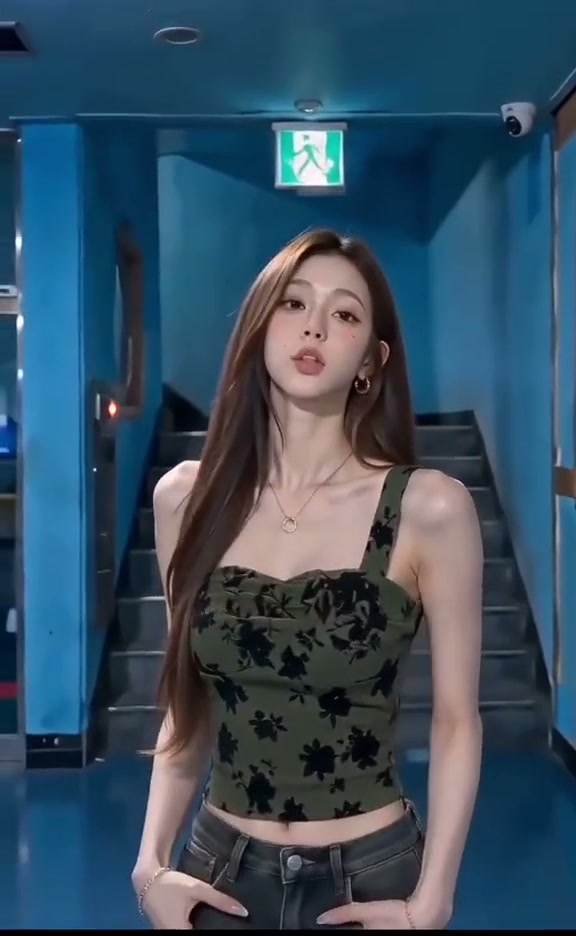
Preview the 10-second King Jin AI entrance cut across the teal stairwell, bowing street onlookers, lollipop smirk, and skyline finish.
Turn one clear portrait into the viral 10-second King Jin AI dramatic entrance MP4 synced with trend audio, offering both 9:16 vertical and 16:9 street-bow cuts from 5 credits.
- 1Includes 2 built-in presets: 9:16 Vertical Cut (stairwell intro) and 16:9 Street Bow Cut (crowd opener).
- 2Preserves your face, hairstyle, and casual hoodie or jacket from head to waist across four scene shifts.
- 3Keep mouths, collars, and eyes uncovered—never hold cups or snacks near your chin in your JPEG.
- 4Outputs a 10-second MP4 in 9:16, 1:1, or 16:9 across 480p, 720p, and 1080p.
- 5Starts at 5 credits (Standard 480p); purchased credit packs never expire.
- Duration
- 10 Seconds
- Entry Rate
- 5 Credits (480p)
- Cuts Included
- 9:16 & 16:9
- Cast Size
- 1 Solo Portrait
Choosing Between the 9:16 Vertical and 16:9 Street Bow Cuts
Searching King Jin alongside AI pulls up two distinct edits circulating on TikTok and CapCut: a punchy vertical 9:16 cut that teases you inside a moody green-lit stairwell before dropping into the crowded street, and a wide 16:9 opener that drops straight into the bowing bystanders under neon storefronts.
Inside the studio's Step 1 selector, both cuts take a single portrait upload—zero reference footage needed. If your target channel is mobile Reels or TikTok FYP feeds, stick with the 9:16 Vertical Cut so nothing gets letterboxed or edge-cropped during the rapid cuts. Save the 16:9 Street Bow preset for horizontal compilation intros or desktop reaction overlays.
10-Second Multi-Location Beat Map
Inspecting the actual frames of the 10-second sequence shows why clean upper-body contrast matters across lighting shifts:
10-Second Entrance Cut Breakdown
| Timestamp | Phase | What Happens on Screen | Why Your Photo Matters Here |
|---|---|---|---|
| 0.0s – 2.0s | Teal Stairwell & Green Exit Sign | Opening under the dim overhead tube and glowing green exit sign, the solo lead faces forward near stairwell handrails before stepping out. | Pick a crisp high-contrast jacket or hoodie rather than pure dark black on dark backgrounds. |
| 2.0s – 6.0s | Crosswalk Bow & Lollipop Pull-Away | Cutting to a wet urban night street, surrounding bystanders bow deeply in respect as the protagonist glides a white lollipop from their lips into a cool half-smile. | Upload an uncluttered front selfie with mouth unobstructed and sunglasses removed so eyes stay locked forward. |
| 6.0s – 8.5s | Lobby Strut & Side-Glanced Grin | Quick beat-matched jumps alternate between walking toward clear stairwell lobby glass and glancing back over a shoulder with a confident grin. | Show both shoulders evenly instead of tight side profiles so upper-body turns match cleanly. |
| 8.5s – 10.0s | Daylight City Skyline Finale | Closing outdoors in crisp overcast light against city high-rises, the lead settles upright in a chest-up hero frame on the final bass note. | Choose natural window light in your source portrait so dark night cuts and bright skyline endings stay balanced. |
Why Clear Lips Beat Props in Your Source Portrait
Because viewers know this trend for the slow-motion lollipop pull, some creators try holding a real candy stick in their uploaded JPEG. In practice, static hand-to-mouth poses confuse the transition between the stairwell opener and the street reveal—producing ghosted sticks or doubled fingers at the two-second mark.
Leaving your hands relaxed at your sides and keeping collars flat gives the motion engine clean facial geometry across every camera cut, the same clean chest-up discipline that drives crisp results in our Stormzy Shut Up AI framing guide.
Portrait Prep Checklist: Night Street & Skyline Consistency
Because this effect runs on a locked motion preset with zero prompt typing, photo selection accounts for most of the final quality.
Upload Photos Like This
- Chest-up or waist-up portrait taken straight on at eye level with your head, neck, and jacket visible.
- Balanced indoor daylight or soft window lighting without colored neon washes tinting your cheeks.
- Mouth uncovered and relaxed hands kept completely away from your chin, collar, or hair.
- Unbranded streetwear jackets, solid hoodies, or clean casual shirts without giant chest decals.
- Single adult subject centered with room above the hairstyle for 9:16 headroom.
Avoid These Mistakes
- Holding lollipops, coffee cups, phones, or fingers near your mouth inside the source photo.
- Sunglasses, visors, face masks, or heavy bangs blocking your eyes during the street smirk.
- Tight head-only avatars cropped at the chin where collars and shoulders are missing.
- Cropped CapCut or TikTok screenshots carrying captions, timestamps, or watermark bars.
- Group photos, minors, or copyrighted public-figure portraits.
Carry Your Portrait Into Studio
Test Either Entrance Cut With Zero Re-Upload
Drop your uncluttered portrait here to launch the 10-second 9:16 or 16:9 King Jin AI studio preset starting at 5 credits.
 10s MP4
Manual Multi-Clip Templates vs. 1-Photo AI
Traditional CapCut searches force creators to film four separate walk-and-smirk clips in different hallways and night streets before syncing velocity ramps by hand. Generating straight from one still portrait removes filming locations entirely:
King Jin AI vs. Manual CapCut Multi-Clip Templates
| What Matters | Viral AI Video Preset | Typical CapCut Template |
|---|---|---|
| Location & Crowd Staging | Builds the stairwell walk, bowing street onlookers, and rooftop skyline across 10s from 1 JPEG. | Requires filming multiple outdoor clips plus organizing friends to bow along a street. |
| Vertical 9:16 & 16:9 Flexibility | Lets you toggle between the stairwell 9:16 cut and wide 16:9 opener directly inside Step 1. | Locks each template link to a fixed aspect ratio and hard-coded clip slots. |
| Synced Trend Soundtrack | Exports a finished 10s MP4 with matched dramatic audio ready for Reels or TikTok. | Often forces extra timeline trimming or separate trending sound pairing inside TikTok. |
| Pay-As-You-Go Access | Starts at 5 credits (Standard 480p); purchased packs never expire. | Standard template effects and clean exports increasingly gate behind recurring Pro subscriptions. |
Want another confident solo meme workflow using crisp chest-up portraits? Pair this edit with Talk to Me Doja AI or explore the rest of our viral meme templates on site.