See Faceless Trio Cool Entrance AI in Action — No Prompt Writing Needed
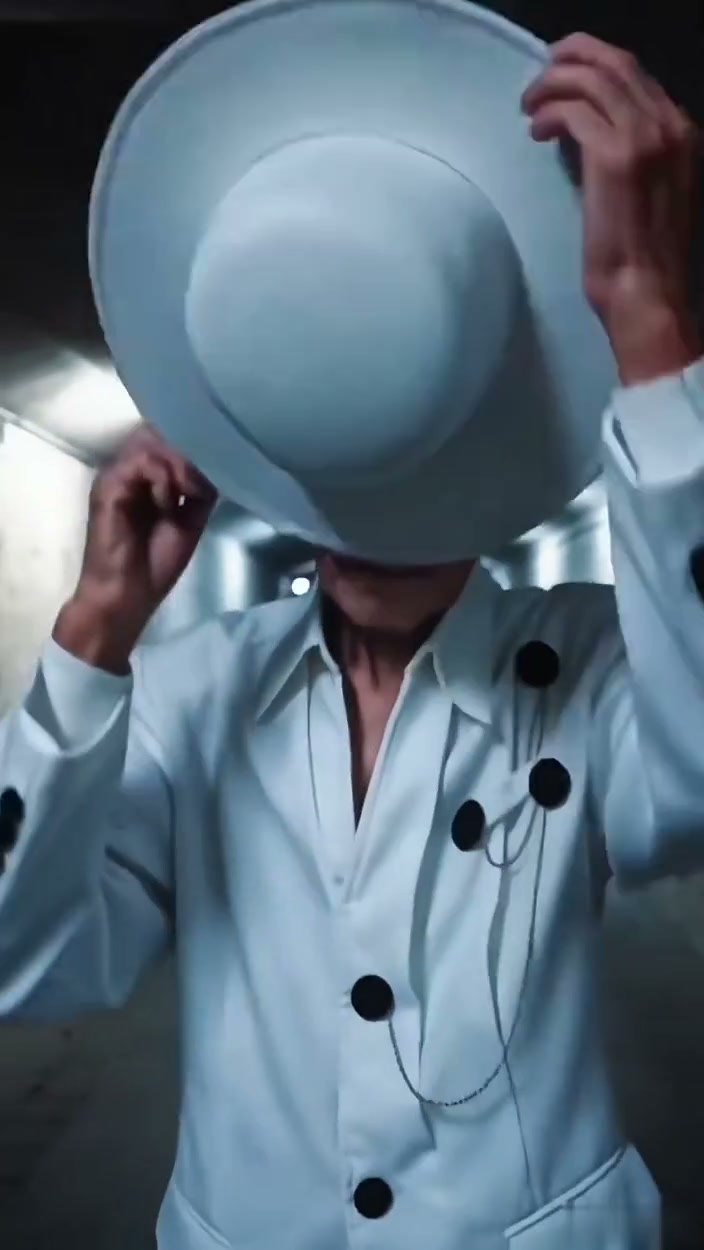
Reference choreography for the 9-second 9:16 Faceless Trio Cool Entrance AI walk: fedora brim shadow, 20+ arm halo fan, and synchronized V-formation tunnel stride.
Build the dramatic 9-second underground tunnel trio entrance from 1, 2, or 3 crisp portraits starting at 5 credits—no CapCut Pro redirects or manual keyframing needed.
- 1Supports 1 Performer (Center Lead), 2 Performers (Lead + Right Wingman), or Full Trio (All 3 slots).
- 2Automatically performs the 0.0–3.0s white wide-brim fedora pull-down and intense forward gaze.
- 3Triggers the symmetrical 20+ outstretched sleeve halo bow at 3.0–5.0s without frozen standing arms.
- 4Delivers a vertical 9:16 9-second MP4 paired with the beat-matched entrance audio track.
- 5Pay-as-you-go starting at 5 credits (480p Standard); purchased credit packs never expire.
- Duration
- 9 Seconds
- Cast Mode
- 1, 2, or 3 Photos
- Entry Rate
- 5 Credits (480p)
- Default Framing
- 9:16 Vertical
Why Creators Ditch Broken Template Links
Scroll TikTok or Instagram Reels under “Cool AI Trio Entrance” or “Masked Trio Entrance” and you will immediately spot why creators love the format—and why most struggle to make their own. Comment sections are packed with users asking for the link, only to hit expired region-locked mobile templates, upsells after exporting, or choppy cutouts that turn three people into blurred silhouettes down the hallway.
Instead of spending an evening masking three separate keyframe tracks inside a mobile editor, our dedicated Faceless Trio Cool Entrance AI studio locks directly onto the underground corridor camera pull-back, fedora brim shadow timing, and multi-arm halo choreography. Drop in solo portraits for just the center role or your entire three-person squad and export a ready-to-post clip in under two minutes.
Looking for another choreographed group routine once your squad entrance finishes? Check out our Gangnam Style Dance AI studio or read the three-person dance casting walkthrough for multi-slot lineup ideas.
Frame-by-Frame Tunnel Choreography
Understanding what happens at each timestamp helps you choose photos with outfits and facial contrast that shine both up close and from down the corridor.
9-Second Underground Tunnel Storyboard
| Timestamp | Phase | What Happens on Screen | Why Your Photo Matters Here |
|---|---|---|---|
| 0.0s – 3.0s | Fedora Brim Tip & Eye Shadow Close-Up | Chest-up framing in the concrete pedestrian tunnel as the Center Lead lifts a wide-brim hat onto his head with both hands, tugs the brim down over his brows, and raises a calm gaze directly into the lens. | Pick a crisp close-up or chest-up portrait for Photo 1 with bare forehead and zero sunglasses so the hat-tip reveal holds clear likeness. |
| 3.0s – 5.0s | Chest-Hand Bow & 20+ Arm Radiating Halo | The camera pulls rapidly back to a full-body wide shot. The Center Lead leans forward with his right hand pressed over his chest as a symmetrical fan of over 20 dark-suited arms with crisp cuffs flares open behind his back, clenches into fists, and retracts. | Neutral standing photos work fine here—pose isolation keeps uploaded static arms out of the bow and halo sequence. |
| 5.0s – 7.0s | Flanking Wingmen Step Into V-Formation | Two flanking wingmen emerge from the lit rear corridor behind the Center Lead’s right and left shoulders, locking into a balanced three-person diagonal V-formation under twin fluorescent ceiling strips. | Give Photos 2 and 3 distinct jacket silhouettes or color tones from Photo 1 so both flanking figures stand out sharply behind the center lead. |
| 7.0s – 9.0s | Synchronized Foreground Tunnel Stride | All three performers stride smoothly toward camera down the metal-handrailed underground walkway—Center Lead with left hand tucked calmly at hip—until reaching full-body foreground scale. | Keep 9:16 portrait format selected so left and right wingmen stay well inside the frame edge through the final step. |
Photo Prep for 1, 2, or All 3 Slots
Because this routine switches from an intimate close-up in seconds 0.0–3.0s to a full-corridor three-person walk by second 7.0s, small photo choices change output sharpness dramatically. Follow this checklist before uploading:
Trio Portrait Checklist: Avoiding Outfit Clashes & Close-Up Blur
Because this effect runs on a locked motion preset with zero prompt typing, photo selection accounts for most of the final quality.
Upload Photos Like This
- One centered solo subject per photo slot with clear facial lighting from nose to hairline.
- Unobstructed eyes and eyebrows—let the tunnel choreography add the hat motion instead of wearing caps in your upload.
- Contrasting outfits between Photo 1 (Center Lead) and Photos 2 & 3 (Wingmen) so the three silhouettes separate cleanly.
- Chest-up or full-body framing with room above hair and clear shoulder lines.
- Unique photo files per slot—duplicate-file guard protects against accidentally casting the same image twice.
Avoid These Mistakes
- Group selfies where two friends stand side by side inside the same single image.
- Heavy sunglasses, motorcycle helmets, or deep shadow across the upper face.
- Side-profile silhouettes or extreme wide-angle distortion.
- Uploading identical duplicate photos into Photo 2 or Photo 3 slots.
- Blurry night-club snapshots with smeared facial edges.
Launch the Trio Entrance Preset
Ready to cast yourself or your trio inside the fluorescent tunnel corridor? Jump straight into the live browser studio below and select 1, 2, or 3 performer slots.
Create Your Trio Tunnel Entrance · 5 Credits
Carry your Center Lead photo directly into our 9-second studio (and add 1 or 2 wingmen if casting a duo or full trio).
 9s MP4
Preset Workflow vs. CapCut Pro Links
Trying to track down the original CapCut link from viral comments frequently lands creators on unavailable regional templates or paywalled export screens. Generating inside our dedicated browser preset bypasses template hunting while keeping three-person tunnel depth and timing rock solid:
Browser Studio Preset vs. Traditional CapCut Template Links
| What Matters | Viral AI Video Preset | Typical CapCut Template |
|---|---|---|
| Broken template link risk | Zero third-party app links—dedicated tunnel choreography loads directly in browser. | Comment links routinely redirect to unrelated templates or show unavailable regional errors. |
| Multi-person depth & lighting | Aligns Center Lead, Right Wingman, and Left Wingman under twin corridor fluorescent strips across 9s. | Flat green-screen layers clash awkwardly with tunnel shadows and look pasted on. |
| Cast size flexibility | Toggle smoothly between 1 Performer, 2 Performers, or Full Trio without breaking formation. | Deleting or skipping template photo placeholders leaves blank black gaps on screen. |
| Cost & plan lock-in | Starts at 5 credits pay-as-you-go with no monthly fee; purchased credit packs never expire. | Many viral entrance filters gate HD export behind recurring Pro subscriptions. |