See Bad Aim Edit AI in Action — No Prompt Writing Needed
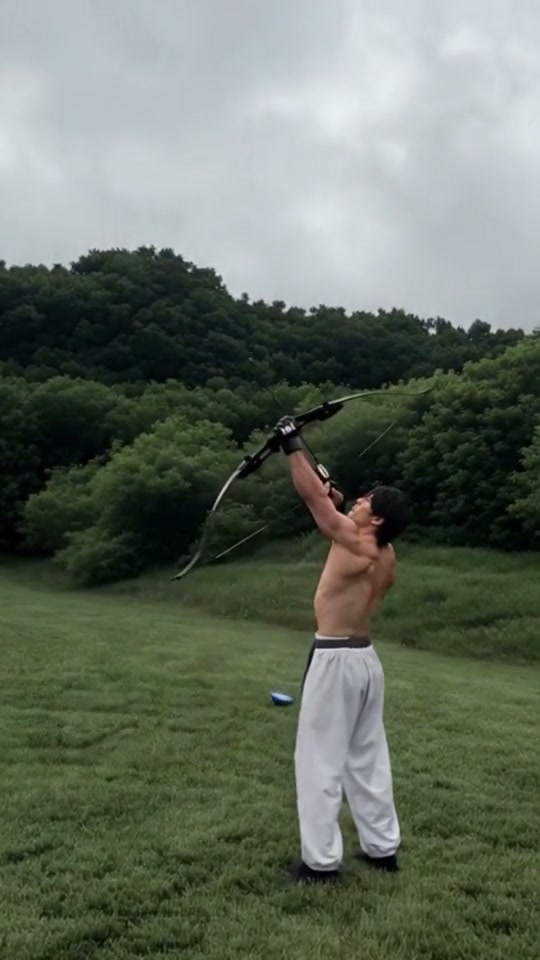
Preview the 15-second Bad Aim Edit Fighter routine: skyward meadow bow shot, lawn target miss, and monochrome office sip-and-shush.
Turn one adult portrait into the viral 15-second archery-to-office meme—choosing either Fighter Version or Cartoon Version timing—starting at 8 credits with no CapCut velocity curves required.
- 1Two built-in trend cuts: live-action Fighter pacing or exaggerated Cartoon timing rendered photorealistically.
- 2Runs one centered adult portrait from overcast outdoor grass into black-and-white office blinds.
- 3Keep eyes clear, front lighting even, and hands outside pockets so the bow grip and drink raise look natural.
- 4Exports 15 seconds in vertical 9:16 proportions (plus optional 1:1 square or 16:9 widescreen).
- 5Starts at 8 credits (Standard 480p) with zero monthly plan and automatic error refunds.
- Duration
- 15 Seconds
- Entry Rate
- 8 Credits (480p)
- Trend Cuts
- Fighter & Cartoon
- Aspect Ratio
- 9:16 Vertical
Fighter vs. Cartoon Timing: Picking Your Right Cut
Most creators searching Bad Aim Edit AI or "miss the shot, own the office" already know the two branches circulating on TikTok: the athletic live-action archery clip with a fighter stepping from a field into a dim monochrome office, and the viral 3D animated archer remix whose exaggerated head tilt makes the botched shot even funnier.
Instead of forcing two separate workflows, our studio lets you toggle Fighter Version or Cartoon Version above the upload box while feeding the exact same single portrait input. Pick Fighter for grounded athlete posture; pick Cartoon when you want snappier comedic beat exaggeration mapped onto your real likeness.
15-Second Meadow-to-Office Cut Map
Unlike 7-second loop dances, this 15-second narrative comedy edit hinges on four distinct camera shifts between outdoor overcast daylight and monochrome window blinds:
15-Second Bad Aim Edit Storyboard
| Timestamp | Phase | What Happens on Screen | Why Your Photo Matters Here |
|---|---|---|---|
| 0.0s – 3.5s | Overcast Meadow & Skyward Draw | Standing in an open green field with woodland behind you, you tilt your chin upward and pull a black recurve bow vertically toward the clouds before releasing. | Leave breathing room above your crown in the upload photo so hair shape stays crisp when tilting backward. |
| 3.5s – 6.0s | Deadpan Stare Beside Bullseye Target | Lowering the bow toward waist height, you lean forward and watch the stray arrow drop harmlessly into the grass right next to a flat lawn target. | Use a relaxed neutral expression or slight closed-mouth half-smile rather than an extreme grimace. |
| 6.0s – 11.0s | Black-and-White Office Glance & Sip | A hard cut drops into crisp monochrome office light with venetian blinds: glancing smoothly over one shoulder with a smirk before lifting a glass for a composed sip. | Avoid hoodies pulled up or scarves blocking your neck silhouette so shoulder turns stay sharp in monochrome. |
| 11.0s – 15.0s | Two-Finger Shush & Doorway Close | Framing tightens near the office doorway as you lock eyes with the camera, raise black fingerless gloves quietly to your lips, and hold steady. | Skip eyeglasses with heavy reflections so eye lock holds clean right into the black-and-white finale. |
Selfie Lighting Across Two Color Grades
Switching mid-clip from natural green-meadow daylight into high-contrast black-and-white indoor shadows exposes weak input photos faster than single-location templates. Deep forehead shadows or neon club lighting confuse grayscale contrast once the 6-second hard cut hits, washing out cheekbones just as the close-up shush begins.
Shooting in soft window daylight or neutral shade gives the model clean tonal separation on both the sunny bow draw and the monochrome blinds reveal—just like the balanced daylight framing that helps fast-cut transitions stay sharp in Bottle Kick AI portrait prep.
Portrait Prep Checklist: Outdoor-to-Monochrome Continuity
Because this effect runs on a locked motion preset with zero prompt typing, photo selection accounts for most of the final quality.
Upload Photos Like This
- Front-facing waist-up or upper-torso photo illuminated evenly by soft window light or open shade.
- Relaxed arms kept away from your chin so lifting a bow or raising a drink glass feels unobstructed.
- Clear unobstructed eyebrows, open eyes, and neat hair edges with headroom above the scalp.
- Plain athletic tops, knitwear, jackets, or button-downs free of loud corner watermarks or brand logos.
- Sharp single adult subject with clean posture facing straight toward the lens.
Avoid These Mistakes
- Hands already tucked into pockets, crossing the mouth, or gripping props across the chest.
- Sunglasses, masks, heavy colored LED party lighting, or harsh overhead gym spotlight shadows.
- Tight chin-to-forehead crops missing shoulder width needed for the 6-second turn.
- Group photos, background bystanders, or screenshot frames carrying burned-in TikTok captions.
- Celebrities, public figures, minors, or heavily smoothed social filter avatars.
Send Portrait Straight to Studio
Test Your Photo in Fighter or Cartoon Cut
Carry one daylight portrait directly into the 15-second Bad Aim Edit AI studio starting at 8 credits.
 15s MP4
Manual CapCut Splices vs. 1-Photo Generation
Trying to recreate this trend manually inside mobile editors means filming yourself outdoors pretending to shoot a bow, recording a second monochrome clip sipping a glass indoors, then spending twenty minutes syncing velocity curves to hit the beat drop at second six:
Bad Aim Edit AI vs. Manual CapCut Multi-Clip Templates
| What Matters | Viral AI Video Preset | Typical CapCut Template |
|---|---|---|
| Two sets & props handled automatically | Generates outdoor meadow archery and monochrome office blinds across all 15s from one JPEG. | Requires filming two separate real-life locations with a physical bow, target, and office room. |
| Switchable trend timing | Toggle between Fighter Version and Cartoon Version inside one unified studio view. | Locks you into whichever creator clip slot layout a fixed timeline template exposes. |
| Continuous likeness & audio sync | Produces a cohesive 15s MP4 with matched beat-drop audio already aligned. | Manual black-and-white color grading and audio trim shifts often drift out of sync. |
| Upfront pay-as-you-go rate | Starts at 8 credits (Standard 480p); purchased credit packs never expire with zero subscription. | Watermarked exports and Pro effects sit behind recurring monthly billing. |
Ready to test another contrast-driven solo comedy clip after exporting? Compare clean upper-body portrait posing in our You Never Let Her Pay AI Creator Guide, or explore more viral trends in the studio directory.