See Big Hands AI in Action — No Prompt Writing Needed
Generated directly from 1 portrait photo—no green screen, manual keyframing, or complex prompt writing.
Big Hands AI casts you as the solo runway model in the viral TikTok forced-perspective giant hands trend (#bighands, #outfittransition). Using one portrait photo on Viral AI Video generates an 12-second MP4 starting at 6 credits (Standard 480p) with zero prompt engineering.
- 1Input needed: 1 clear front-facing portrait photo in even daylight with visible facial features and natural expression.
- 2Optical illusion hook: giant foreground hands pinch and adjust the downstage model like a living miniature fashion doll.
- 33 outfit transitions: starts in a layered streetwear look, shifts at 5.1s into chic urban separates, and concludes at 9.7s in an oversized motorsport jersey.
- 4Formats & options: supports 9:16 vertical, 1:1 square, and 16:9 widescreen across Standard, Fast, Pro, and Ultra models.
- 5Transparent pricing: starts at 6 credits (12s, Standard 480p); failed tasks automatically return reserved credits.
- Clip Length
- 12 Seconds
- Entry Cost
- 6 Credits (480p)
- Aspect Ratios
- 9:16 · 1:1 · 16:9
- Photo Input
- 1 Front-Facing Portrait
Why the Big Hands Format Works
Short-form fashion and comedy content thrives on unexpected scale juxtapositions. The Big Hands trend pairs a classic high-fashion runway strut with surreal forced-perspective giant hands that enter from the foreground edges to pinch, adjust, and style the model downstage.
Three structural elements make this viral format consistently capture top-tier viewer retention:
- Immediate foreground scale contrast: Viewers are hooked within the first two seconds by the optical illusion of giant hands treating a human runway model like an articulated fashion doll.
- Rhythmic multi-look payoff: Instead of a single static outfit reveal, the clip delivers three rapid outfit shifts timed to musical beats, encouraging repeated replays.
- Minimalist runway environment: The neutral white-wall living room setting keeps viewer attention focused squarely on the model facial likeness, wardrobe changes, and hand interactions.
12-Second Shot-by-Shot Beat Breakdown
| Timestamp | Phase | What Happens on Screen | Why Your Photo Matters Here |
|---|---|---|---|
| 0.0s – 2.5s | Forced-Perspective Pinch | Giant POV hands enter from the extreme foreground edges, reaching toward downstage center to pinch and adjust the model waist. | A front-facing photo with visible eyes and jawline provides the cleanest anchor for the initial downstage stance. |
| 2.5s – 5.1s | First Outfit Strut | The model steps forward in the opening streetwear look, turning confidently while the giant hands withdraw to the camera margins. | Even natural lighting without deep facial shadows ensures continuous identity retention during the turn. |
| 5.1s – 9.7s | Second Outfit Snap | On the musical beat, the wardrobe transforms into high-fashion chic urban apparel as the model strikes a mid-runway pose. | Avoid source photos with sunglasses or heavy filters so the model eye expression stays sharp through the snap. |
| 9.7s – 12.0s | Motorsport Finale | The outfit snaps into an oversized motorsport racing jersey and relaxed trousers before delivering an effortless final pose. | Single-person portraits guarantee no extra background figures interfere with the final full-body composition. |
How to Pick the Best Portrait Photo (Zero-Prompt Workflow)
Because the Viral AI Video studio handles the camera direction, giant hand physics, and choreography on the cloud GPU, you never write a prompt. Choosing an optimal portrait photo is the single step that ensures maximum likeness quality.
High-Accuracy Portrait Photos vs. Common Mistakes
Because this effect runs on a locked motion preset with zero prompt typing, photo selection accounts for most of the final quality.
Upload Photos Like This
- Front-facing or slight three-quarter portrait where both eyes, nose, and full hairstyle are clearly visible.
- Even daylight or bright indoor lighting that highlights natural skin tones and facial contours.
- Clean, uncluttered background with only one person in the entire frame.
- Head, neck, and shoulders visible with natural posture—no props or complex outfits required.
- Clear, bare face without sunglasses, heavy blur filters, or obstructing stickers.
Avoid These Mistakes
- Two or more people in the source photo, which can cause identity blending.
- Dark backlit photos or harsh shadows cutting across the eyes and jawline.
- Extreme close-up crops cutting off forehead, hairstyle, or chin.
- Heavy beauty filters, cartoon stickers, or hand gestures covering the mouth.
- Celebrity images or copyrighted pictures you do not have permission to use.
Have Your Photo Ready? Launch Straight Into the Runway Studio
Select one clear portrait photo here to carry it into the Big Hands AI studio pre-loaded—review your transparent credit cost (from 6 credits at 480p) and generate in seconds.
 1 Portrait Photo
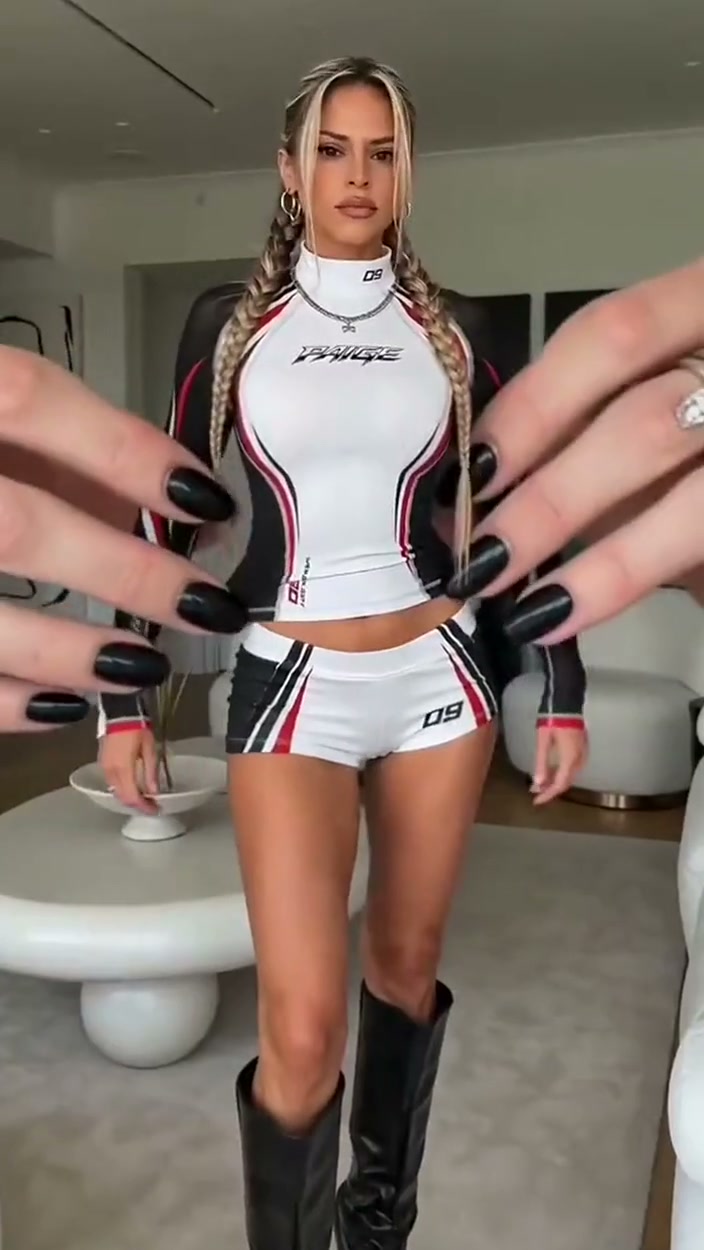 12s MP4
Preset Video vs. CapCut Templates: Which Should You Use?
Creators searching for "big hands dress up CapCut template" or "giant hands trend TikTok" want quick fashion reveal content. Here is how our dedicated AI video preset compares to traditional CapCut template cutouts:
Big Hands AI Preset vs. CapCut Templates
| What Matters | Viral AI Video Preset | Typical CapCut Template |
|---|---|---|
| How you appear in the video | Synthesizes authentic cinematic motion casting your likeness across all three complete outfit transformations. | Pastes 2D photo cutouts onto pre-recorded video slots with standard pan-and-zoom keyframes. |
| Giant hand interaction & physics | Full 3D interaction: giant hands realistically pinch and adjust your waist in seamless forced perspective. | Static hand overlays that rarely match your body proportions or perspective angle. |
| Manual editing required | Zero prompts or keyframe adjustments—upload 1 photo, review credit cost, generate, and preview. | Requires manual cutout masking, edge smoothing, and multi-track timing adjustments. |
| Resolution & aspect ratio options | Outputs high-definition MP4s in 9:16 vertical, 1:1 square, or 16:9 widescreen across Standard, Fast, Pro, and Ultra tiers. | Locked to the original template aspect ratio and export resolution limits. |
| Credit model vs. subscription | Starts at 6 credits per 12s Standard 480p video; purchased credit packs never expire. | Basic templates are free with watermarks; premium export features require recurring monthly subscriptions. |
Audio, Previewing & Posting Tips
Before sharing your completed runway transformation to TikTok, Instagram Reels, or YouTube Shorts, follow these three creator recommendations:
- Preview full motion and audio before downloading: Verify the waist pinch, runway strides, and all three outfit snaps in the on-screen player. Desktop downloads can mix the preset companion audio, while direct phone QR downloads deliver the raw MP4.
- Attach trending platform music on upload: The AI generation provides authentic rhythmic pacing. When publishing to TikTok or Instagram Reels, pair your video with an authorized audio track from the platform sound library for maximum algorithm reach.
- Toggle AI content disclosure where required: Turning on the platform AI-generated content flag keeps your viral fashion transitions transparent and compliant with community distribution standards. Looking for more viral fashion formats? Check out our companion Elevator Outfit Change AI effect studio or explore You Never Let Her Pay AI for cinematic comedic storytelling.