See GTA 6 AI Gameplay in Action — No Prompt Writing Needed
Generated from a single portrait photo—featuring authentic Vice City sidewalk tracking, supercar entry, and a 5-star sunset police chase.
GTA 6 AI Gameplay casts you as the open-world protagonist strolling down Ocean Drive in Vice City, hopping into a parked yellow supercar, and escaping an intense 5-star police chase. One clear portrait photo renders an 10-second vertical MP4 starting at 5 credits with zero prompt writing.
- 1Input needed: 1 clear front-facing portrait photo in even daylight showing your head and shoulders.
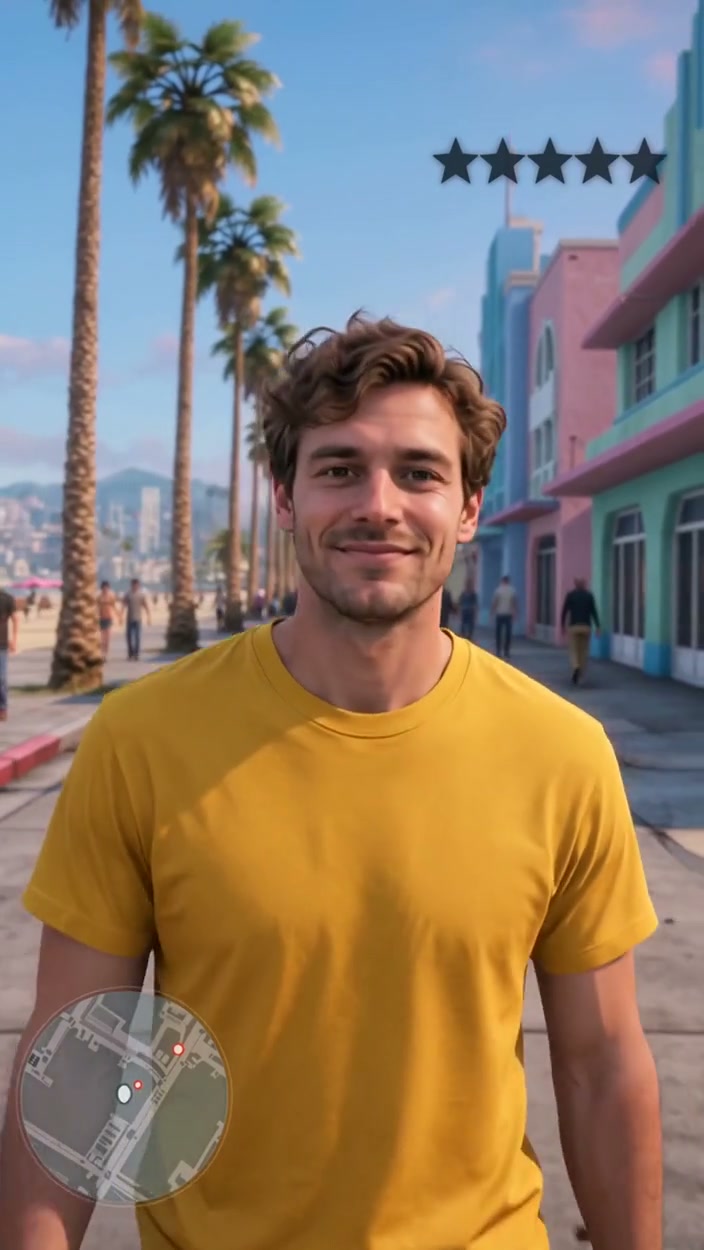
- 2Instant visual hook: opens with third-person character tracking on the sidewalk with radar mini-map and 5 wanted stars.
- 3Matched timeline: 0.0–2.0s sidewalk stroll, 2.0–3.8s supercar approach, 3.8–5.2s vehicle entry & wanted stars, 5.2–7.5s boulevard acceleration, 7.5–10.0s 5-star police pursuit.
- 4Dual scene options: choose between coastal Boardwalk Stroll and downtown Urban Bomber scenes.
- 5Transparent pricing: starts at 5 credits (10s, Standard 480p); failed tasks automatically return reserved credits.
- Clip Length
- 10 Seconds
- Entry Cost
- 5 Credits (480p)
- Aspect Ratios
- 9:16 Vertical Portrait
- Photo Input
- 1 Clear Portrait Photo
Why the GTA 6 Gameplay Format Works
Short-form gaming clips thrive when they tap into massive cultural hype with high-immersion realism. Instead of static mockups or trailer cuts, this gameplay format mirrors the exact third-person walking camera and elevated pursuit angles of open-world blockbusters.
Two core elements make the format immediately viral across feeds:
- Authentic in-game HUD cues: The circular radar mini-map in the bottom-left and the five wanted stars in the top-right establish instant gaming recognition within the first half-second of scrolling.
- Dynamic motion escalation: Strolling calmly along the sunlit boardwalk (
0.0–3.8s) creates high contrast when the protagonist suddenly enters the yellow exotic supercar and wanted stars ignite, kicking off a high-octane 5-star police chase with squad cars and an overhead helicopter (5.2–10.0s).
10-Second Shot-by-Shot Beat Breakdown
| Timestamp | Phase | What Happens on Screen | Why Your Photo Matters Here |
|---|---|---|---|
| 0.0s – 2.0s | Sidewalk Stroll | Protagonist walks forward along the Vice City sidewalk with a confident stride while the circular radar mini-map tracks location and wanted stars remain dark. | A front-facing portrait with sharp eye visibility ensures the third-person walking camera captures your facial features clearly. |
| 2.0s – 3.8s | Supercar Approach | Protagonist turns toward the street, spots the parked yellow exotic sports car curbside, and walks over to the vehicle door. | Clear shoulder and neckline definition helps the model smoothly transition your posture from walking into the vehicle approach. |
| 3.8s – 5.2s | Vehicle Entry | Protagonist grabs the driver-side door handle and enters the yellow sports car as wanted stars instantly ignite in glowing gold. | Even lighting across your portrait prevents shadows from obscuring your expression during the car door opening motion. |
| 5.2s – 7.5s | Boulevard Launch | The sports car accelerates down the center of the palm-lined boulevard as a police surveillance helicopter swoops in overhead. | The model maintains your character identity inside the vehicle cockpit through the rear window perspective. |
| 7.5s – 10.0s | 5-Star Pursuit | Camera pulls back into high-angle pursuit mode as two police squad cars with flashing red and blue strobe lights give chase toward the sunset. | The high camera elevation delivers cinematic chase framing while pre-synced siren audio anchors the climactic escape. |
How to Pick the Best Protagonist Photo (Zero-Prompt Workflow)
Because the studio handles the full choreography, radar HUD, and chase camera angles on the server, you never write a prompt. Choosing a clean portrait photo is the single most important step to getting an authentic open-world protagonist likeness.
High-Accuracy Protagonist Photos vs. Common Mistakes
Because this effect runs on a locked motion preset with zero prompt typing, photo selection accounts for most of the final quality.
Upload Photos Like This
- Front-facing selfie or upper-body portrait with sharp focus on eyes, nose, and facial contours.
- Even natural daylight or bright indoor lighting that highlights your hair and skin tone clearly.
- Plain, uncluttered background with only one person in the entire frame.
- Natural posture and confident facial expression fitting an open-world action lead.
- Clear visibility of your personal outfit and clothing style for consistent rendering.
Avoid These Mistakes
- Sunglasses, heavy dark shadows, or novelty stickers that hide your eyes and forehead.
- Group photos with multiple friends or family members that confuse character assignment.
- Blurry low-resolution crops or extreme side-profile angles with hidden facial features.
- Hands covering your mouth, chin, or cheeks in selfie poses.
- Celebrity portraits, public figures, or images used without appropriate authorization.
Have Your Portrait Ready? Launch Straight Into Vice City
Pick one clear portrait photo to carry into the GTA 6 AI Gameplay studio—review your upfront credit estimate (from 5 credits at 480p) and generate in seconds.
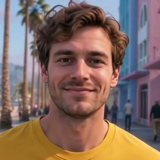 1 Portrait Photo
 10s MP4
Preset Video vs. CapCut Templates: Which Should You Use?
Creators searching for "GTA 6 CapCut template" or "GTA 6 AI filter" usually want a fast way to join the gaming trend. Understanding the core differences between template overlays and dedicated AI motion generation helps you choose the best tool:
GTA 6 AI Gameplay Preset vs. CapCut Templates
| What Matters | Viral AI Video Preset | Typical CapCut Template |
|---|---|---|
| How you appear in the game | Synthesizes an authentic 10-second motion clip where you physically stroll the sidewalk, enter the supercar, and drive away under pursuit. | Cuts out a 2D still photo and overlays it on top of pre-rendered gameplay clips with simple zoom-and-pan effects. |
| HUD, car entry & chase choreography | Full motion synthesis with synchronized radar mini-map, 5-star wanted ignition, sports car acceleration, and pursuing squad cars. | Static green screen overlays that require manual timeline alignment and external asset slicing. |
| Manual editing required | Zero prompts or keyframing—upload 1 photo, pick Boardwalk or Urban scene, review credits, and generate. | Requires manual masking, cut timing, and soundtrack synchronization in the mobile editor. |
| Resolution & aspect ratio | Generates crisp vertical 9:16 MP4s in Standard 480p, 720p, or 1080p tailored for mobile short-form feeds. | Depends on the source user template resolution and account export settings. |
| Credit pricing vs. recurring fees | Starts at 5 credits per 10s clip with zero subscriptions; purchased credit packs never expire (subscription credits follow billing validity) and failed tasks auto-refund. | Free basic features with recurring monthly Pro subscription tiers required for premium filters and clean exports. |
Audio, Previewing & Posting Tips
Before sharing your completed GTA 6 video to TikTok, Instagram Reels, or YouTube Shorts, keep these essential creator tips in mind:
- Preview the full clip sequence before exporting: Watch the transition from the sidewalk stride into the supercar cockpit and observe the high-angle police pursuit. Listen to the engine roar and siren mix directly in the preview player.
- Combine with trending gaming audio on TikTok: The studio workflow includes pre-muxed engine acceleration, tire squeals, and siren sound effects. You can also pair the video with trending gaming sounds or GTA radio tracks directly inside TikTok or Reels when publishing.
- Explore complementary viral and comedy presets: If you enjoy action and stunt formats, you can also explore our Bad Aim Edit AI comedy action preset or check out Cat Riding Dirt Bike AI for viral pet stunt motion.