See Laisse Tomber Les Filles AI in Action — No Prompt Writing Needed
Generated directly from one portrait photo with 1960s French pop choreography, vintage illustrated eyes backdrop, and synchronized retro motion.
Laisse Tomber Les Filles AI casts you as the lead performer in a vintage 1960s French pop television show in front of an illustrated pop-art backdrop. Using one portrait photo generates an 15-second MP4 starting at 8 credits (Standard 480p) with zero manual prompts.
- 1Input needed: 1 front-facing portrait photo in even lighting with visible hair and facial features.
- 2Instant visual hook: opens right away with retro shoulder bounces, playful head tilts, and chic French Ye-Ye pop expressions.
- 3Matched timeline: 0.0–3.0s opening sway, 3.0–6.0s head tilt and arm frame, 6.0–9.5s iconic hair pose, 9.5–12.5s rhythmic hair tugs, 12.5–15.0s closing smile.
- 4Formats & options: default 16:9 widescreen layout plus optional 9:16 vertical and 1:1 square across Standard, Fast, Pro, and Ultra models.
- 5Transparent pricing: starts at 8 credits (15s, Standard 480p); failed tasks automatically return reserved credits.
- Clip Length
- 15 Seconds
- Entry Cost
- 8 Credits (480p)
- Aspect Ratios
- 16:9 · 9:16 · 1:1
- Photo Input
- 1 Clear Portrait
Why the 1960s French Pop Format Works
Short-form video audiences respond strongly to nostalgic vintage aesthetics paired with authentic personal likenesses. The Serge Gainsbourg and France Gall 1964 anthem has seen renewed virality on TikTok because its playful rhythm, distinct hair-posing choreography, and pop-art illustrated eyes backdrop immediately stand out from modern video formats.
Key visual elements that make this retro template engage viewers:
- Immediate retro stage presence: The video opens at
0.0swith centered framing, vintage TV broadcast lighting, and subtle rhythmic shoulder bounces that capture viewers in the first three seconds. - Iconic Ye-Ye fashion poses: Raising both arms behind the head to fluff hair in sync with the beat gives creators an expressive, aesthetic showcase that performs well on Reels and TikTok.
- Clean 16:9 cinematic framing: The widescreen broadcast presentation provides breathing room for the illustrated pop-art backdrop while keeping the performer front and center.
15-Second Shot-by-Shot Beat Breakdown
| Timestamp | Phase | What Happens on Screen | Why Your Photo Matters Here |
|---|---|---|---|
| 0.0s – 3.0s | Opening Sway | Centered medium close-up, rhythmic head sway and subtle retro shoulder bounce while lip-syncing to the opening French pop melody. | Balanced front lighting ensures your facial features and expression register clearly against the pop-art illustrated eyes backdrop. |
| 3.0s – 6.0s | Arm Frame Pose | Playful glance to the side with head tilt, transitioning into raising both arms smoothly to frame the head. | Keep both shoulders and upper arms visible in your uploaded portrait so the AI generates natural arm elevation. |
| 6.0s – 9.5s | Signature Hair Pose | Both hands behind the head fluffing and holding hair in a classic vintage fashion pose with a radiant smile. | Ensure your hair is not cropped at the top of your photo so the model accurately preserves your hairstyle silhouette. |
| 9.5s – 12.5s | Teasing Hair Tugs | Playfully grasps locks of hair on both sides with fingertips, spreading them outward in sync with the musical cadence. | Clear separation between hair and background helps the model track delicate finger-to-hair interactions smoothly. |
| 12.5s – 15.0s | Resolving Smile | Releases hair, lowers arms gracefully, and delivers a warm confident smile as the final musical phrase resolves. | A natural resting expression in your source photo gives the AI flexibility to transition into an authentic closing smile. |
How to Pick the Best Portrait Photo (Zero-Prompt Workflow)
Because the preset locks all choreography, lighting, and camera motion on the server, you never write a prompt. Choosing a clear input photo is the key factor that determines your likeness sharpness and outfit styling.
High-Accuracy Portrait Photos vs. Common Mistakes
Because this effect runs on a locked motion preset with zero prompt typing, photo selection accounts for most of the final quality.
Upload Photos Like This
- Front-facing portrait where both eyes, nose, lips, and hairstyle are clearly visible.
- Even, natural daylight or balanced indoor light with minimal harsh shadows.
- Plain or simple background with only one person in the entire frame.
- Head, neck, shoulders, and upper torso clearly framed without cutting off hair.
- Natural expression without dark sunglasses, hats, or heavy beauty filters.
Avoid These Mistakes
- Multiple people in one photo, group selfies, or photos with pets.
- Harsh backlit silhouettes or extreme low-light environments.
- Extreme side angles, overhead views, or hands covering the mouth and chin.
- Tight forehead crops that cut off your hairstyle or hair volume.
- Heavy stickers, watermarks, or beauty distortion filters that alter face structure.
Ready to Star in Your 1960s Retro Pop Video?
Select your portrait photo and enter the Laisse Tomber Les Filles AI studio pre-loaded—review your exact credit estimate (from 8 credits at 480p) and generate in seconds.
 1 Portrait Photo
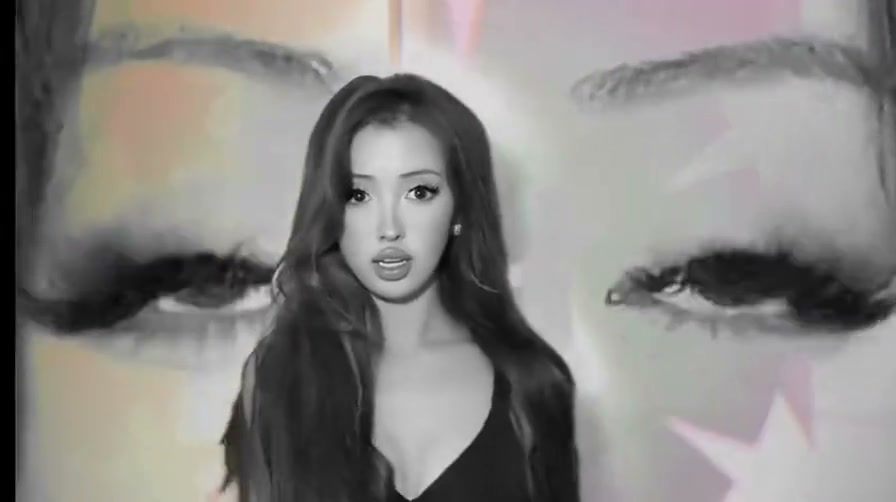 15s MP4
Preset Video vs. CapCut Templates: Which Should You Use?
Creators searching for "laisse tomber les filles capcut template" often look for a quick way to join the trend without manually animating vintage assets. Here is how this AI video preset compares to typical editing templates:
Laisse Tomber Les Filles AI Preset vs. CapCut Templates
| What Matters | Viral AI Video Preset | Typical CapCut Template |
|---|---|---|
| How your likeness appears | Synthesizes an 15-second retro video where your likeness authentically performs vintage TV choreography and expressive gestures. | Pasting photo cutouts or static face overlays onto pre-existing footage. |
| Retro stage & lighting generation | Full AI scene generation with 1960s television broadcast grain, vintage studio lighting, and pop-art illustrated backdrops. | Relies on static template video layers or stock footage overlays. |
| Manual editing required | Zero manual editing or keyframing—upload 1 photo, review transparent credits, and generate. | Requires aligning photo cutouts to template beats and adjusting layer masks. |
| Aspect ratio & resolution options | Generates MP4s in 16:9 widescreen, 9:16 vertical, or 1:1 square across 480p, 720p, and 1080p resolutions. | Limited to the specific template aspect ratio and device export options. |
| Credit model vs. subscription | Starts at 8 credits per 15s Standard 480p clip; purchased credit packs never expire with zero monthly commitment. | Free basic features with recurring monthly subscription fees for premium filters and exports. |
Audio, Previewing & Posting Tips
Before downloading and publishing your generated clip to TikTok, Instagram Reels, or YouTube Shorts, review these three helpful creator tips:
- Preview full motion and audio before downloading: Watch the complete $15-second generation to check hair-posing gestures, facial expressions, and stage lighting transitions. The browser player provides instant playback before consuming download bandwidth.
- Select trending audio on your publishing platform: Generated clips include ambient audio without copyrighted tracks. When uploading to TikTok or Instagram Reels, pair your video with the official Serge Gainsbourg / France Gall "Laisse Tomber Les Filles" sound from the platform music library for maximum algorithmic reach.
- Add AI content disclosures and explore other trends: Enabling platform AI labels maintains viewer trust and complies with short-form platform policies. Want to explore more viral music video concepts? Check out our Hotline Bling AI dance effect studio or read the Hotline Bling creator guide for more choreography tips.