See This Generation Rules the Nation Dance AI in Action — No Prompt Writing Needed
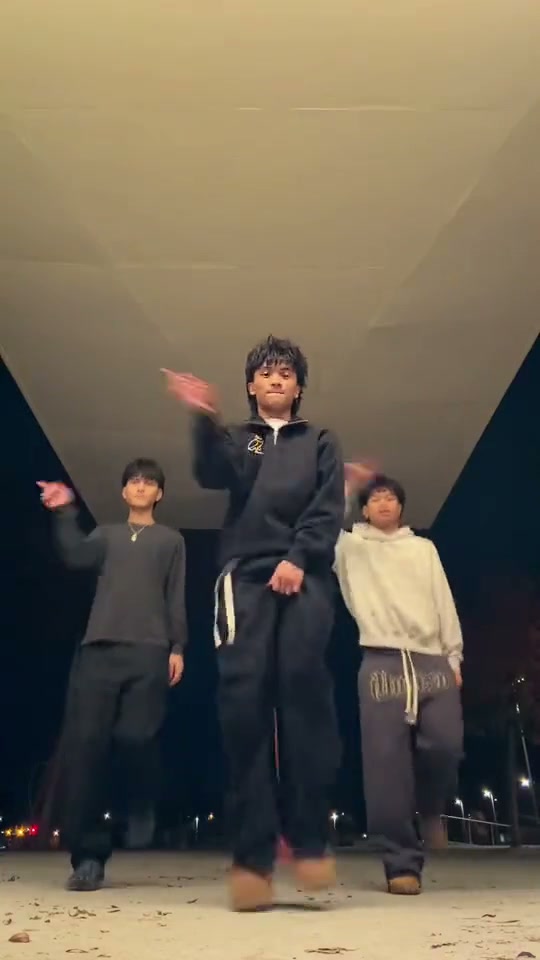
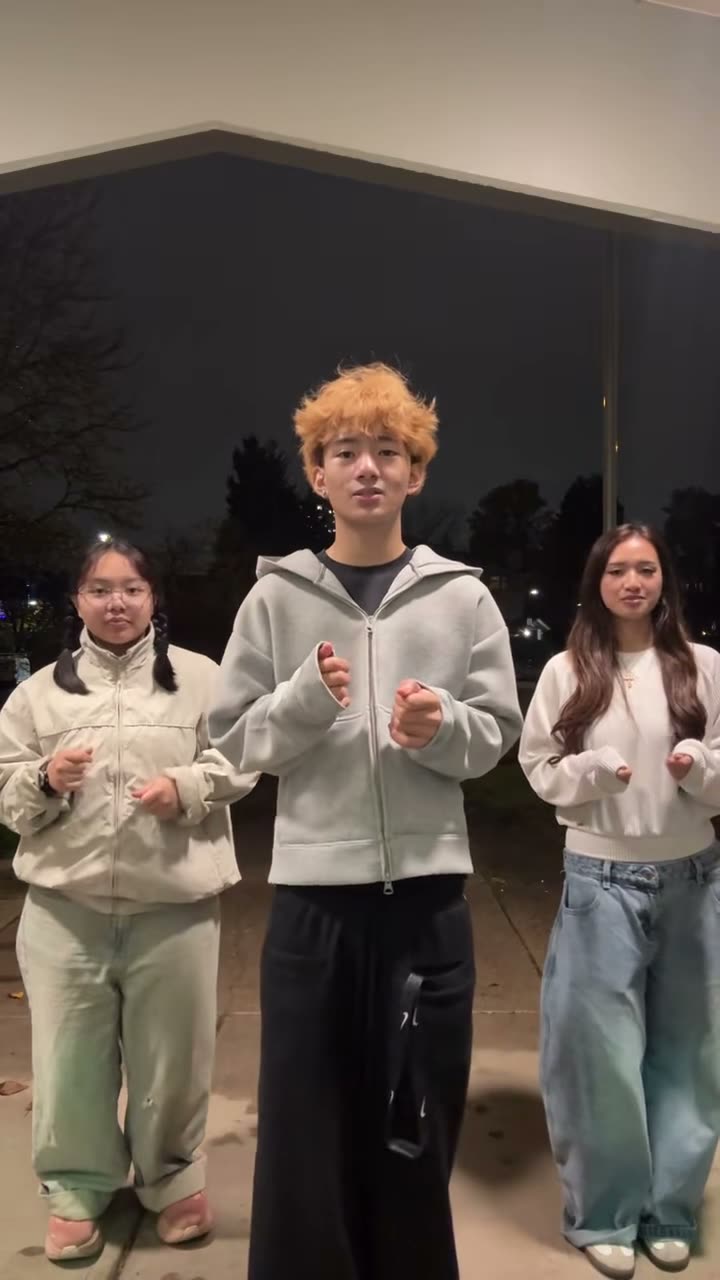
Preview the 15-second This Generation Rules the Nation AI Courtyard Trio synced to the reggae bassline and arm waves.
Transform 1 to 3 everyday photos into the viral 15-second This Generation Rules the Nation reggae dance trend—cast all 3 friends in the Courtyard Trio or 2 dancers in the Concrete Garage Duo with synced audio starting at 8 credits.
- 1Seven flexible cast setups: Courtyard All 3 Dancers (3 photos), Courtyard Center/Left/Right Solo (1 photo), Garage Both Dancers (2 photos), and Garage Left/Right Solo (1 photo).
- 2Follows authentic vintage reggae choreography: bent-elbow bounces, sequential crew entrances, shoulder sways, and synchronized wrist waves.
- 3Works best with clear front-facing portrait or waist-up photos where arms rest naturally at sides without pockets.
- 4Produces native 9:16 vertical MP4s calibrated to 15 seconds with balanced motion fidelity.
- 5Standard 480p starts at 8 credits; purchased credit packs never expire and failed generation requests refund automatically.
- Clip Length
- 15 Seconds
- Starting Cost
- 8 Credits (480p)
- HD Cost
- 15 Credits (720p)
- Cast Presets
- Solo / Duo / Left / Right
- Native Aspect
- 9:16 Vertical MP4
- Audio Track
- Synced Pass the Dutchie Included
Why the This Generation Rules the Nation Dance Blew Up on TikTok
Set to the iconic reggae rhythm of Musical Youth's timeless anthem (“This generation rules the nation / With version”), this vintage reggae dance trend surged across TikTok and Instagram Reels because of its infectious groove, relaxed swagger, and unmistakable nostalgia. Rather than complicated acrobatic floorwork, the routine emphasizes musicality, torso bounce, and synchronized arm gestures that look fantastic whether performed solo or with a crew.
Our AI studio gives creators the power to step directly into these viral routines from a single clear photo, animating natural body language, hair motion, and outfit styling while staying faithful to the rhythm and camera movement of the original videos.
Frame-by-Frame Choreography Breakdown (15 Seconds)
Understanding the timing of this 15-second performance helps creators select portraits that translate into realistic movement throughout every musical transition.
15-Second Reggae Dance Beat Map
| Timestamp | Phase | What Happens on Screen | Why Your Photo Matters Here |
|---|---|---|---|
| 0.0s – 3.0s | Opening Groove & Shoulder Roll | Performers establish rhythm with relaxed shoulder rolls, slight head tilts, and gentle knee bounces aligned with the opening reggae skank guitar. | Use an evenly lit front-facing photo with relaxed shoulders and clearly visible jawline. |
| 3.0s – 6.5s | Chest Pump & Forearm Bounces | Arms rise toward chest level as dancers perform alternating forearm pumps and rhythmic side-to-side torso sways on the main vocal phrase. | Ensure arms are not tucked inside jacket pockets so elbows and forearms flex cleanly. |
| 6.5s – 10.5s | Two-Step Side Pivot & Wrist Flicks | Weight transfers across a two-step side pivot accented by playful wrist flicks and subtle head nods matching the bassline drop. | Wear tops with defined sleeve silhouettes for clean arm tracking during side turns. |
| 10.5s – 15.0s | Forward Stride & Peace Sign Pose | Dancers step slightly toward the lens, deliver a synchronized double arm bounce, and lock into the iconic peace sign salute on the final beat. | Avoid hands obscured by beverages, bags, or high collars to ensure crisp hand geometry. |
Choosing Courtyard Solo vs. Garage Duo
Different video concepts call for different settings and cast dynamics. Our studio offers two distinct viral environments:
- Courtyard Canopy Trio Lead (1 Photo): Set in a bright outdoor sunlit courtyard beneath an overhead canopy, this scene positions your uploaded likeness as the primary center dancer flanked by two synchronized backing performers. It delivers vibrant daylight aesthetics and high visual depth.
- Concrete Garage Duo (2 Photos): Filmed in an urban industrial parking space, this setup lets you and a friend dance side by side in lockstep. Want to try it with a single photo first? Switch to Garage Left or Garage Right to animate yourself alongside the original dancer.
Looking for other dual-performer viral dance challenges? Check out our companion Christian Dior Dance guide for another two-person trend with sunset aesthetics.
Photo Prep: Why Arm Posture & Lighting Decide Realism
The AI animation engine synthesizes choreography directly from your uploaded portrait pixels. Starting with optimal source photography makes a dramatic difference in the final clip quality. Because this routine involves chest-height arm pumping and rapid wrist gestures, portraits with hands buried inside pockets or holding drinks can cause unnatural limb generation when hands emerge.
Photo Checklist: Clean Facial & Outfit Motion
Because this effect runs on a locked motion preset with zero prompt typing, photo selection accounts for most of the final quality.
Upload Photos Like This
- Clear front-facing portrait or upper-body shot with even daylight or soft studio lighting.
- Arms resting naturally at sides or lap with hands visible outside pockets.
- Solid tops, streetwear hoodies, or jackets with clean sleeve outlines.
- Two distinct individual photos when using Garage Duo mode so each dancer maintains unique features.
- Direct gaze at the camera without dark sunglasses obscuring the eye region.
Avoid These Mistakes
- Selfies where hands are stuffed deep inside pockets or holding objects near the chest.
- Cropped close-ups that cut off shoulders, neck, and upper torso.
- Harsh colored lighting, heavy flash glare, or intense neon cast.
- Uploading the exact same image into both dancer slots in two-person mode.
- Low-resolution social media screenshots covered in text stickers or watermarks.
Launch Your Photo Straight Into Dance Studio
Ready to generate your reggae dance performance? Carry your portrait directly into the interactive workspace:
Bring Your Portrait Directly Into the Studio
Preload your photo now to test Courtyard Solo or Garage Duo routines across 15 seconds—no account needed to preview before generating at 8 credits.
 15s MP4
AI Dance Studio vs. Manual CapCut Templates
Many creators attempt to recreate trending dance videos using CapCut or traditional video editors. Here is how our dedicated AI video generation compares with conventional editing tools:
This Generation Dance AI vs. Traditional Video Templates
| What Matters | Viral AI Video Preset | Typical CapCut Template |
|---|---|---|
| Authentic dance movement from still photos | Generates authentic torso sways, forearm pumps, and peace sign gestures across 15s from 1 or 2 static photos. | Limited to 2D pan-and-zoom photo slides unless you physically film yourself performing the choreography. |
| Multi-scene and multi-role flexibility | Switch between Courtyard Canopy and Concrete Garage with solo, duo, left, or right role options in one click. | Requires tracking down multiple unrelated template links and manually adjusting keyframes for different setups. |
| Outfit continuity and styling preservation | Preserves your uploaded clothing colors, textures, and neckline seamlessly throughout all camera angles. | Auto-cutout stickers often leave ragged halos, blur edges, or superimpose heads unnaturally on unrelated bodies. |
| Predictable credit pricing and audio sync | Clear transparent pricing from 8 credits with automatic refunds on failure and perfectly synced reggae audio. | Frequently hides features behind subscription tiers or removes original audio tracks due to regional licensing. |