See Mexico Pterodactyl AI in Action — No Prompt Writing Needed
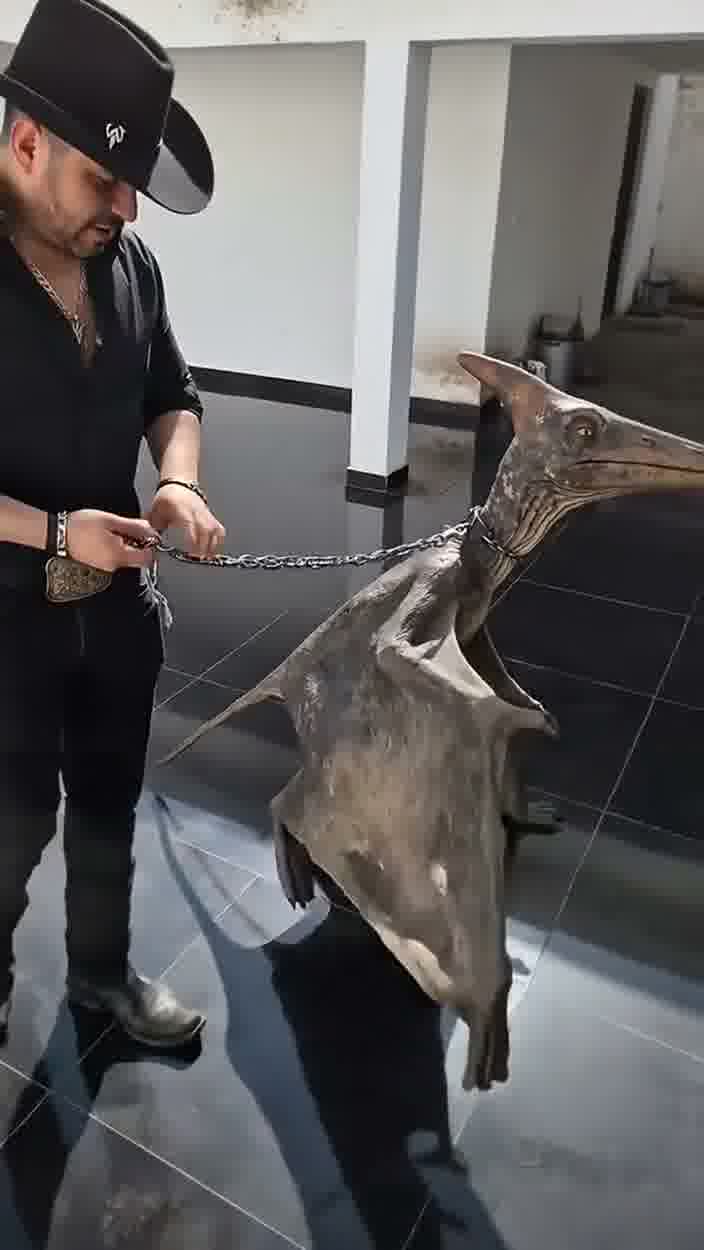
Cast yourself, your pet, or both together on a leash across Courtyard Patio or Lake Bridge—no green screen or manual editing.
Mexico Pterodactyl AI lets you cast Owner + Pet (2 photos), Pet Only (1 pet photo), or Owner Only (1 portrait) across a glossy courtyard or tropical lake bridge. Generating an 10-second MP4 starts at 5 credits (Standard 480p) with zero prompt writing.
- 1Input needed: 2 photos for Owner + Pet, 1 pet photo for Pet Only, or 1 human portrait for Owner Only.
- 2Instant visual hook: opens with the casual silver-chain leash walk across reflective courtyard tiles or a scenic lake bridge.
- 3Matched timeline: 0.0–2.4s taut leash setup, 2.4–5.8s steady walking close-up, 5.8–8.0s hands on leash, 8.0–10.0s side-by-side stroll.
- 4Formats & options: supports 9:16 vertical, 1:1 square, and 16:9 widescreen across Standard, Fast, Pro, and Ultra models.
- 5Transparent pricing: starts at 5 credits (10s, Standard 480p); failed tasks automatically return reserved credits.
- Clip Length
- 10 Seconds
- Entry Cost
- 5 Credits (480p)
- Aspect Ratios
- 9:16 · 1:1 · 16:9
- Photo Input
- 1 Clear Portrait
Why the Dinosaur Leash Stroll Works
Short-form comedy clips explode when they blend deadpan mundane behavior with an absurd, high-production premise. Rather than using cartoon dinosaurs or exaggerated screaming, the Mexico Pterodactyl format mimics casual security footage or a nonchalant neighborhood vlog where someone walks an ancient pterosaur exactly like a golden retriever.
Two core elements make the format immediately viral:
- Deadpan casual posture: The performer holds the heavy silver chain leash with calm, everyday composure, treating an apex prehistoric flyer as an ordinary household companion.
- Realistic quadrupedal animation: The pterosaur moves with anatomically grounded wing-knuckle strides, leathery skin folds, and subtle head crest bobs that sell the illusion far better than green-screen stickers.
10-Second Shot-by-Shot Beat Breakdown
| Timestamp | Phase | What Happens on Screen | Why Your Photo Matters Here |
|---|---|---|---|
| 0.0s – 2.5s | Leash Setup | You stand holding the taut silver chain leash as the realistic pterodactyl ambles forward on wing knuckles in bright daylight. | Clear eye visibility and natural head posture in your source photo anchor identity as the creature moves beside you. |
| 2.5s – 5.0s | Wing Strides | The pterosaur takes deliberate quadrupedal steps toward the camera, nodding its crest while you guide the leash steadily. | Even front lighting across your forehead and jawline keeps facial structure stable during medium-wide tracking. |
| 5.0s – 7.5s | Synchronized Stroll | You bring both hands to the leash with calm composure as the pair moves in lockstep across the tiles or wooden boardwalk. | Unobstructed shoulder and torso styling preserves your authentic clothing without blending into the background. |
| 7.5s – 10.0s | Scenic Companionship | You and the pterodactyl walk side by side in relaxed companionship, pausing naturally toward the camera. | Single-person portraits avoid background bystanders from interfering with the leash grip or creature silhouette. |
How to Pick the Best Portrait Photo (Zero-Prompt Workflow)
Because the studio handles the pterosaur anatomy, leash physics, and camera tracking automatically, you never have to write a prompt. Choosing a sharp, well-lit input photo is the most impactful step to guarantee lifelike realism.
High-Likeness Photos vs. Common Mistakes
Because this effect runs on a locked motion preset with zero prompt typing, photo selection accounts for most of the final quality.
Upload Photos Like This
- Front-facing or slight three-quarter portrait with clear eyes, nose, and jawline.
- Even natural daylight or bright indoor lighting showing authentic skin tone and hair.
- Plain, uncluttered background with only one person in the entire frame.
- Full head and upper torso visible in your everyday casual clothing.
- Natural bare face without sunglasses, masks, or hands covering the mouth.
Avoid These Mistakes
- Two people in one frame or children and public figures.
- Heavy backlighting or dark shadows obscuring facial expressions.
- Extreme close-ups with forehead or chin cropped out.
- Costume accessories, sunglasses, or heavy beauty filters.
- Blurry motion snapshots or low-resolution crops.
Have Your Portrait Ready? Launch Straight Into the Studio
Upload one clear portrait photo here to carry it into the Mexico Pterodactyl AI studio pre-loaded—review your exact credit estimate (from 5 credits at 480p) and generate in seconds.
 1 Portrait Photo
 10s MP4
Preset Video vs. CapCut Templates: Which Should You Use?
Creators searching for "Mexico pterodactyl CapCut template" or "pterodactyl walk meme" frequently encounter frustrating multi-step tutorials involving green-screen chromakeying and manual keyframe tracking. Here is how our one-click preset compares:
Mexico Pterodactyl AI Preset vs. CapCut Templates
| What Matters | Viral AI Video Preset | Typical CapCut Template |
|---|---|---|
| How you star in the clip | Renders full physical interaction, holding the chain leash and walking in sync with the pterodactyl from 1 photo. | Requires manual green-screen cutouts, static photo overlays, and timeline positioning over stock travel footage. |
| Pterosaur motion & environment synthesis | Features authentic quadrupedal wing-knuckle strides, realistic leathery skin, and matching patio or lake lighting. | Relies on pre-rendered green-screen dinosaur clips with mismatched shadows and flat lighting. |
| Manual editing required | Zero prompts, keyframes, or masking—upload 1 portrait, pick your scene, and generate in one click. | Tedious multi-track editing, manual chroma-key adjustments, and tricky boundary feathering. |
| Resolution & aspect ratio options | Generates MP4s in 9:16 vertical, 1:1 square, or 16:9 widescreen across 480p, 720p, and 1080p (Pro+). | Constrained by fixed project aspect ratio and account export limitations. |
| Credit model vs. subscription | Pay-as-you-go starting at 5 credits per 10s clip; packs never expire with auto refunds on failures. | Basic templates are free, while premium export features and advanced filters require recurring monthly plans. |
Audio, Previewing & Posting Tips
Before sharing your prehistoric pet clip to TikTok, Instagram Reels, or YouTube Shorts, keep these tips in mind:
- Watch the full preview before posting: Check the leash grip and walking pace across the entire $10-second duration. The result preview plays the fully muxed ambient track so you can confirm timing before saving.
- Attach trending audio on your platform: While our MP4 download includes atmospheric footsteps, chain rattle, and creature ambient audio, pairing the video with trending TikTok comedic sounds or Mexican folk accordion beats often boosts organic reach.
- Turn on the AI-generated content label: Toggle TikTok's AI disclosure flag when publishing to maintain platform compliance while maximizing comedy value. Want to explore more viral comedy edits? Star in Bad Aim Edit AI or read our Bad Aim Edit creator guide for precision archery timing, or try Cat Riding Dirt Bike AI for pet stunts.