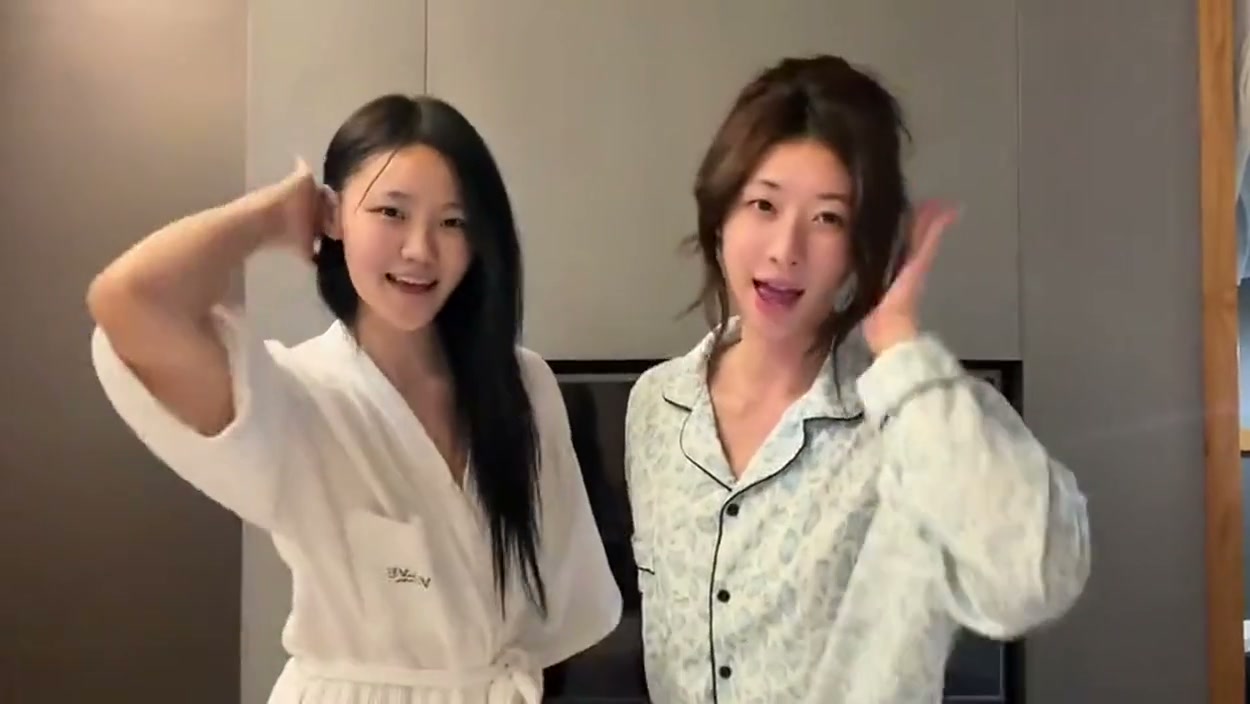
K-pop quartet BESTie's catchy 2013 anthem "Love Options (연애의 조건)" made an unexpected viral return to global charts, sparking a worldwide TikTok wave with millions of fan tributes. The routine opens with two best friends holding hands in everyday loungewear before snapping instantly into glamorous summer styling in front of a blooming floral hedge.
Recreating this viral transformation in real life demands matching outfits, outdoor daylight locations, and intricate choreography rehearsals. With Bestie Love Options AI, you can skip the wardrobe changes and camera setups entirely—turning standard selfies into a fluid 12-second 16:9 widescreen video with pre-synchronized Korean vocals.
See Bestie Love Options AI in Action — No Prompt Writing Needed
Frame-by-frame 12-second widescreen K-pop bestie choreography featuring loungewear-to-glam transformation, cheek-side finger flicks, and aegyo side-lean poses.
Quick Answer & Technical Specs
Upload 1 or 2 portraits to star solo or as a duo in the viral BESTie Love Options K-pop challenge. The AI animates your facial features, hairstyles, and styling through 12 seconds of high-energy choreography with synchronized audio.
- 1Input needed: 1 or 2 front-facing portraits with clear facial lighting (everyday casual photos work cleanly).
- 2Choreography: 0.0–2.8s loungewear intro, 2.8–5.1s glam reveal & cheek flicks, 5.1–7.4s head tilts, 7.4–9.7s finger wiggles, 9.7–12.2s aegyo pose.
- 3Duo & Solo modes: dance together as besties or star solo in either left or right slot while keeping partner intact.
- 4Audio: authentic BESTie Korean pop chorus automatically synchronized and pre-muxed in the MP4.
- 5Transparent pricing: starts at 6 credits (12s, Standard 480p); failed renders refund instantly.
- Clip Length
- 12 Seconds
- Entry Cost
- 6 Credits (480p)
- Aspect Ratio
- 16:9 Widescreen
- Cast Modes
- Solo Left, Solo Right, Duo
Why the K-pop Comeback Trend Exploded
The magnetic appeal of "Love Options" stems from its theatrical outfit transformation paired with cute aegyo gestures. The cinematic 16:9 widescreen format gives both besties equal visual weight against the bright outdoor floral backdrop, producing radiant social media content.
12-Second Beat Breakdown
Here is how the 12-second choreography unfolds frame by frame:
12-Second Dance Timeline & Beats
| Timestamp | Phase | What Happens on Screen | Why Your Photo Matters Here |
|---|---|---|---|
| 0.0s – 2.8s | Loungewear Intro | Two besties stand side-by-side in relaxed morning loungewear holding hands and exchanging an affectionate glance toward the camera. | Even indoor lighting establishes facial identities before the transformation. |
| 2.8s – 5.1s | Glam Reveal | Instant transition to outdoor blooming floral hedge in glamorous summer outfits, launching into cheek-side finger flicks. | Dual-subject spatial tracking preserves distinct features through the cut. |
| 5.1s – 7.4s | Head Tilts & Groove | Synchronized fluid head tilts and arm sweeps, lightly touching hair while swaying hips to the upbeat K-pop bassline. | Preserves authentic clothing and hairstyle through fluid body motion. |
| 7.4s – 9.7s | Cheek-Side Wiggles | Both besties raise both hands beside their cheeks, wiggling fingers in synchronized rhythm with glowing smiles. | Hand gesture isolation ensures anatomically clean five-finger hands. |
| 9.7s – 12.2s | Aegyo Finale | Dynamic side-lean pose, resting chin on hands in classic aegyo posture, smiling brightly into the lens. | Steady framing creates an effortless loop on social media feeds. |
Photo Selection Guidelines
Because the platform controls camera motion and choreography server-side, you never need to write descriptive text prompts. High-quality input headshots are the primary ingredient for crisp likeness and fluid rendering.
Optimal Portrait Inputs vs. Flawed Uploads
Because this effect runs on a locked motion preset with zero prompt typing, photo selection accounts for most of the final quality.
Upload Photos Like This
- Well-lit front-facing portraits showing balanced light across forehead, eyes, and cheeks.
- Clear unobstructed facial view with zero dark sunglasses or wide brims.
- Natural hairstyles and authentic skin tones captured in sharp focus.
- Exactly one subject framed in each photo upload slot.
- High-resolution source images with sharp eye and lip contours.
Avoid These Mistakes
- Group snapshots featuring extraneous individuals or photobombers.
- Severe top-down or bottom-up angles that skew facial symmetry.
- Aggressive digital smoothing filters or illustrated cartoon avatars.
- Dimly lit, noisy, or motion-blurred smartphone shots.
- Images of public figures or persons who have not given consent.
Ready to Dance? Launch Straight Into the Studio
Upload your photos to star in the Bestie Love Options AI studio—review your credit quote (starting at 6 credits for Standard 480p) and generate your video in seconds.
 12s MP4
Preset Studio vs. Mobile CapCut
Creators looking for "bestie love options capcut template" frequently encounter frustrating obstacles with mobile apps. Here is an honest appraisal of our web effect studio versus phone-based templates:
Bestie Love Options Studio vs. Mobile CapCut Templates
| What Matters | Viral AI Video Preset | Typical CapCut Template |
|---|---|---|
| Character Integration | Synthesizes complete skeletal motion, facial micro-expressions, and synchronized arm work. | Sticks a flat static cutout layer over an existing video backdrop. |
| Accessibility & Setup | Runs entirely in any modern browser without downloading third-party software or apps. | Demands app store installations and chasing down elusive creator links. |
| Workflow Simplicity | Zero manual masking or timeline scrubbing—upload pictures, pick quality, and render. | Forces tedious manual cutout adjustments, boundary feathering, and beat aligning. |
| Soundtrack Reliability | Original BESTie Korean vocal track (.m4a) seamlessly pre-muxed into your downloaded file. | Audio elements frequently face regional muting or copyright restrictions. |
| Billing Transparency | Pay per generation from 6 credits per 12s render with automated failure refunds. | Free versions stamp watermarks; clean exports require recurring monthly subscriptions. |
Audio & Publishing Advice
Before uploading your finished K-pop creation to TikTok, Instagram Reels, or YouTube Shorts, keep these suggestions in mind:
- Verify your preview before downloading: Check playback on both desktop and mobile to ensure expressions and audio sync look crisp. For another duo dance experience, explore Stop The Wedding Dance AI or read our breakup anthem dance guide.
- Tag popular music hashtags: Boost visibility by adding #BestieLoveOptions, #KpopChallenge, #BestieGoals, and #ViralAIVideo to your captions.
- Turn on the AI content disclosure: When sharing on short-form platforms, toggle the synthetic media switch to stay compliant with community guidelines.