
END OF BEGINNING AI CAMPFIRE SINGALONG VIDEO PRESET
Cast 1 to 3 portraits into the viral backyard campfire singalong to Djo's hit track. Star as the Center Lead Vocalist, Left Lounge Singer, or Right Acoustic Guitarist around dancing flames with synchronized acoustic chords. Pay-as-you-go video generation starts at just 5 credits with zero monthly subscription.
CREATE YOUR CAMPFIRE SINGALONG VIDEO
Choose your performers & upload photos

Tip: Use a clear front-facing portrait with eyes and facial features visible in even daylight.
Video Options
By generating you confirm compliance with our Terms · Privacy · Acceptable Use
10-second video · 5 credits per generation · One-time packs, no subscription
WHAT IS THE END OF BEGINNING TREND?
End of Beginning preset is a specialized photo-to-video generator for the viral campfire singalong trend set to Djo's hit song. Cast yourself or friends as the Center Lead Vocalist, Left Lounge Singer, or Right Acoustic Guitarist. The AI renders a 10-second vertical MP4 with synchronized acoustic guitar strumming, dancing fire pit flames, and nighttime garden ambiance without manual editing.
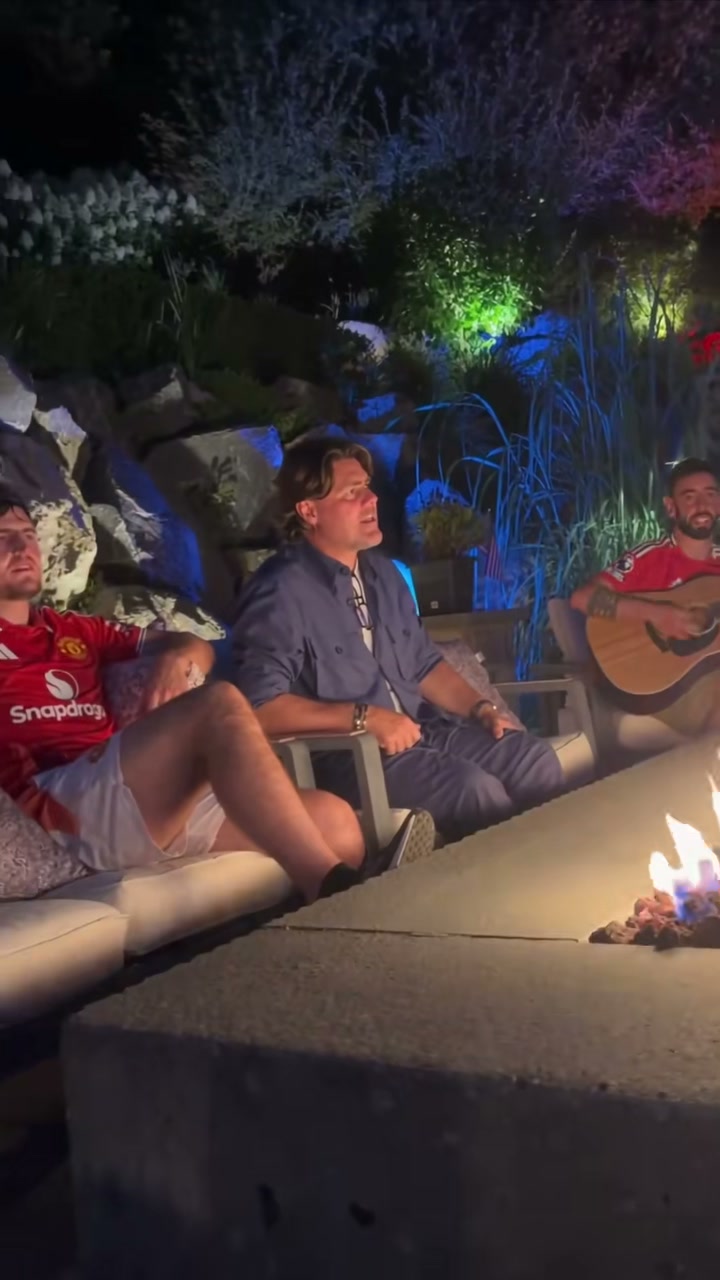
This preset follows the viral nighttime campfire acoustic version popular on TikTok, set to Djo's global indie hit "End of Beginning". The trio sits around an outdoor fire pit: the center lead singer delivers passionate vocals, the right musician fingerpicks an acoustic guitar, and the left friend sways along from the patio sofa. Use the preview to explore the choreography before adding your photos.
Photo 1 stays with the center lead vocalist seated behind the fire pit. Photo 2 casts the left lounge singer reclining on the patio sectional, and Photo 3 casts the acoustic guitarist on the right. Each identity follows its assigned performer naturally throughout the scene, preserving your uploaded facial likeness, hairstyles, and personal clothing styles.
Comedy & Pranks Templates
Explore More Viral AI Video Templates
Jump into related trending formats in this category or browse the full directory.
How to Create Your Campfire Singalong Video in 3 Steps
The routine and motion reference are already included. Select the dancers, add a portrait for each selected role and choose your output settings.
Choose Cast Setup & Upload Photos
Use one portrait for the center lead. In two-person mode, add Photo 2 for the right dancer. In three-person mode, add Photo 3 for the left dancer. Each slot needs a separate single-person photo.
Choose Your Format & Review Credits
Choose a model, supported resolution and vertical, square or landscape format. Standard 480p costs 5 credits for this 10-second preset; other settings change the total. Sign in and confirm permission for everyone in the photos.
Render & Download MP4
Follow the task status while the model generates. Preview the full video, listen to its audio, and download the MP4 to your computer or phone before the displayed expiry. Add permitted music in TikTok, Reels, or Shorts when you publish.
Choose Your Campfire Singalong Lineup
Choose how much of the trio to recast. The reference routine, acoustic guitar chords, and 10-second length stay the same in every mode.
Solo: Step into the Lead
Use Photo 1 for the center lead vocalist seated upright behind the fire pit. The preset keeps the acoustic guitarist and left sofa friend in their original roles with appearance unchanged.
Duo: Bring a Friend on the Sofa
Add Photo 2 for the lounge singer reclining on the patio sectional sofa. Your first portrait stays on the center lead vocalist, while the acoustic guitarist remains unchanged.
Trio: Cast Your Whole Group
Use Photo 3 for the acoustic guitarist seated on the right to cast all three positions. Check photo assignments before generating so each friend sits in their preferred campfire spot.
Why Create Your End of Beginning Video Here
Upload your portraits, check the transparent credit total, and create your version of the viral TikTok campfire singalong. The patio setting and guitar audio are handled for you; review the generated MP4 before sharing.
Failed-Task Credit Return
Failed tasks refund reserved credits automatically.
One-Click Direct Preset
Outdoor campfire reference and guitar rhythm are included. Add photos without writing prompts.
Flexible Resolution & Format
Choose 9:16, 1:1 or 16:9 in 480p, 720p or 1080p. Costs update dynamically.
MP4 Download & Phone Handoff
Download the MP4 directly or scan the QR code for mobile save.
Non-Expiring Sitewide Credits
Purchased pack credits never expire and work sitewide across all effects.
Transparent Privacy & Expiry
Download your MP4 before link expiry. Uploaded photos are processed securely.
Inside the Campfire Singalong Routine
Review the acoustic guitar intro, emotional head sways, and center singer vocal climax in your finished clip.
Guitar Intro & Setting the Scene
The right guitarist establishes the acoustic rhythm while the left singer relaxes on the sofa and the center vocalist focuses forward behind the fire pit.
Head Tilt & Chorus Melody
Dancing flames leap upward from the concrete fire pit as the center singer tilts back with emotion into the opening chorus melody.
The Iconic High-Note Delivery
The center lead singer delivers the emotional peak against illuminated garden greenery and warm firelight before settling into the rhythm.
Photo Guidelines & Quality Tips
Give each performer a clear facial reference before you generate.
Prepare One Portrait per Selected Performer
- Use Even Light and Visible EyesUse daylight or balanced indoor light. No costumes or props needed; the AI renders the patio setting and motion.
- Frame Head & Upper TorsoKeep head and shoulders visible. Avoid tight crops or heavy blur.
- Avoid Obscured Faces & Heavy FiltersAvoid deep shadows, motion blur, or cartoon filters obscuring facial identity.
- Keep Each Photo to One PersonUpload one portrait per role. Single-subject photos prevent identity confusion.
Check the Cost and the Finished Motion
- iReview the Displayed Credit TotalResolution and model choices update credit totals in real-time.
- iWatch Gestures, Rhythms & MotionWatch the guitar strumming and singing expressions across all three performers.
- iKnow What a Failed Task MeansIf generation fails, reserved task credits return to your balance immediately.
- iPrepare First, Generate When ReadyPreview examples for free. Sign in and ensure your credit balance covers the selected render.
How Your Portraits Follow the Singalong
Uploaded portraits provide facial likeness and hairstyle for selected performers. The reference video supplies the singing performance, guitar strumming, camera motion, and campfire setting.
Select 9:16, 1:1, or 16:9. Review the center lead's singing, flames, and guitarist performance before downloading. You can review credit options, refund policy and photo processing and retention before starting a render.
End of Beginning — Frequently Asked Questions
QHow do I create an End of Beginning campfire singalong video?
QCan I make an End of Beginning video for free, or is it paid?
QHow many credits does the 10-second End of Beginning clip cost, and what is the refund policy?
QHow do I cast all three roles: Center Vocalist, Lounge Friend, and Guitarist?
QCan I replace just the lead singer while keeping the original guitarist and friend?
QWhat photo lighting produces the best results with the fire pit ambiance?
QDoes the generated video include the viral acoustic singalong audio?
QWhy is this faster than manually editing CapCut recap templates?
QCan I export in vertical 9:16 format directly for TikTok and Instagram Reels?
Make Your Campfire Singalong Trio Video
Choose who takes the lead and who joins the campfire roles. Add your portraits, review the cost and create your 10-second campfire singalong.