See Jingle Bells Cat AI in Action — No Prompt Writing Needed
Generated directly from one calm cat portrait photo—no musical props, green screens, or prompt engineering required.
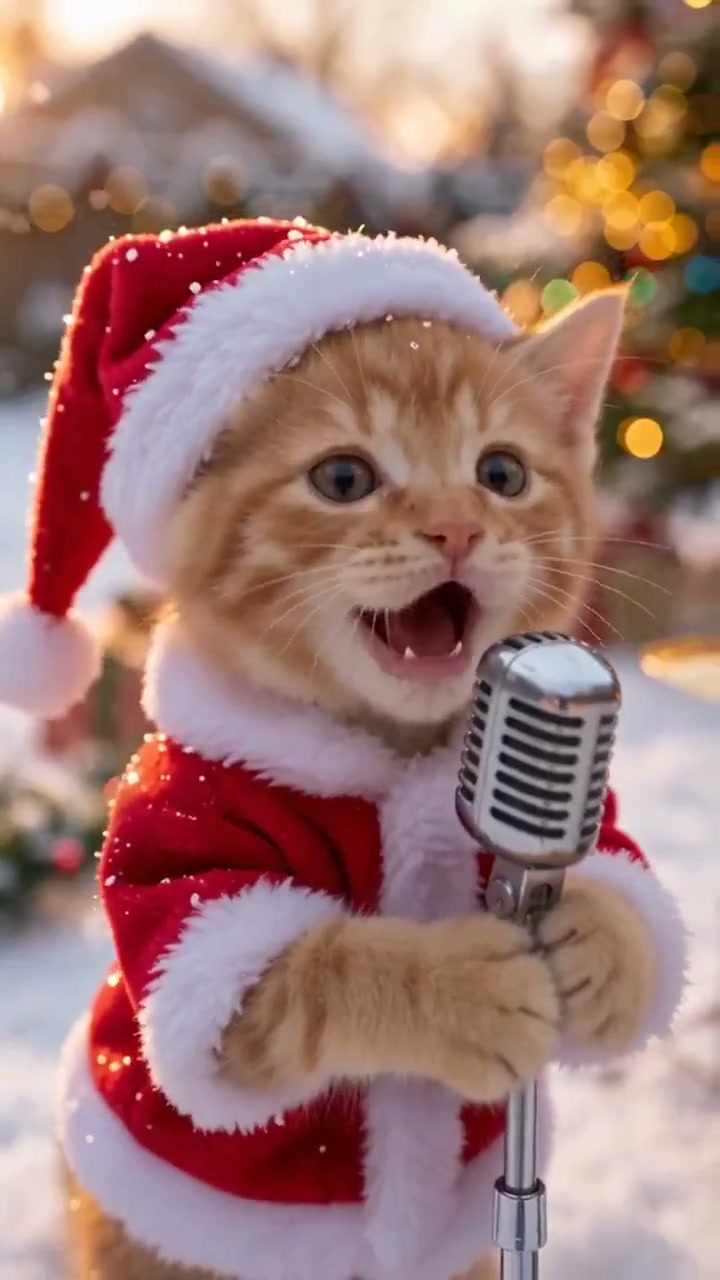
Jingle Bells Cat AI casts your pet center-stage as the adorable solo caroling kitten in a cozy Santa coat singing Jingle Bells into a vintage standing chrome microphone in a snowy winter wonderland. Uploading one clear pet portrait on Viral AI Video generates a 12-second vertical MP4 starting at 6 credits (Standard 480p) with synchronized caroling audio.
- 1Input needed: 1 front-facing photo of your cat, dog, or domestic pet in even lighting (no human faces or celebrities).
- 2Instant visual hook: opens immediately with your pet in a festive Santa coat vocalizing into a standing chrome microphone in falling snow.
- 3Matched timeline: 0.0–3.0s snowy intro & mic grip, 3.0–6.5s soulful head tilts & Santa hat bobs, 6.5–9.5s holiday chorus & warm bokeh glow, 9.5–12.0s grand carol finale & whisker twitches.
- 4Formats & options: native 9:16 vertical TikTok/Reels framing, plus 1:1 square and 16:9 widescreen across Standard, Fast, Pro, and Ultra models.
- 5Transparent pricing: starts at 6 credits (12s, Standard 480p); failed tasks automatically return reserved credits.
- Clip Length
- 12 Seconds
- Entry Cost
- 6 Credits (480p)
- Aspect Ratios
- 9:16 · 1:1 · 16:9
- Photo Input
- 1 Clear Pet Photo
Why the Solo Santa Cat Carol Format Works
Holiday short-form video algorithms reward heartwarming animal comedy that combines authentic pet likeness with festive musical spectacles. Instead of static photo cutouts or generic slide transitions, the solo Santa cat preset places your pet inside a fully animated, snowy winter wonderland with realistic falling snowflakes and glowing Christmas tree bokeh lights.
Two key visual strengths give this preset exceptional retention on social feeds:
- Immediate melodic punchline: The video opens at second zero with your pet in crisp focus at the vintage standing chrome microphone, opening its mouth wide and vocalizing in rhythm with the cheerful Jingle Bells melody.
- Heartwarming holiday aesthetics: Dressing your pet in a fluffy red-and-white Santa hat and cozy Santa coat while singing passionately in falling snow creates constant emotional resonance and high replay value across the entire clip.
12-Second Shot-by-Shot Beat Breakdown
| Timestamp | Phase | What Happens on Screen | Why Your Photo Matters Here |
|---|---|---|---|
| 0.0s – 3.0s | Snowy Intro & Chrome Mic Grip | The kitten stands upright behind the standing chrome microphone in the snow, opening its mouth wide and vocalizing the cheerful opening lines of Jingle Bells. | A front-facing portrait with clearly visible eyes and snout ensures accurate facial articulation at the mic stand. |
| 3.0s – 6.5s | Soulful Head Tilts & Santa Hat Bobs | Expressive joyful head tilts and passionate meow vocal delivery with ears perked under the fluffy white brim of the festive red Santa hat. | Even natural lighting in your photo preserves natural coat colors and fur patterns during expressive head movements. |
| 6.5s – 9.5s | Holiday Chorus & Warm Bokeh Glow | The kitten belts out the festive chorus, furry paws resting naturally near the microphone stand while Christmas tree bokeh lights glow warmly behind. | Avoid photos with hands holding the pet so the AI model generates natural paws at the microphone stand. |
| 9.5s – 12.0s | Grand Carol Finale & Whisker Twitches | Final joyful holiday crescendo delivery with realistic whisker twitches and expressive open-mouthed carol finish before closing in snowy holiday serenity. | Single-pet source images ensure sharp facial focus and prevent features from blurring during vocal expressions. |
How to Pick the Best Pet Photo (Zero-Prompt Workflow)
Because the studio handles the Santa cat choreography, festive snowy background staging, and camera pacing on the server, you never write a prompt. Choosing a clear input portrait is the one step you control that visibly enhances pet likeness and facial expressions.
High-Accuracy Pet Photos vs. Common Mistakes
Because this effect runs on a locked motion preset with zero prompt typing, photo selection accounts for most of the final quality.
Upload Photos Like This
- Front-facing or slight three-quarter portrait where both eyes, nose, snout, facial features, and natural ears are fully visible.
- Even natural daylight or balanced indoor lighting showing true fur color and facial markings.
- Plain, uncluttered background with only one animal in the entire picture.
- Full head and upper chest in sharp focus—no holiday hats or props in the photo required.
- Natural calm expression without heavy filters, stickers, or digital overlays.
Avoid These Mistakes
- Two pets in one frame or human hands cradling the pet right next to its cheeks.
- Dark backlit snapshots where black or dark fur disappears into shadows.
- Blurry or motion-blurred action shots where eye and whisker details are lost.
- Sleeping or curled poses where the pet’s face is buried in bedding or blankets.
- Human faces, public figures, or images you do not own rights to use.
Ready to Make Your Cat Sing Jingle Bells? Open the Studio
Select your favorite pet portrait to load it directly into the Jingle Bells Cat AI studio—review your credit estimate (from 6 credits at 480p) and generate your holiday video in minutes.
 12s MP4
Preset Video vs. CapCut Templates: Which Should You Use?
Creators searching for "jingle bells cat CapCut template" or "cat singing jingle bells meme" often look for a quick way to participate in holiday trends. Here is how our generative video studio compares against standard CapCut mobile templates:
Jingle Bells Cat AI Preset vs. CapCut Templates
| What Matters | Viral AI Video Preset | Typical CapCut Template |
|---|---|---|
| How your pet appears | Synthesizes authentic feline facial articulation, singing expressions, and body sways guided by your pet photo and built-in motion capture. | Places static photo cutouts or sticker overlays onto pre-rendered stock footage with zero realistic facial motion. |
| Festive winter wonderland setting | Generates an authentic snowy holiday scene with falling snow, glowing bokeh lights, cozy Santa coat, and vintage standing chrome microphone. | Restricted to fixed template assets, often cropped into awkward 3:4 or letterboxed frames. |
| Manual video editing required | Zero manual editing or timeline keyframing—upload 1 photo, review credits, and click generate. | Requires downloading the mobile app, navigating asset layers, and manual photo masking. |
| Resolution & aspect ratios | Outputs clean 9:16 vertical MP4s for TikTok/Reels, 1:1 square, or 16:9 widescreen across Standard, Fast, Pro, and Ultra models. | Tied to the author’s original canvas ratio, frequently requiring crops or watermarked exports. |
| Pricing & subscriptions | Starts at 6 credits per 12s video with non-expiring credit packs and automated failure refunds. | Free basic templates frequently lock HD export options and premium filters behind recurring monthly subscriptions. |
Audio, Previewing & Posting Tips
Before publishing your finished festive Santa cat video to TikTok, Instagram Reels, or YouTube Shorts, keep these creator recommendations in mind:
- Watch the preview with synchronized audio: Every generation comes pre-configured with the viral Jingle Bells caroling audio. Preview the full clip in your studio player to verify facial likeness, musical rhythm, and audio sync before downloading.
- Attach trending holiday sounds on platform: While the downloaded MP4 includes synchronized caroling audio, short-form algorithms often boost videos that also tag trending holiday sounds directly from the TikTok or Instagram music library.
- Disclose synthetic pet content: When posting realistic AI-animated pet videos, turning on the platform’s AI-generated content toggle maintains full transparency and community guidelines compliance. Looking for more viral holiday ideas? Try our Jingle Bell Rock Dance AI guide or explore high-speed animal stunts in Cat Riding Dirt Bike AI.